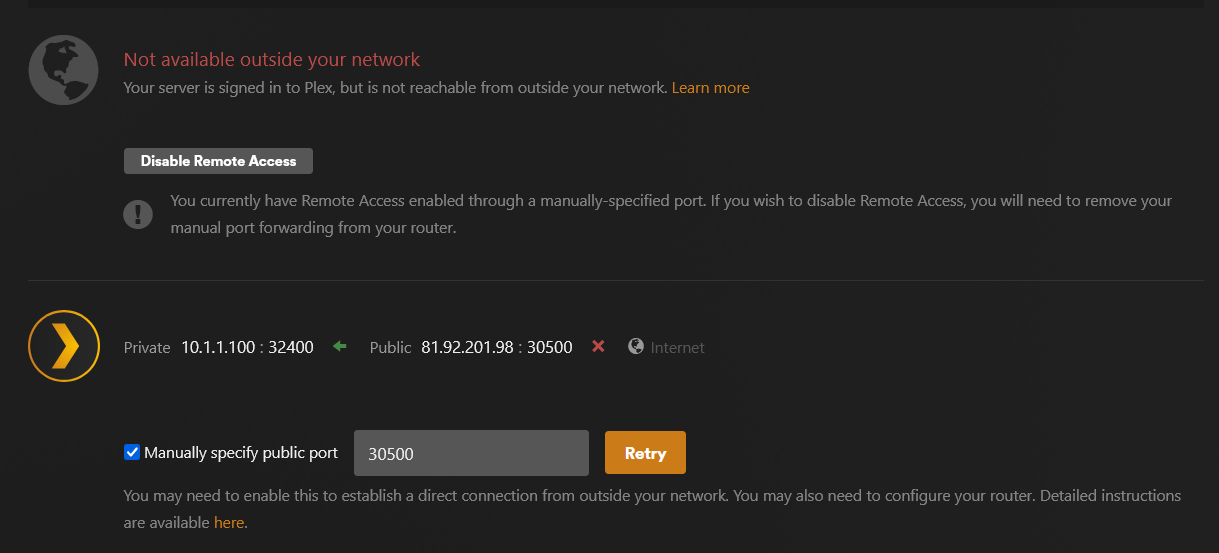
Server Version#: 1.40.1.8227
Player Version#: 4.125.1
Hi all,
Ever since upgrading my OpenWRT router, I have been having trouble getting remote access to work, and the more I look into it I wonder if it’s more to do with Plex remote servers than any port forwarding or split-tunneling I use on the router.
To summarise Plex runs on my NAS (QNAP) and I have a VPN client on my router that directs devices within a specific subnet range (including the NAS) through a VPN. That’s where the split-tunneling comes in as I have it set to route anything on the 32400 local port and remote domains (plex.tv and plexapp.com) via WAN instead.
From what I can test the local port and port forward on the firewall as below are working as an open port check says 30500 is open and since I also run DDNS if I go to (ddns url):30500 externally it will take me directly to my server.
Is there something I missing that I can change from my side to get this working?
Let me know if you need any more info such as Plex logs or more setting info from Plex or the Router.
P.S. No reason to hide the IP address, since that’s the VPN, hence why it’s not working 
When you upgraded your router, what else did you change with it?
I look at your Plex.tv account, see your “212” IP address (which is what’s published for Remote Access), and it is working (I’m presented with a login screen)
Thanks for your help and you are right, for now…it is working via the correct WAN IP you mentioned. I am not sure what corrected it as I restarted the app and retried the connection, which I had done a few times previously, but this time it worked.
It’s done this before and worked for a while but would then stop working for unknown reasons and would have the same struggle to fix it.
As for the router upgrade, it was to the latest version of OpenWRT 23.05.03 from a much earlier version so I needed to recreate the settings. I remember having the same issue a couple of years ago with the previous version but had got it working stably since.
I will have to keep an eye on it and see how long it lasts this time as I fear any change such as restarting the router or Plex could break it again 
So it seems about 24 hours or less, but it seems to have broken again
Would anyone be able to check the logs or suggest where I look to find what might be causing this please?
Plex Media Server Logs_2024-04-03_15-19-50.zip (4.3 MB)
EDIT: From what I could find this could be relevant?
Apr 03, 2024 15:09:01.151 [969646960] DEBUG - PublicAddressManager: Obtaining public address and mapping port.
Apr 03, 2024 15:09:01.188 [969646960] DEBUG - PublicAddressManager: Obtaining public IP.
Apr 03, 2024 15:09:01.188 [969646960] DEBUG - [HCl#42e] HTTP requesting GET https://v4.plex.tv/pms/:/ip
Apr 03, 2024 15:09:01.354 [853386096] DEBUG - [HttpClient/HCl#42e] HTTP/2.0 (0.2s) 200 response from GET https://v4.plex.tv/pms/:/ip
Apr 03, 2024 15:09:01.364 [969646960] DEBUG - PublicAddressManager: Got public IP from v4.plex.tv: 81.92.201.98
Apr 03, 2024 15:09:13.431 [969646960] DEBUG - NAT: UPnP, found device <http://10.1.1.58:8008/ssdp/device-desc.xml> with private address <10.1.1.100>
Apr 03, 2024 15:09:13.431 [969646960] DEBUG - NAT: UPnP, not an IGD: <http://10.1.1.58:8008/ssdp/device-desc.xml>.
Apr 03, 2024 15:09:13.434 [969646960] DEBUG - NAT: UPnP, found device <http://10.1.1.100:8200/rootDesc.xml> with private address <10.1.1.100>
Apr 03, 2024 15:09:13.434 [969646960] DEBUG - NAT: UPnP, not an IGD: <http://10.1.1.100:8200/rootDesc.xml>.
Apr 03, 2024 15:09:13.885 [969646960] DEBUG - NAT: UPnP, found device <http://10.1.1.100:8080/upnpd/7f62677dd1.xml> with private address <10.1.1.100>
Apr 03, 2024 15:09:13.885 [969646960] DEBUG - NAT: UPnP, not an IGD: <http://10.1.1.100:8080/upnpd/7f62677dd1.xml>.
Apr 03, 2024 15:09:13.885 [969646960] DEBUG - NAT: UPnP, getPublicIP didn't find usable IGD.
Apr 03, 2024 15:09:14.270 [969646960] WARN - NAT: PMP, got an error: Not Supported by gateway.
Apr 03, 2024 15:09:14.290 [969646960] DEBUG - [HCl#42f] HTTP requesting GET https://81-92-201-98.12b6a919884641f29d4ed9bcb7eb54a1.plex.direct:30500/identity
Apr 03, 2024 15:09:14.296 [853386096] WARN - [HttpClient/HCl#42f] HTTP error requesting GET https://81-92-201-98.12b6a919884641f29d4ed9bcb7eb54a1.plex.direct:30500/identity (7, Couldn't connect to server) (Failed to connect to 81-92-201-98.12b6a919884641f29d4ed9bcb7eb54a1.plex.direct port 30500 after 5 ms: Couldn't connect to server)
Apr 03, 2024 15:09:14.367 [969646960] DEBUG - MyPlex: mapping state set to 'Mapped - Not Published'.
Apr 03, 2024 15:09:14.368 [969646960] DEBUG - MyPlex: Last published value didn't change, we're done.