@ChuckPa TIDAL integration used to work... now does not work
I am here for only a few…
I do not know Tidal. I know of account issues (show as my-plex in the logs).
AFAIK, Plex/web is performing the work, not the server but am likely wrong as it’s brokered.
You can attach your logs and I’ll look after the holiday
I just linked my Tidal account to plex and cannot get into anything. The My Tidal and My Tidal Playlists give the error, “There was an unexpected error loading this library”. Recommended is the stock message about joining. Attached is my log file.Plex Media Server Logs_2019-12-26_08-20-00.zip (3.9 MB)
I am having same issue, not able to reach my library on plex server running on Ubuntu. Am subscribed to Tidal and plex pass as well.
I’m having same issue, not able to reach my library on plex server running on Arch Linux . I’m subscribed to Tidal and plex pass as well.
The Android App worked till today (maybe because of cached credentials) but won’t show Tidal content.
Second Account without Tidal subscription works well.
I have the same problem, I can’t log in to my account. I have Tidal and plexpass. @ChuckPa Help me…
@valentine83 Have you seen this thread? We think we solved the problem for ourselves over there… unfortunately, the Plex team didn’t seem too interested in helping us with this one.
Thanks! It helped! I will no longer link my account with Tidal …
First, to address any “negative vibes”,
- Apologies for not communicating everything going on behind closed doors.
- It is a known backend problem.
- It is actively being worked
Lastly,
For now, unfortunately the answer is to unlink and relink.
I appear to be having the exact same issue. I tried a free trial of tidal and had it linked to plex, now I can’t access https://app.plex.tv/desktop without a 500 error.
Did you follow my post , directly above yours?
I tried to reply to your post that said we should ping you to have you manually fix it. Apparently replying on here just means mentioning without quoting the message or anything  also don’t see another way to ping you. Note that pinging you is the accepted solution and shows in the top post. Not trying to be argumentative, just trying to establish I’m not am idiot or too lazy to read.
Your post above mine just says to unlink and relink (not very clear on what or how) so I looked at the url linked a few posts up and it seems to talk about unlinking an Android device? I have an Android device but it isn’t the problem, the problem is accessing via the web browser.
I don’t even see how I could remove an android device if I wanted to since I can’t access any of the app.plex.tv urls to get to the settings to do so.
If I try to access the settings using anything that isn’t your web portal e.g. http://127.0.0.1:32400/web/index.html#!/settings/web/general or using the desktop app I can see the page but it doesn’t have any options for unlinking accounts or devices. I’ve tried looking everywhere for the devices page that is mentioned here: Devices | Plex Support but I don’t see it. Here’s what I see:
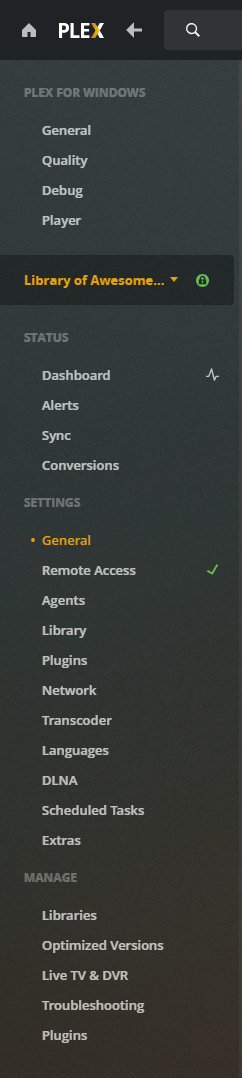
Also I see an exclamation mark next to my login, not sure what that means so I’m afraid if I sign out I might not be able to sign in there either.

Steps to replicate:
- go to https://www.plex.tv/
- click “my account” then “settings”
- it takes me to https://app.plex.tv/desktop#!/account
- try to log in
- I get this message:
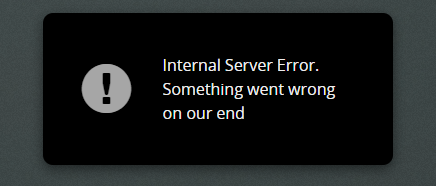
and this error in the chrome console:
Sometimes get this error instead


If you could provide some clear steps for fixing this issue that would be amazing as it seems I’m missing something important.
The problem is with Tidal linked to the account.
It is between Plex.tv and Tidal’s servers.
Please go to Plex.tv and UNLINK your Tidal subscription from your account.
Now return to PMS and reauthenticate with the server.
You will find it will come back to normal operation.
If you wish, you may relink the Tidal account.
Where do you go to unlink tidal from Plex? Been looking, haven’t found it.
For me, it’s Settings - Online Media Sources but mine may be different.
Where did you first link your Tidal account. It should be there.
I don’t see a section called online media sources when I view settings when connecting via the loopback address. See the tall picture I have in my second message to see the options I see. Note that I can’t get to the settings from plex.tv because I get the error. I wonder if the account settings I need are only available if you can log in proper.

Again, I cannot see any pages that start with app.plex.tv it requests that I log in, then when I do, it immediately gives the error message.

Try shutting down the server first.
Next go to app.plex.tv and unlink Tidal.
If this will not work, please let me know and I’ll see if someone internally can disconnect it for you.
Was a good idea, but unfortunately shutting down the server didn’t change anything in this case. Still get the server error. If you could have someone manually disconnect my account from Tidal that would be great  . I don’t plan to use it in the future if that makes anything easier.
