Hello… I’m trying to edit a movie in my plex library. Using Chrome. Plex has labled the movie as “Dragon Ball Episode of Bardock” the TV special that was only aired in japan. However the file is supposed to be “Dragon Ball Z Bardock - The Father of Goku” Both movies exist on IMDB. I’ve labled the movies file as “Dragon Ball Z Bardock - The Father of Goku” in windows file explorer. Also I can change the movie title to what the correct one is, however it changes it back to “Dragon Ball Episode of Bardock” Which is again, incorrect. Is their a way to fix this, or adjust a plex database so that the movie will refer to the correct title?
Some would argue that this is not a ‘movie’ but simply a special episode of Dragon Ball Z and therefore is better put into a tv show library.
https://www.thetvdb.com/series/dragon-ball-z/seasons/0
But it could be simply your file. If it’s a mp4 file, it could have the incorrect title embedded in it.
Do this:
Go to
- Settings - Server - Agents - Shows - TheTVDB
In there, grab the line ‘Local Media Assets’ with your mouse and drag it downwards, so it ends up being at the bottom of the stack of active agents.
Repeat the same under
- Settings - Server - Agents - Shows - TheMovieDatabase
- Settings - Server - Agents - Movies - Plex Movie
- Settings - Server - Agents - Movies - TheMovieDatabase
Afterwards, ‘Refresh Metadata’.
Hmm. I didn’t think about them being in Tv Shows. They are all on the movies IMDb so I figured that was good enough. The file itself is an MakeMKV MKV rip from the Blueray. (left in mkv uncompressed) It hasn’t had it’s metadata modified. But I’m still confused because you could make the same argument for Episode of Bardock, and yet it sees the two “episodes” as the same thing.
Which metadata agent are you using for your movie library?
Because normally, ‘Plex Movie’ wouldn’t recognize either of them, they’re both classified as ‘tv movie’ or ‘video’. Plex Movie only knows ‘cinema movies’.
You might have better luck with using TheMovieDatabase agent.
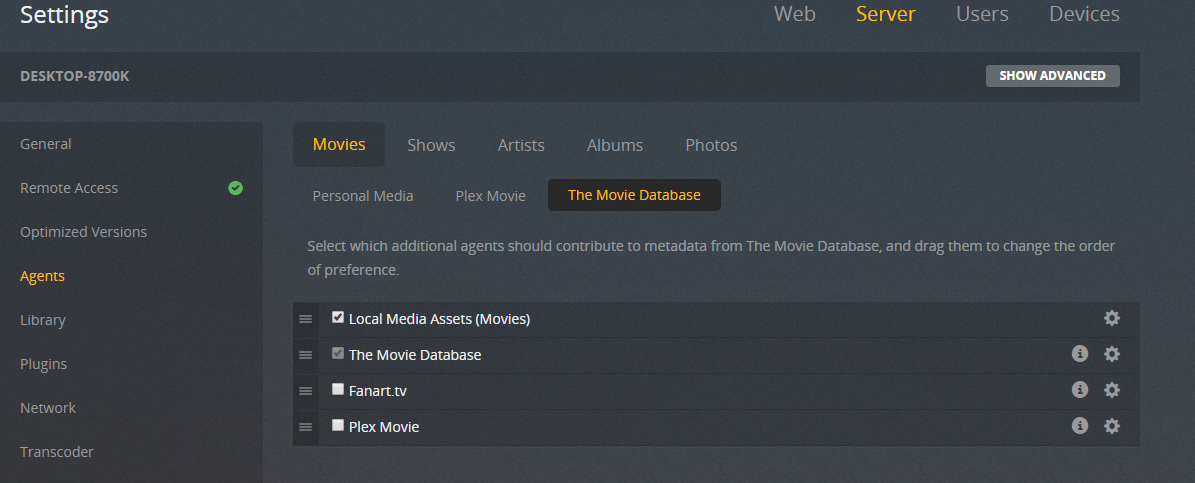
I have all the other DBZ movies in at these settings in the same file and title formats. They all recognize correctly. Hence why I’m not getting why just one doesn’t. Even the Trunks Special is listed correctly.
The screenshot only shows how the TMDB agent is configured.
But it doesn’t show whether it is this agent that is being used or a different one.
To see that, you have to Edit your library,
go to the ‘Advanced’ tab
and look what is selected in the ‘Agent’ dropdown.
Hmm it appears is WAS using plex movies. I changed it to “the movie database” and refreshed all content. Even redownloaded meta data. It still isn’t correct. Note that I CAN change the movie title to the correct one. However if I try to edit the rest of it, it resets it back to “episode of bardock” immediately. The only thing that it lets me keep is the title. Which reads the correct title because I changed it.


Whenever you have mismatches, they will sometimes ‘stick’ with the file, even after you renamed it.
Use the Plex Dance to resolve those cases.
Browsing that link has me curious in Filebot. What to do what to do…
