The episode poster art for some TV shows are out of order for the episodes. It looks like those with episode ordering according to TVDB DVD order but it could be some others as well. When comparing episode poster art, it looks like Plex is grabbing the artwork form TMDB instead of TVDB. I checked the Agent ordering for pulling metadata and it is in the correct order with TVDB being above TMDB for all options under Shows. Is there another setting I need to change that I’m missing or is this a problem with Plex itself?
You have 2 options, one which could have an impact on every series in your library and the other option which will impact just the individual series you make the change on.
The first option is to change the library default. This option is good if you prefer the TVDB overall (TMDB is the default) and then you can use option 2 to correct those series where you might prefer TMDB.
(don’t mind the obfuscation, I was just having fun with it since it wasn’t required)
From the left menu panel (expand it if collapsed) click on the 3 vertical dots, then click on Manage Library and finally Edit to open the edit library modal.
From the edit library modal click “Advanced” in the left panel then near the bottom of the right panel (might need to scroll down a little, I did so for the screenshot to show the full drop down) click the drop down next to “Episode Ordering” and select which you want to be the default then click the “Save Changes” button.
The second option allows you to change at the series level and offers a few more options, so this can be used even if the default is the provider you want but maybe you want the DVD order (Firefly is a popular example of that I believe).
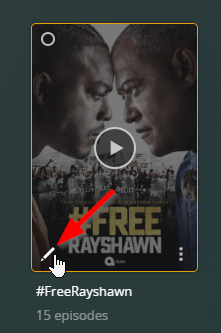
From the Library view, hover over the poster of the series then click the pencil icon in the bottom left corner to open the edit modal for the series.
From the edit modal, click “Advanced” in the left panel then in the right panel near the bottom (again, might need to scroll down a bit, I did that for the screenshot to show all the options) and click the drop down for “Episode Ordering.” Select the one that you want for that series and then click the “Save Changes” button.
Finally thing you’ll need to do after making the change for either option is to refresh the metadata. For option 1, refreshing metadata for the whole library would be the easiest option but of course that means that a lot of series could potentially change. The other option is to refresh the metadata individually at each show level so you can be a little more aware of any changes.
For option 2, after making the change refresh the metadata for the individual series and if there are any differences, you should see the changes update.
I appreciate the response! Sadly, that did not work. The episode poster art is still in the wrong order even though the episode titles are correct. Plex seems to be pulling the episode poster art from somewhere other than TVDB and I can’t figure out why. I have TVDB listed, after local assets, as the agent to use.
Plex uses a consolidated metadata approach now. You can’t instruct plex to get metadata from one specific site anymore, all you can control is the episode ordering. The metadata would be the same for the episodes themselves,only the ordering will change. There are some exceptions to this but not many.
Now, in saying that one way plex links all this is via external ids between tmdb and tvdb. So can you give us an exact example of something that you see being wrong. We can then check the external links for the episodes on tmdb. The links might be off which we can fix…
Based on what you wrote, it sounds like you are still on the old agent and you haven’t updated to the latest agent. The directions I gave were for the new agent which will appear as “Plex TV Series” in the library edit modal under advanced. If you are still using the old agent you might consider upgrading to the new one to see if there is a change.
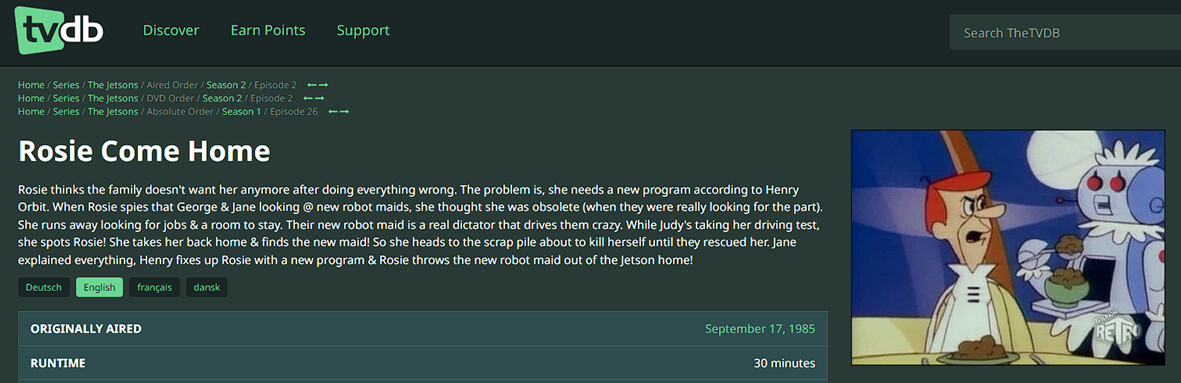
Thanks. The example that brought this to my attention was The Jetsons, season 2, episode 2, “Rosie Come Home” (the aired episode order from TVDB). The correct episode title is showing, but the episode poster art is from season 2, episode 25, “Space Bong.”
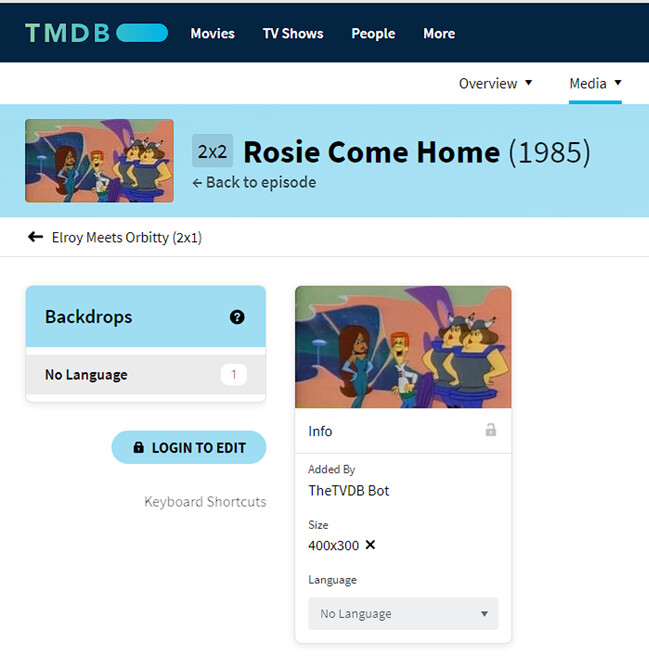
I’m not sure where Plex is pulling the episode poster art from. I wonder if it is from TMDB or from the same source as TMDB since TMDB has the right episode order but uses the same wrong episode art that is showing above.
It looks like TMDB pulled the episode art from TVDB but it got the wrong episode art since that is not the art showing on TVDB for this particular episode. The TVDB episode art, however, is correct:
I’ve noticed this same problem for many of the episodes of The Jetsons, but also for some other TV shows.
That said, I looked through the episode art for The Jetsons on TVDB and many of the episode poster art is also mixed up on TVDB. So this may be a bigger problem than just one site.
Its unfortunate but all to common for older shows Anyhow, I’ll see what I can fix-up with regard to the episode ids links but the artwork is another matter. I might just ask that tmdb remove the current artwork if its completely known to be wrong. Maybe correct images would be got from the fandom site → The Jetsons | The Jetsons Wiki | Fandom and uploaded to tmdb ?
I’ll try and get some time in the coming days to fix-up the ids.
I’ve fixed up the tmdb external ids to tvdb for all episodes so they should all match now. These will take 24-72 hours to replicate into the plex metadata cache backend.
On the images I created this report Reported Problem for The Jetsons - Discuss The Jetsons — The Movie Database (TMDB) so lets see what the moderators over there think. I suspect as the ids where wrong one of their agents pulled in the wrong images for some episodes. This was done years ago, no one noticed Anyhow, details over on that thread!
And here we go again with another episode of the neverending story “Plex prefering TMDB rubbish over correct metadata from TVDB”.
And as always the only reasonable thing to do for the plex developers would be GIVE YOUR COSTUMERS BACK THE LIBERTY TO CHOSE THE SOURCE OF THEIR METADATA!!!
So who wants to stick with chaos and rubbish can do this and who wants to switch back to reliable data can do this too.




 Anyhow, I’ll see what I can fix-up with regard to the episode ids links but the artwork is another matter. I might just ask that tmdb remove the current artwork if its completely known to be wrong. Maybe correct images would be got from the fandom site →