You have 2 options, one which could have an impact on every series in your library and the other option which will impact just the individual series you make the change on.
- The first option is to change the library default. This option is good if you prefer the TVDB overall (TMDB is the default) and then you can use option 2 to correct those series where you might prefer TMDB.

(don’t mind the obfuscation, I was just having fun with it since it wasn’t required)
From the left menu panel (expand it if collapsed) click on the 3 vertical dots, then click on Manage Library and finally Edit to open the edit library modal.

From the edit library modal click “Advanced” in the left panel then near the bottom of the right panel (might need to scroll down a little, I did so for the screenshot to show the full drop down) click the drop down next to “Episode Ordering” and select which you want to be the default then click the “Save Changes” button.
- The second option allows you to change at the series level and offers a few more options, so this can be used even if the default is the provider you want but maybe you want the DVD order (Firefly is a popular example of that I believe).
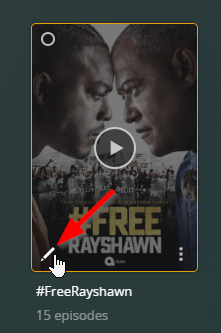
From the Library view, hover over the poster of the series then click the pencil icon in the bottom left corner to open the edit modal for the series.

From the edit modal, click “Advanced” in the left panel then in the right panel near the bottom (again, might need to scroll down a bit, I did that for the screenshot to show all the options) and click the drop down for “Episode Ordering.” Select the one that you want for that series and then click the “Save Changes” button.
Finally thing you’ll need to do after making the change for either option is to refresh the metadata. For option 1, refreshing metadata for the whole library would be the easiest option but of course that means that a lot of series could potentially change. The other option is to refresh the metadata individually at each show level so you can be a little more aware of any changes.
For option 2, after making the change refresh the metadata for the individual series and if there are any differences, you should see the changes update.
-Shark2k
