Plex - refresh the plex libraries but not db - plex display not right

Server Version#:
Player Version#:
web client 3.108.2 1.19.1.2645-ccb6eb67e
Windows 10.0 (Build 18362)

Plex on 2 PCS
#1 most of the libraries are red, 2 are white. Seem to work ok.
unable to update server 1.19.4.2902. Downloads, starts install and then
nothing

#2 when opened it displays all the libraries and works ok. However it won’t
display the hierarchy above the libraries. Haven’t tried to down load server
update yet.

Is there a way to repair the plex software or fix these issues ?
.
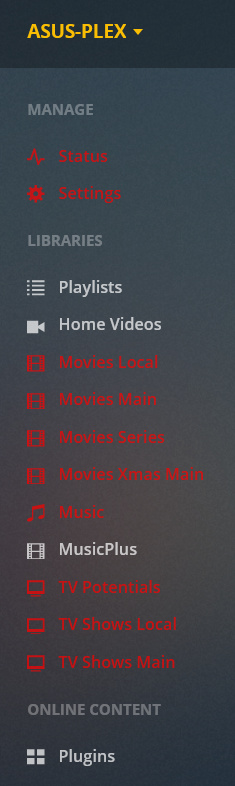
Sorry, what does that mean?
Could you provide a screenshot?

Similarly, please provide a screenshot, to illustrate the issue.

image

on the other pc, different server, the area from to playlist is missing.

This is from an ancient version of the web app. Try using https://app.plex.tv instead.

I pasted the address you mentioned, fixed both PCs.
Where do I put it so as it always load this address instead of m old one.

Also, is there a way to make a server the default, i…e both servers are listed and I would like to control which is at the top ?

You seem to be using more than one server. Make sure that all of them have up-to-date software versions installed.

Use a bookmark in your web browser. You can also place it onto your desktop or into the start menu.

Scroll down to the last paragraph in this article and perform the “reset” procedure: https://support.plex.tv/articles/customizing-plex-web/

This topic was automatically closed 90 days after the last reply. New replies are no longer allowed.
