Server Version#: 1.25.3.5385
Player Version#:
Plex Media Server Logs_2022-01-11_21-15-51.zip (3.4 MB)
Hello! This plex server has been a dream and a nightmare!
I have been through several iterations of connection issues, and I seem to fix one to find another a few weeks later.
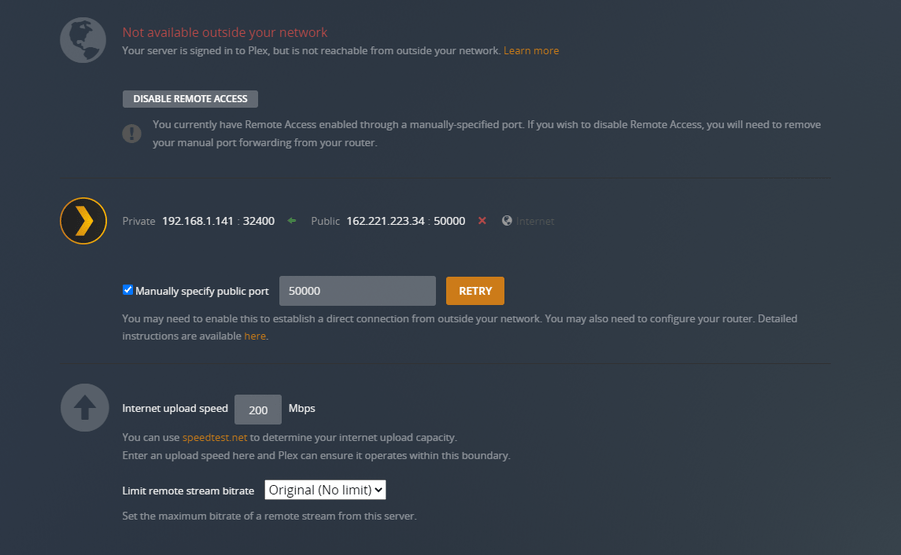
Currently, at least visually, I can get the plex server to say that it is fully accessible outside my network. 30 seconds later give or take, it says that it can’t connect to the internet. However, my girlfriend in another city still seems to be able to connect in this issue, however my best friends parents cannot. I’ve included attached server logs. I am running my server on Windows 10 64 bit
Things I have fixed in the past
A double nat situation which resulted in my getting a static IP
Port Forwarding
Disabled and re-enabled NAT and UPnP settings in Router
Every setting from troubleshooting I’ve seen online seems to be correct and I am just at a loss. Any help is greatly appreciated.
have you allowed Plex in firewall?
If you manually port forwarded you should not need UPnP
Yes Windows Firewall is configured to allow Plex both Privately and publicly.
Also my routers default is UPnP enabled so I just disabled and re-enabled. its either that or Dynamic Routing. Which is preferable?
Not sure what “Dynamic Routing” is. UPnP is just basically automatic port forwarding. What brand/model router do you have?
With manual port forwarding you don’t need to rely on the router to try to figure it out. It does require that you set a static IP for your server computer via DHCP Reservation or locally on computer.
DHCP Reservation is set up for the server. I’m using a Linksys EA6900
I would recommend giving your server a static IP then configure single port forwarding on your Linksys router for port 32400 external/internal to your server.
That should take care of it.
If that doesn’t work provide the output of the following command from your server
route print
So oddly enough, I am at work at the moment, and decided to test my connection. I can connect to plex… however, this is what my server is stating. I am no where near my home server at the moment, am I getting some weird glitch?
Your public port is 32400. I can hit it from here.
Set your manually specify public port to 32400, then apply and save changes.

When I changed the setting here at work, I got the spinny wheel of death connectivity.
OK this continues to get weirder. I’ve included a screenshot of my dual monitors here at work. the website on the left is by going to plex.tv logging in. From there I am unable to connect to my plex server. However, going directly to the route as you typed above, after a bit of a load time, I am in fact in to my server there. Reloading plex.tv’s launcher did not fix the issue on it however. Why can I direct connect but the plex web client can’t?
Secure Connections are set to Preferred but not required. Also, further investigation shows that while files appear, when clicking in to them to play, it shows all files as UNAVAILABLE and they cannot be played.
have you tried a different DNS like Google DNS? Something is preventing the server from successfully sending the info to plex.tv which is why app.plex.tv is not working.,
may need more specifics about your network setup
I really have not messed with DNS at all but would be willing to try if someone could help step me through it. Just need to learn.
There is info on how to change DNS in link in previous reply.
What ISP do you have?
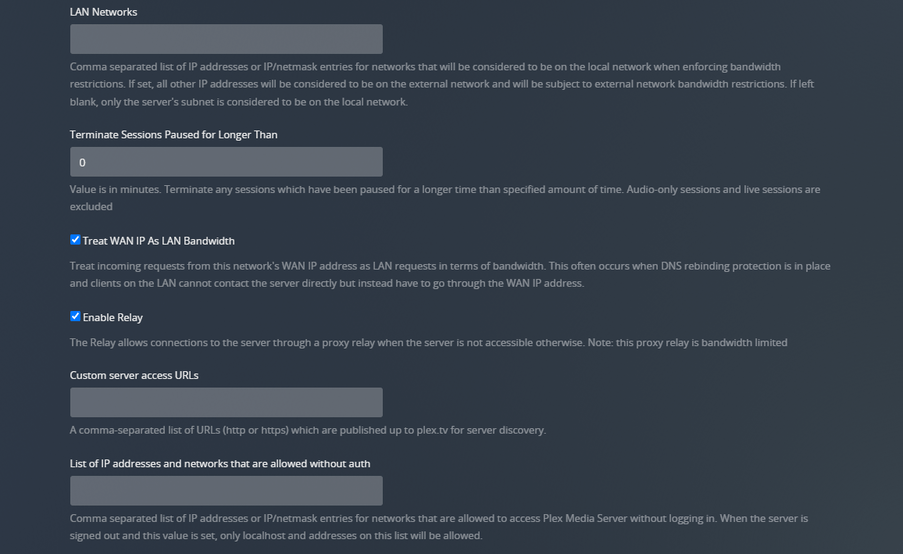
In Plex, go to Settings \ Network (Show Advanced) and provide a screenshot.
I have metronet for my ISP, and have paid extra to get the static IP from them.
With the DNS information, are we speaking about changing that information in my Router, or is there DNS Settings in plex?
[Uncheck] Enable server support for IPv6
[Uncheck] Treat WAN IP As LAN Bandwidth
[Uncheck] Enable Relay
Go back to Remote Access and disable / enable remote access.