The server is the brain - it knows where all the media is, holds all the posters and things like that. You can download the official version for your QNAP here - just select “QNAP” and make sure “Plex Pass” is off (as it really means “beta”).
The client is the “viewer/player”. As @dane22 wrote, if your Samsung TV is smart, this will already ben installed on your TV - you simply need to select it and run.
You will still want to go to https://app.plex.tv to setup your server (If it is not already set up) though.
Thanks for that. The thing is I downloaded the Plex server through the QNAP App site. I don’t have enough know how to start downloading bootleg copies. And the one I downloaded via QNAP has worked fine until now.
@mark_bell_me_com let’s try to get this sorted for you. Your concerns about broken apps are valid, and you bring up very good points.
So I’m going to try to distill it. Here is the big picture.
Plex the company makes software for playing media.
Plex makes two pieces of software to accomplish that:
Plex Media Server
Plex Media Player
Two pieces of software are needed for Happy Plexing, server and player.
The server streams your videos to you. It keeps track of what you play, what’s new, and artwork.
The player receives the videos when you press play and displays that with sound and subs.
So when we want to use the whole Plex system, the company provides website articles so you can see the supported hardware for server and player.
There is no player listed that runs on the QNAP NAS. The section for NAS Players refers to servers which is bad.
It sounds like you’ve identified a problem with the QNAP AppCenter where it’s showing you what seems like an official player, and you’re frustrated when that doesn’t work.
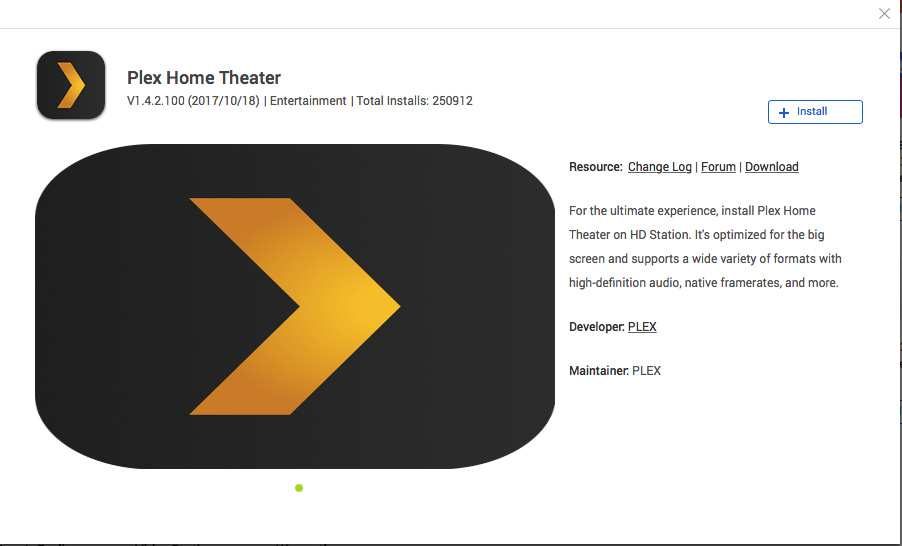
May I ask are you referring to clicking on AppCenter -> Hybrid DeskStation -> Plex Home Theater which claims to be on v. 1.4.2.100 from 2017?
@mark_bell_me_com is/was using a totally separate 3rd party app from the QNAP website that allows the QNAP to directly connect to the TV via HDMI). This unofficial app has not been updated in a while and no longer works.
…and ironically, that is the bootleg copy. To do it correctly, you need to follow the instructions that any of us have given you above.
Download the correct Plex Server App and set it up
Run the Plex media player app that should already be on your Samsung Smart TV
The method of downloading and installing the official (and correct) version is exactly the same as how you downloaded the unofficial 3rd part version. However the setup will Nik doubt be different. You will want to go to https://app.plex.tv to do that. (If it is not already set up) though.
the issue is the lack of clarity in apps linked with qnap nas
when you first run your nas… those apps are there and then it is fair to think they are part of standard software delivered with your nas. this plex player included in the hd station (used to display everything from your nas through hdmi cable) was working fine and you could think this is the way to use plex.player with my tv that might not have the app in the tv apps… now of course this specific app has been removed without any warning… (usual incredible policy of qnap) and people are angry… as they might have spent money for a pass or equipment… i guess both qnap and plex could do something about it and release an official app for this… but I doubt…
Thanks all for your responses. I think that the Plex Media Server that I have installed (and painstakingly set up) is genuine. Only today I was asked to update it to the latest version. I suspect that the Plex Home Theatre (the client?) is what was bogus. I’m reinstalling the earlier QTS firmware on my NAS to see if I can restore things to how they were for now. The Plex app on my Samsung TV is frankly prehistoric and doesn’t seem to support most of the files. Sorry for being grumpy. Will let you know how I get on.
Yes that’s not a real app from Plex. It’s their software hacked to work on QNAP by some guy.
So based on what you’ve said, I’ll claim there are two errors here, none your fault.
The AppCenter has bad, incorrect information about Plex Home Theater
The Plex Articles on NAS Players refer to servers which is wrong.
The picture I attached about Plex Home Theater, it has two errors that are QNAP’s fault:
Developer: PLEX The word PLEX is underlined and takes you to plex.tv. Well Plex is not the developer and maintainer. Some guy from France did this Home Theater thing on his own. This app doesn’t come from PLEX at all.
It has a Changelog | Forum | Download link. The Forum link takes you here. We don’t support that app. It makes no sense. You can’t get to anything that tells you who made it when using the AppCenter. The fact that Plex Home Theater appears on a new QNAP’s AppCenter with bad information is a massive oversight or totally ridiculous.
It was never clear you were installing 3rd party unsupported stuff. I’m sorry it took a long while to get to the bottom of this, but it was bugging me for months. Thanks for brining it up.
My understanding is that the developer has stopped working on it for personal reasons. Don’t be offended if you do not get a response.
As annoying as this is, I would recommend that you stay up-to-date with the QNAPs QTS for bug-fixes and security patches etc. The workaround would then be to connect your TV to a Plex-capable streamer instead of to your NAS (which would need to be attached to your router if it isn’t already).
I only have an Apple TV, but there are many alternatives to get you going. I believe both Roku and Amazon Fire TVs are decent options (I have no personal knowledge of them though).
Thanks for the reply. I understand that is the case with father mande, but this one was only developed in the last month by a guy called cris I think (at the qnapclub store). Has he really stopped since September?
Anyway, I only use Plex for movies as it’s the only server that can deal with them split over multiple files, and that can read the correct audio channel. All other servers either can’t do the former or the latter or both! I have the Plex app on my TV(s) but it can’t play 5.1. All my movies are stored on the NAS with it’s HDMI directly connected to my AV processor, so HD Desk Station is pretty much my only way to play them properly.
Is there any other solution to get 5.1 through to ,my AV processor?
Yeah, it was posted further up the thread and was the link I referred to. New here so haven’t figured out how to quote a post! Anyway, this is the chap: https://qnapclub.eu/en/qpkg/805 in case anyone else wants to try it and figure out why it hangs all the time!