Server Version#: 1.32.8.7639
Player Version#: doesn’t matter/web client
I’m running an older QNAP x64 device with QTS firmware 4.3.6 (in case that matters).
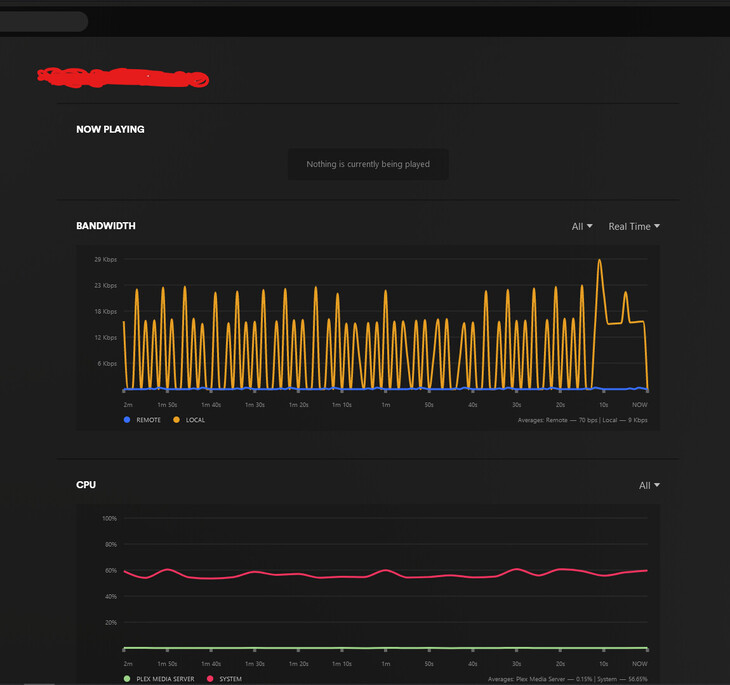
After Plex Server has been running for a while (usually several days), I notice the NAS hits 100% cpu, and the Plex server dashboard claims it’s not the one consuming those resources. However when I login to the QNAP interface and check the running processes, I find several Plex Transcoder processes consuming all the CPU. This happens even if nobody is using the system, and I do not have any scheduled tasks set to transcode media (I do allow transcoding for playback but most users never use it or need it and 95% of the time, i see “Direct Play” or “Direct Stream” indicated when players are watching something).
I’ve noticed once these processes are running, they never stop, even if nobody is connected and playing anything - I don’t see any activity currently indicated in the dashboard and these seem to be zombie processes. The only way I have found to resolve them is to stop and restart the plex app in the QNAP App Center and then all is well again for a few days or so until they eventually reappear, sometimes one, two, or even 3 of them consuming every bit of CPU again.
Any ideas on what is likely causing these? I feel like these are runaway processes that are stuck doing something pointless whenever this happens. It’s pretty frustrating as the NAS does get quite loud and hot while this happens and obviously using more power than it should need to until I kill them.