Please re-enable debug, not verbose, logging. Without debug level entries it is difficult to tell what is happening with the server.
There is a typo in Allowed Networks. Use 192.168.1.0/24 or 192.168.1.0/255.255.255.0. Jan 15, 2026 09:50:16.206 [132311686572856] ERROR - Error parsing allowedNetworks entry '192.168.1.x 255.255.255.0': Invalid argument [system:22]
If you cannot reach server settings via Plex Web and are comfortable with the Linux CLI & text editors (Nano, Vim, etc.), then you can directly edit preferences.xml. See Advanced, Hidden Server Settings, logDebug and allowedNetworks.
Stop Plex Media Server.
Make a backup copy of preferences.xml. sudo cp -p Preferences.xml Preferences.backup
Edit Perferences.xml to correct the entries. logDebug="1" allowedNetworks="192.168.1.0/24"
Verify correct ownership & permissions after saving the changes.
plex:plex is default. Adjust as needed if running with a different username/group. ls -l Preferences.xml sudo chown plex:plex Preferences.xml <-- if needed
The comment by @FordGuy61 regarding a bug in PMS 1.41.7 had me looking at the size of my plugins.library.db files. Several of my these files are 47GB in size each.
Are the 3X47GB files with dates prior to today safe to manually delete now? It would be nice to reclaim that disk space if possible.
Plex isn’t constantly scanning the library anymore, but the pages are flashing approximately every 10-11 seconds (and it looks like it’s doing a mini-scan). This is more noticeable on the Mac app than the Web version.
I’ll follow up with new logs if the server goes missing again.
Also, the device at 192.168.1.88 needs the app restarted (terminate and restart)
It’s trying to use the old certificate
Lastly, Hardware transcoding does not appear to be enabled.
The N150 has the capability.
If it’s not showing up (to be enabled) in Transcoder settings,
then stop Plex, reinstall the package using DPKG and have it make certain everything is correctly configured
Jan 16, 2026 14:08:02.953 [126504215034680] DEBUG - [VoiceActivityDetectionManager] [Universal] Using local file path instead of URL: /mnt/Video/Movies/Pirates of the Caribbean - Dead Men Tell No Tales (2017)/Pirates of the Caribbean Dead Men Tell No Tales (2017) {tmdb-166426} [Bluray-1080p Proper][EAC3 Atmos 7.1][x265].mkv
Jan 16, 2026 14:08:02.953 [126504215034680] DEBUG - [VoiceActivityDetectionManager] TPU: hardware transcoding: final decoder: , final encoder:
Jan 16, 2026 14:08:02.953 [126504215034680] DEBUG - [VoiceActivityDetectionManager/JobRunner] Job running: EAE_ROOT=/tmp/pms-8f66a461-4c8d-42fe-af51-05d2439a3d85/EasyAudioEncoder FFMPEG_EXTERNAL_LIBS='/var/lib/plexmediaserver/Library/Application\ Support/Plex\ Media\ Server/Codecs/ca90ef9-9a65c18385d96de09023e106-linux-x86_64/' X_PLEX_TOKEN=xxxxxxxxxxxxxxxxxxxxxxxxxxxxxxxxxxxxxxxxxx "/usr/lib/plexmediaserver/Plex Transcoder" -codec:1 eac3_eae -eae_prefix:1 20bd17c2-56da-4116-8879-1bd91af448e6_ -analyzeduration 20000000 -probesize 20000000 -i "/mnt/Video/Movies/Pirates of the Caribbean - Dead Men Tell No Tales (2017)/Pirates of the Caribbean Dead Men Tell No Tales (2017) {tmdb-166426} [Bluray-1080p Proper][EAC3 Atmos 7.1][x265].mkv" -y -nostats -loglevel quiet -loglevel_plex error -progressurl http://127.0.0.1:32400/video/:/transcode/session/20bd17c2-56da-4116-8879-1bd91af448e6/07b2018d-8a85-45c0-99df-0d19d16c1a48/progress -filter_complex "[0:1] aresample=async=1:ochl='mono':rematrix_maxval=0.000000dB:first_pts=0:min_hard_comp=0.01:osr=8000[0]" -map "[0]" -metadata:s:0 language=eng -codec:0 flac -b:0 4096k -f flac -map_metadata -1 -map_chapters -1 "/var/lib/plexmediaserver/Library/Application Support/Plex Media Server/Cache/Transcode/Detection/ee51c278-5530-42dd-8b8a-a61eca68dea8"
Thanks for knowledge. I thought I’d disabled IPv6 when I switched ISPs to one that doesn’t support v6. I guess I forgot to hit save .
192.168.1.88 is the server itself. It doesn’t have the player app installed. Is there a way for me to get it to refresh the certificate? I remember that Tautulli was complaining about a stale certificate. Could it be a similar application hosted on the server that is causing this rather than Plex itself?
Hardware transcoding is already turned on & functional (at least on video playback). I wasn’t aware that the n150 was also capable of HW audio transcode, but I’d be happy if I’m wrong about that.
Restarting plexmediaserver did work to get the server back up again this time.
Part of my troubleshooting earlier this week was to stop & reinstall Plex using a fresh download and dpkg. Do you think it’s worth doing again?
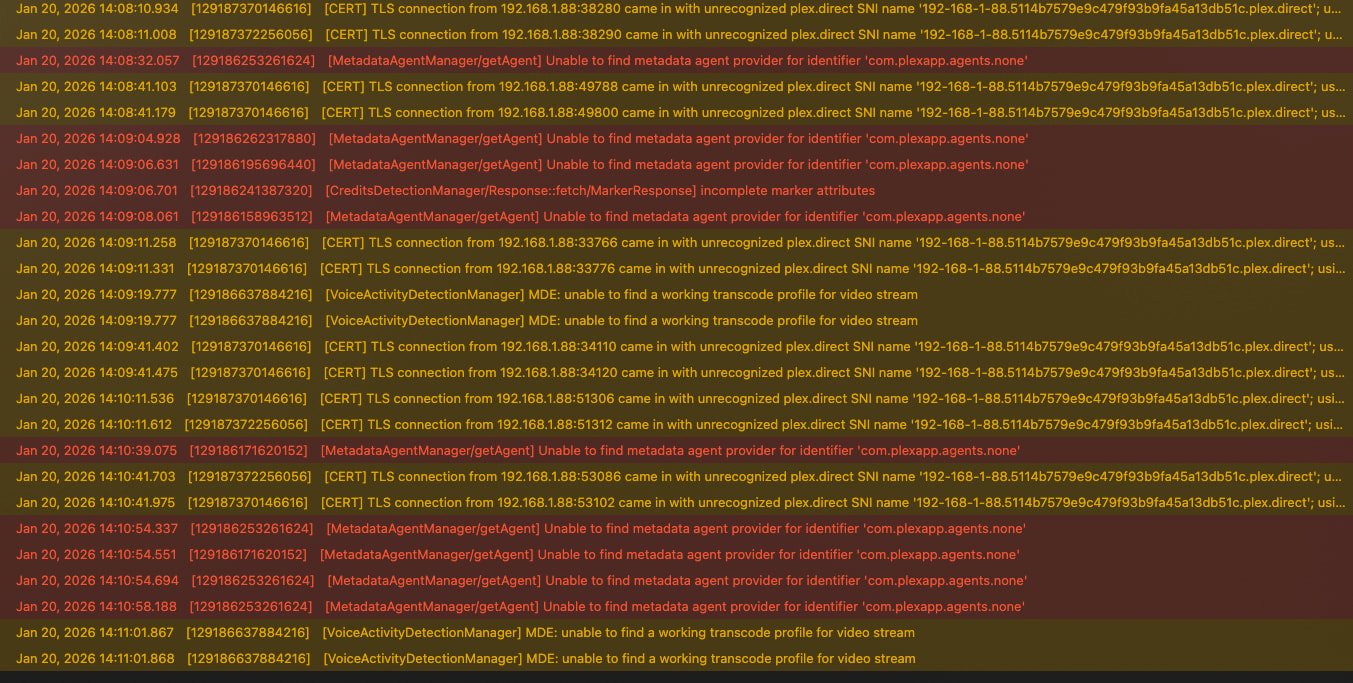
I was noticing a lot of errors/warnings regarding the agents. Unable to find metadata agent provider for identifier ‘com.plexapp.agents.none’ It was while I was trying to save the setting in one of the libraries that the Plex crashed. Trying to make the same changes just now caused it to freeze for several minutes, but then it resumed on its own.
I don’t know if that’s important, or related, but I thought I’d add that information.
They are what need to pull the new cert ID info from Plex.tv
Shield / AFTKA / etc – reboot
ATV - Restart
TV’s - Full power off (not standby – there’s a setting for that)
Browsers – Control + F5 is a force reboot/reload of the browser
After powering down/rebooting all the devices I have plex installed on, and re-authorizing all the apps on the server that interact with Ples, Plex server been stable for the past four days.
I’m still getting the TLS warnings, but everything is working.
I’m also getting errors regarding MetadataAgentManager/getAgent , VoiceActivityDetectionManager & CreditDetectionManager errors, but perhaps those are just certain files that have issues?


 .
.