What is the difference compared to using the command prompt to set the static IP? I didn’t do anything to/with the router that I am aware of.
Command prompt and GUI should provide the same end result. Some users prefer to type commands others prefer GUI. Some users use remote access and might only have command prompt.
GUI is probably the easiest way.
Just go into network, set it and be done with it.
You also want to make sure that EITHER the static IP is out of the range that DHCP uses or that this IP is removed from DHCP use.
For example on my network 1-100 are for equipment and servers while my DHCP range starts at 101 and up.
@cayars I believe I have set the static IP, but how do I ensure that the static one I set it to is not in DHCP use? Is that something done via my router?
Yes, on the router there will a setup for DHCP. On most home routers you can set a range for it to use.
So for example if your home network was 192.168.1.1 through 254 you can set the DHCP range to something like 192.168.1.101-254. Then all address up to 100 will not be given an IP from the router but you instead can set them statically.
Sorry for the late reply, I was out of town on holiday. Now that I am back, I tried to stream plex. About 90 seconds into the media stream, I got the buffering circle, then my PC lost internet connectivity; exactly as expected. I have set my IP address as static according to the guides I can find online. Here are screenshots showing the IP config and the trouble shooter.


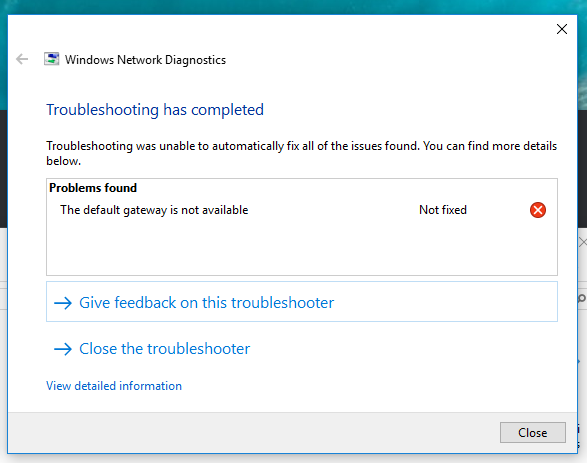
So, I tried the troubleshooter steps, but none of the steps worked. The troubleshooter was telling saying that it was a potential router issue, but again, all of my other devices continue to work online.
Thanks
Sorry, I do not see where it says if I can bump a thread or not. But I figured I would notify people who had replied since my latest reply was so spaced out.
@cayars @nokdim @johnm_ColaSC Would you please mind looking at the second set of screenshots? I set a static IP and then forced the problem to occur. New IPconfig snap is included as well. Thank you
Did you look at the suggestion of @pl_5309 above? or the post by @asjmcguireplex shown below.
Yes, I have done both of these things. My drivers are newest versions and I disabled hyperthreading.
My windows box got the 1809 Win 10 update, killed my Realtek ethernet and had to download one from the Manufacturer. Plex has identified some memory leaks and people are testing them before it gets public release. Hopefully your solution is in the next release.
@pl_5309 o you think it may be specifically a windows issue and not a plex issue? I have the most updated windows 10 version that I can see from the windows updater as well.
@johnm_ColaSC do you have any other ideas why I am still having the issue?
It was the Windows update that broke it, I had to disable automatic driver updates and specifically download one from Realtek. https://www.realtek.com/en/component/zoo/category/network-interface-controllers-10-100-1000m-gigabit-ethernet-pci-express-software
On my Linux box with the oddball Intel ethernet, it was fixed in a kernel update and can now use the hyperthreading.
This topic was automatically closed 90 days after the last reply. New replies are no longer allowed.
