Server Version#:1.30.0.6486
Player Version#:1.60.1.3413-533a7645
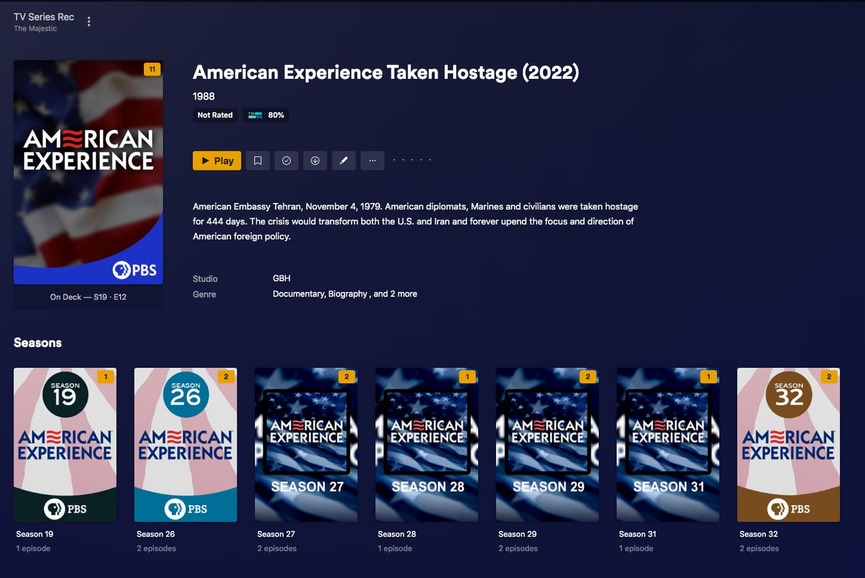
Added the latest episode of “American Experience” to my library a few days ago. After a scan of the library the match for this series is no longer correct. Have spent a few days trying various schemes while also hoping the Plex Agent gets itself fixed. No joy so reaching out here.
Appears that the Plex TV Agent is matching this series to a recent episode ‘Taken Hostage’ which was (until very recently) listed in TMDB as a movie titled “American Experience Taken Hostage (2022)” with the exact same summary now residing in my library entry for the show. TMDB now has changed its entry to a movie “Taken Hostage (2022)” combining the 2 “American Experience” episodes S34E05 and S34E06 which are in the “American Experience” TV Series listing in TMDB.
Tried adding a .plexmatch file to the American Experience directory with the entries
Title: American Experience
tvdbid: 71638
tmdbid: 1181
Neither ‘Fix Match’ nor ‘Unmatch’/‘Match’ matches the to TV series “American Experience”. First match offered is “American Experience Taken Hostage (2022)”.
At a loss what action(s) I can take to get this fixed. Any suggestions are welcome.
Try supplying more details. Particularly how your files are named, the server platform, the used agent type.
Check if this tv show even exists on the relevant metadata sources for Plex: TheMovieDB.org and TheTVDB.com (and in the case of a brand-new show when it was added on there).
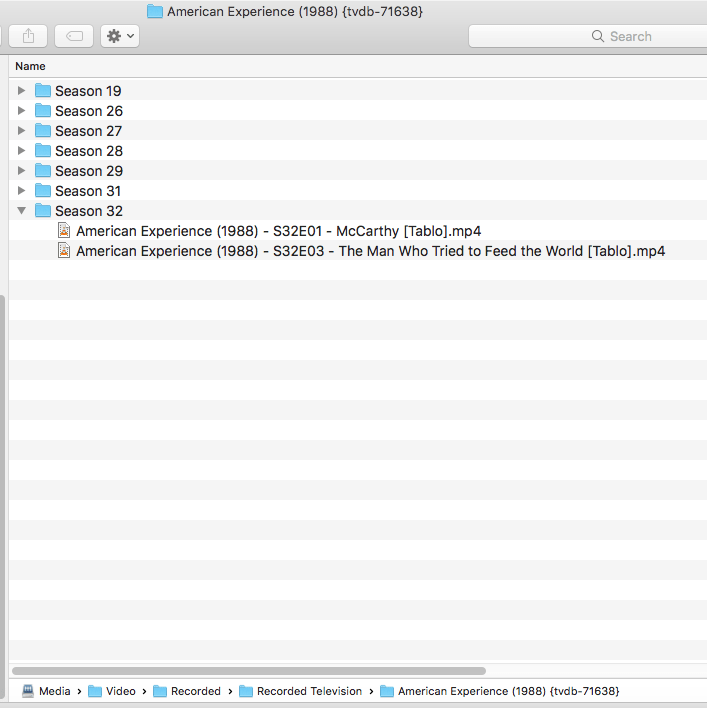
My NonFiction Library has 279 shows with just shy of 3,300 episodes. American Experience has 174 episodes across 33 seasons. All my files are mp4 and I’ve had no issues with metadata in the past several years. All my folders and files follow the Plex naming conventions meticulously.
I’ve copied a few seasons of American Experience to a new media folder on my server. I’ve created a new TV Show library on my Plex server that has only the new folder. The library scan results in the same previous bogus match using the “Plex TV Series” agent. Changing the agent to “The Movie Database” and “TheTVDB” gives perfect matches in both cases.
This is clearly an issue with the “Plex TV Series” agent have the incorrect information matching to this particular TV show. I can’t find any means to report such errors directly to Plex. Is there such a thing?
When I use the Plex TV Series and the TVDB order I’m not getting any show descriptions, but if I switch it to the TMDB show order everything shows up as expected
This is with no show id’s, no plexmatch file and no fix matching. I don’t even have the date in the show folder
Thanks for your work on this. Using your suggestion, I get the same partial result in my test library. Episode titles and descriptions get populated, but the show title and the show description remain “American Experience Taken Hostage (2022)” and its corresponding description.
Unfortunately, changing Episode ordering from TheTVDB to The Movie Database will not work for me as that results in unacceptable changes to many of my other 278 shows in my NonFiction Library.
I think I will just need to wait until the error(s) in the Plex TV Series Agent get acknowledged and corrected.
Thanks, I’d forgotten that option in the advanced settings. Setting Episode order for just this show to The Move Database gives the same result in that the show title and description are both still incorrect.
In addition, I find The Movie Database’s episode numbering is not infrequently different from other prominent TV show information sources. For example the ‘Coney Island’ season 3 episode (2/4/1991) is ep. 13 in The Movie Database, but ep. 14 in TheTVDB, TVMaze and IMDB. Since I’ve been using TheTVDB via FileBot for years to name my files, setting the Episode ordering to The Movie Database mis-matches the many, many episodes where The Movie Database differs from TheTVDB.
Changing my file names in order to reflect The Movie Database is not a option, since I use Sonarr to track my collection and Sonarr corresponds to TheTVDB and, therefore, lines up with my files names as they are.
So, I have no other recourse but to wait until the error(s) in the Plex TV Series Agent get acknowledged and corrected.
I came here to report this exact same problem. “American Experience” is being matched as “American Experience Taken Hostage (2022)”. The series title is incorrect. It appears to be applying a recent episode title and description to the series as a whole. I had to un-match the series until this is rectified.
Is there a way to force Plex to use local metadata only? I have all my shows and episodes tagged with Kodi nfo files. Is there a specific file format to use with Plex?
Same issue.
I’ve added both series
I’ve tried fixing with a plexmatch file - no-go.
The only thing that works is changing that library’s agent to The TVDB. Plex TV Series just will not work and only shows American Experience Taken Hostage.
TVDB series #71638 was only showing the single American Experience episode for America Taken Hostage. I now try it and it comes up showing AE as a complete series. I, like wobysen spent hours renaming, re-converting, and re-filing in multiple files episodes to see if fix match would work. It didn’t. Seems we could use a back channel into TVDB to post such errors. I realize that this is a “volunteer” driven database, but admins must have resources to fix such problems.
I had to give up on the Plex Media Scanner. Using TVDB fixes the American Experience problem. But now Plex is nagging me to “upgrade” my library. Any clues on how to get rid of that arrow?
I have exactly the same issue. The Plex Agent match for the PBS Series American Experience is broken. It was working perfectly before, but as I added the last episode the match was to a single episode, and it broke the entire series. Please fix this. This is not an issue of how my content is named or arranged. It worked perfectly before, and I changed nothing except adding the latest episode in the series.