I have the same issue, American Experience is suddenly unmatched. I performed the steps in this post.
I too have the same “American Experience Taken Hostage” problem. I switched to TVDB (at least I think I did) and nothing has changed. Previous to my switching I couldn’t match the last couple of episodes (in fact, that was the first problem I noticed and then I noticed the addition of the “Taken Hostage” portion to the show name).
Otto all of my other TV shows are fine and American Experience files are in standard format and the matching was fine until a few weeks ago. This is an issue with the metadata Plex uses to classify these episodes.
I am having the same problem. It was correctly identified before but since adding the latest episode it removed the data for all the episodes
bump, American Experience match data is still not fixed
Can confirm this is still an issue. I flagged it on Twitter 3 weeks ago and of course got no response, so I’m glad there’s at least a thread here. But there really needs to be a way to flag things like this on the metadata page itself.. The only way I managed to fix it is by “downgrading” my library to use “Plex Series Scanner” with TheTVDB, instead of “Plex TV Series” which forces you to use the bad metadata we’re discussing with a brick wall.

Can this issue please be fixed. the problem is extremely obvious and can’t be that hard to fix. The name of the show simply needs to be renamed to “American Experience”. It’s frustrating that switching to the plex agent has caused one of my shows to be completely broken.
I updated to 1.31.0.6654, the problem is still not fixed.
Adding another voice to the list. This is a very annoying problem that shouldn’t take this long to fix.
Latest season of South Park having same issue. Not showing up even with the correct naming convention
The latest season of South Park works fine for me using the TVDB or TMDB show order
That means it’s not the same issue, and you should probably start your own thread
@OttoKerner
@JacquelineHyde
@Kevin_SWT
TLDR: I just deleted the entire Library and started over. This solved the issue for me and I am using the Plex TV Series indexer. I first attempted to use the Plex Series Indexer which did not resolve the issues and I couldn’t revert back to Plex TV Series - got an error. Using the CLI in an attempt to fix the library also did not help.
I am coming here because I have the exact same issue. The naming convention is correct but it keeps matching to the wrong show… TVDB ID 424640 instead of the correct show TVDB ID 71638.
This is the path on my system
/Volumes/PlexMedia/PlexServer_1/TV Shows/American Experience {tvdb-71638}
The odd thing is that the poster images are for the correct show. It’s just the Title and the Description that are for the incorrect show. And of course the episode list is incorrect.
I first tried to Rematch. The proper show appeared and I selected it, but again the wrong title and Description appeared.
I then remove the show entirely and Optimized the library, cleaned bundles, then re-added the show. Same issue.
I then tried to use the TVDB ID to match when using “Fix Match” and get the same mismatch.
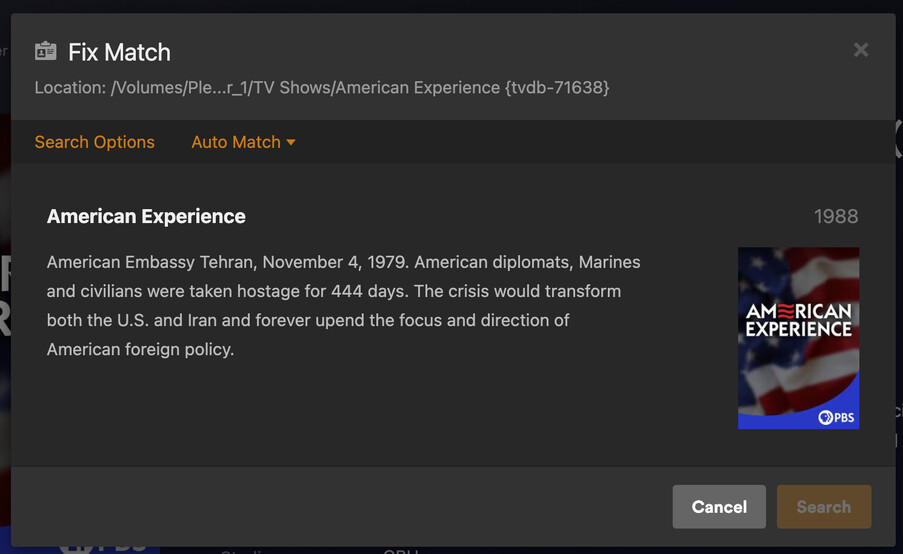

I have the same issue. Plex has now matched individual episodes, it does not match the series though
- choose fix match
- choose american experience 1988
- the series now has American Experience title but the description is for s34e04
Doing some housekeeping . . . Appears the series description has been corrected. Refreshed metadata for the series and all looks to be OK.
Thanks for confirming. I had to fight with IMDB’s submission system to fix this 
episodes and series are now described correctly for me!
