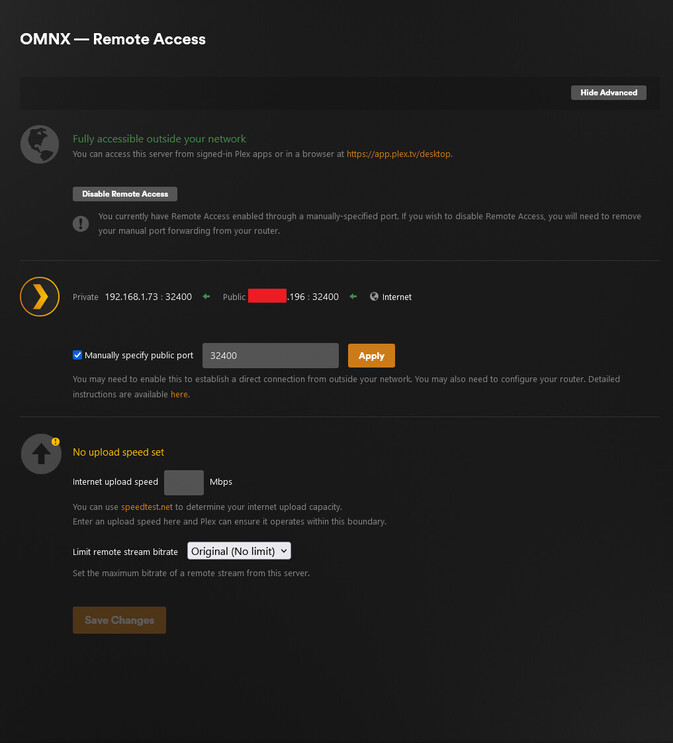
Server Version#: 1.32.7.7571
Problem: I can see the plex server locally on the phone and TV, and remotely on the phone, but not on the we player on any local PC.
Web player logs show messages such as:https://192-168-1-73.4834edc546884534a6644fc9470e1d45.plex.direct:32400/media/providers https://192-168-1-73.4834edc546884534a6644fc9470e1d45.plex.direct:32400/media/providers (Status 0)
And more of this stuff repeating.https://support.plex.tv/articles/206225077-how-to-use-secure-server-connections/
I forgot to mention that I can reach it if i type 192.168.1.73:32400/web/ in the browser, and it did work before, it just stopped one day.
I am using GitHub - mrworf/plexupdate: Plex Update script to simplify the life of Linux Plex Media Server users. so maybe that did something
dbirch
October 3, 2023, 11:32pm
3
Without the server logs (your excepts are not going to cover enough) its hard to troubleshoot
@dbirch
Your server was last seen:
VERSION 1.32.7.7571-13CDC68DC
MACHINE IDENTIFIER xxxxxxxxxx
CREATED 5 MONTHS AGO
LAST SEEN ABOUT 20 HOURS AGO
PUBLISHED YES
Stop the server.
‘/var/lib/plexmediaserver/Library/Application Support/Plex Media Server/Preferences.xml’
Make sure it has Name="value" for -
PlexOnlineUsername
PlexOnlineMail
PlexOnlineToken
PlexOnlineHome
If it’s missing the Token value (I’ve seen them become empty strings "") then we just need to reclaim it.
This shell script will accept a Plex claim token https://plex.tv/claim
@ChuckPa I checked it, it seems it wasn’t blank, and did the procedure anyway with no help. Below are full logs
Plex Media Server.log (414.0 KB)Web Logs.txt (112.9 KB)
Bump - I still need help on this
Thank you for both the server and player logs. These show a lot of info I needed.
What is the LAN IP of the PC ?
( Is the PC on the same subnet as the server - 192.168.1.x ?
Is the firewall (ufw) active on the server ?
If the server on the firewall is active, are the LAN ports open (discovery) ?
https://support.plex.tv/articles/201543147-what-network-ports-do-i-need-to-allow-through-my-firewall/
I have tried from both wifi at 192.168.1.107 and wired ethernet from 192.168.1.67
we are on the same subnet, as I said, on the PC whena I open http://192.168.1.73:32400/web/ I can see the server and stream everything, but when i go to https://app.plex.tv/desktop/#!/ i get “app.plex.tv is unable to connect to “OMNX” securely”
ufw is not even installed on the server, or anz firewall
https://app.plex.tv won’t find the server because it’s not published.
It needs to be reachable (Remote Access on) one time to publish.
Your log shows:
Oct 04, 2023 09:11:04.371 [281473650815200] DEBUG - [EventSourceClient/pubsub/172.104.133.220:443] MyPlex: mapping state set to ‘Mapped - Not Published (Not Reachable)’.
The settings show that it is reachable, and test from mobile phone over cellar connection shows that I can play any file.
It is a really weird problem, I know
Its just from my pc, over a local network
This is VERY weird indeed.
Last ping was 15 minutes ago.
CREATED 5 MONTHS AGO
LAST SEEN 15 MINUTES AGO
PUBLISHED YES (xxx.xxx.xxx.xxx:32400)
LOCAL ADDRESSES 192.168.1.73
Are there any active Layer 2 VLANs active?
ChuckPa:
VLANs
Sorry, I was on a trip for a few days.
No, it is a basic home network on a ISP provided router, I haven’t done any configurations on it except the port forwarding.
My thoughts are
If the problem is with server local broadcasting, maybe the PC cannot find ti, but then, why can the phone an the TV?
If the problem is on the PC side - possible but why doesn’t the PC fallback to remote access if it can’t find the server on local network?
And for 2. I am not quite sure, the plex from web app doesn’t work on my pc with win 10 and bunch of stuff (but it did work before until one day it didnt), and also doesn’t work on my company laptop with a fresh install of Win 11
system
January 11, 2024, 9:36am
13
This topic was automatically closed 90 days after the last reply. New replies are no longer allowed.