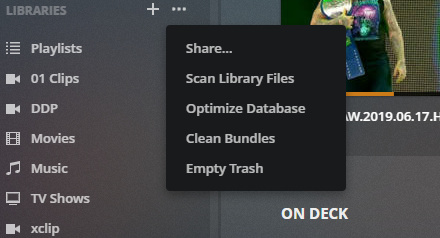
“You can go to libraries and still do those functions.”
Except I can’t.
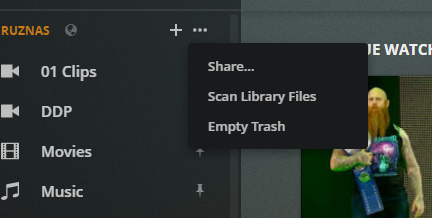
If I click “more” I get these options:
If I go to Manage “Libraries” I get no options other than “Scan Library”
If I go to SETTINGS “LIBRARIES” there are no options at all.
If I go to TROUBLESHOOTING, I can clean bundles and optimize, but not scan the libraries afer
If I turn off the new plex experience I CAN go to libraries and do everything
If I turn on the “New Plex Experience”, there are no LIBRARIES to click, you can only chose individual libraries and none of them have the full “Plex Dance” options.
Is this thread not about the “new Plex Experience” UI or am I missing something??
The new interface does seem to need more clicks and actions to do the Plex Dance.
afaik the only place to clean bundles (and optimize DB) is from the troubleshooting section.
It certainly seems easier in the old interface.
But I suppose you can go to the Settings > Manage > Libraries and scan libraries from there
and then jump down to Troubleshooting to clean bundles.
Yeah generally it just seems that Plex have added UNO from the perspective of those who use the Web App as their client.
For admin stuff it’s pretty painful.
For me, unless they improve the admin experience (not holding my breath), once they remove the old web interfaceI I will probably keep a copy of PMP with the old web interface around just for admin duties.
(I don’t use dvr, so changes to that don’t effect me)
I would just use the admin thing on my web client too, but I add music at work while listening to music, and the new UNO thing is the only way to get the player to play a “Random Album”.
Sadly, the “Library Radio” and “Time Travel Radio” buttons don’t work either here on the web browser or on my PS4. I’m guessing because I didn’t set it up as a Gracenote library, or is it something else?
Looks like the most recent update fixed some of the font issues. The side bar spacing is much better and I can now see all the full names of my libraries. I would still like to see this shrunk up a bit more but overall it’s much improved.
How do you even enable the UNO UI on the Plex Website? I looked up instructions and it said to enable something called “Preview the new experience” under Web Client then General but it isn’t there anymore. So how do we turn it on and then off it we want to go back?
This is a great thought/suggestion. Thank you. I just downloaded/installed it.
That said, I can’t help but thinking that it’s just a matter of time before they “improve” or retire PMP. After the Roku debacle, I feared they’d make their way to Plex Web, and they did. There’s fewer and fewer places to seek shelter in the Plex Universe these days.
Yesterday, I added a new library to my Music server. Before UNO UI, my libraries would automatically appear in concise, alphabetical order on every device/app. No additional steps required. Now, with UNO UI, I have to rearrange/pin my content on every single device/app each time I make an administrative change at the server level.
It might have been doing this for ages, and I just didn’t see it.
Has any one noticed that if you click more to get the list of available servers and then click on the name of the server you get a dashboard just for that server, that I quite like.