As of yesterday, neither my Android Plex app, nor my Android Plexamp app, nor my desktop Plex app will cast to my Sonos system. The day before, everything was working fine. A couple of days ago, Plex pushed an update to the Plex app on my phone, and I just checked on my desktop, and I’m up to date on updates there, too. Can someone help me figure out how to troubleshoot this issue? I’m going to need a lot of step by step instructions in plain English, since I am not tech-savvy at all.
Is it not seeing your Sonos devices or it sees it, but no sound comes out when you hit cast?
Lets start with 1 app at a time. Can you:
- start the Plex for Android app
- reproduce the problem
- wait 1 minute
- grab the Android logs ← click here for instructions
- reply to this and attach the log file
Do you know the IP address of your Sonos device?
I followed the steps below. Attached are the Android logs.
I have two Sonos ONE speakers that are paired together in two adjacent rooms, so usually what I’m playing comes out of both speakers simultaneously. They have the following two IP addresses:
192.168.1.95
192.168.1.110
Felipe
plex-log-fel554.zip (1.6 MB)
Your logs indicate that your server isn’t reachable. Are you sure your server is working properly? Can you try playing something first, then try sending it to your Sonos, and get me a new log.
The logs also indicate that it did connect properly to your Sonos speaker. It takes a little while, but that part appear ok.
10-31 16:24:39.979 i: [LongPollingRemotePlayerSubscriptionManager] - Attempting to connect to Dining Room + 1
10-31 16:25:00.360 i: [LongPollingRemotePlayerSubscriptionManager] - Connection successful
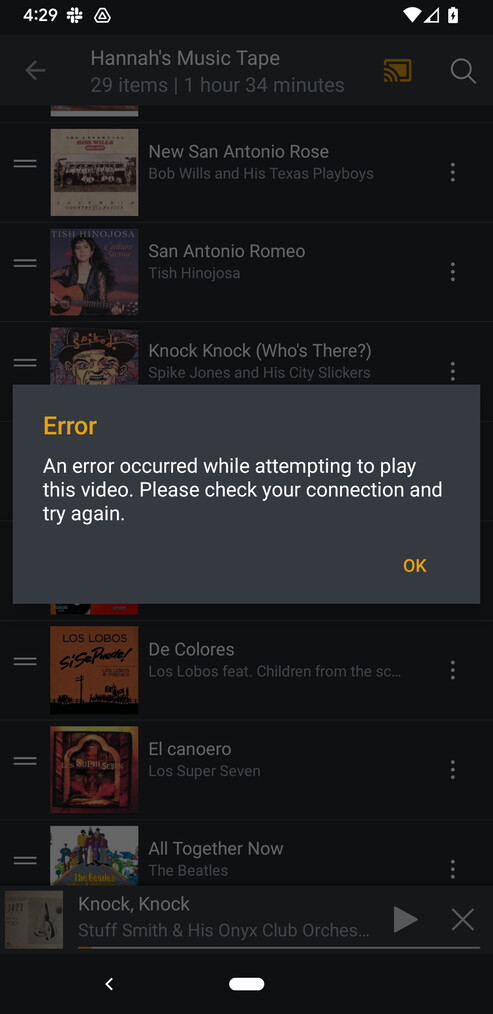
Okay. I opened Plex on my Android phone and started playing a song. Then I used the cast feature and selected my Sonos system. It turned orange, so it connected. But the song didn’t play. It stopped playing completely. So, then I tried to play it, while connected to Sonos, and a notice popped up that this “video” couldn’t play, to try again later. See attached screenshot.
Also attached are the Android logs I downloaded after trying the above.
plex-log-fel554 (1).zip (1.6 MB)
Thanks. I see where it is erroring. I’ll let the team know so they can investigate.
That error you are getting is a bad error message. The app doesn’t know what the error is so it’s showing a generic message, which inadvertently says video.
Can you try unpairing the speakers and see if that makes a difference? Plex just sends the audio, it’s the Sonos themselves that handle the paring. It’s possible that is broken with our app.
I unpaired the speakers and the same thing happens with each of them. Same error message.
I unpaired the speakers and tried casting to each of them. I got the same error message for each.
I unpaired the speakers and tried casting to each of them. I got the same error message as before for each of them.
I unpaired the speakers and the same thing happens with each of them. Same error message.
Have you tried playing the same file directly through the Sonos app?
If you mean from the Sonos app on my phone, yes. That’s what I’ve been doing so far.
Same thing happens when I use the Plexamp app. And when I try casting from the web version of Plex from my computer.
All of them will connect to my Sonos system, but then I get the error messages when I click the play button to start playing the song.
If you’re asking if I’m playing through the Sonos app on my phone, yes. That’s what I’ve been doing so far.
Same thing happens when I use the Plexamp app. And when I try casting from the web version of Plex from my computer.
All of them will connect to my Sonos system, but then I get the error messages when I click the play button to start playing the song.
Thanks for the info. I’ll see is someone on our team can reproduce this. I don’t have a Sonos myself to check.
