Server Version#:1.40.2.8395
Player Version#:1.91.0.129-1cd63c1d
Updated my plex to the latest version and now it will not start. I waited around 20 minutes then reset it. Still nothing. Is my server dead…? I’m dead tired and have been up now till the crack of dawn trying to fix it… 5AM. Can’t figure it out.
I have a bunch of logs but no idea which to upload. Will post when directed to.
Hey did you see the Message posted in you PM notes before you downloaded? do you Auto download or Manual Download?
I personally Skip Auto, I think it’s a Epic waste of time and, I don’t drink tea!
(THIS IS THE MESSAGE)
" (PLEASE NOTE) Please also be patient when updating to this version if you have a very large database and allow the upgrade process to finish.
Rename ‘un/played’ to ‘un/watched’ terminology for video types (PM-1042)
We have identified an issue where automatic updates were not respecting custom paths for existing Windows 64-bit installs. Unfortunately, any automatic fix would introduce security vulnerabilities so we encourage users who installed in a custom path to uninstall and then manually reinstall Plex Media Server."
I hope this helps, I was unable to update myself, I can’t move my database I’m sitting on a 1/2 petabyte not going to reinstall that no thanks. good luck.
Is this Windows or Linux related as it’s not entirely clear.
Regarding dealing with customized metadata locations and recovering large databases, it is easily doable if database backups (scheduled tasks) exist.
Here is one system I helped build and manage.
You’ll notice the metadata directory for PMS is over 1TB due to all the media files which are indexed.
apollo@apollo:~$ df -h
Filesystem      Size  Used Avail Use% Mounted on
tmpfs            26G  9.7M   26G   1% /run
/dev/md0p1      464G   50G  414G  11% /
tmpfs           126G  4.0K  126G   1% /dev/shm
tmpfs           5.0M     0  5.0M   0% /run/lock
tmpfs           192G  1.9G  191G   1% /ramdisk
/dev/sda1       1.1G  6.1M  1.1G   1% /boot/efi
/dev/md4        3.7T  1.6T  2.1T  44% /vol/meta
/dev/md3         19T  8.3T   10T  46% /vol/audio
/dev/md2        182T  126T   57T  70% /vol/series
/dev/md1        164T   70T   95T  43% /vol/movies
tmpfs            26G   72K   26G   1% /run/user/127
tmpfs            26G   56K   26G   1% /run/user/1000
apollo@apollo:~$ find /vol/audio /vol/series /vol/movies -type f -print | wc -l
1029245
apollo@apollo:~$
I did a manual update. Still running. There is disk activity so…
So are we basically stuck on this version now…? I have 400TB too and I DO not want to do this all over again.
Its a linux install. I did a manual update. Its still hanging since 5AM.
400TB plex media library - 600GB in plex app data.
At what point do I call my server dead? I really don’t want to have to do a full reinstall, I spent 8 years building this server.
There is disk activity
Logs
@mattdeezly1996
would you please, in a terminal window, make a tar.gz of the “Logs” directory and attach it?
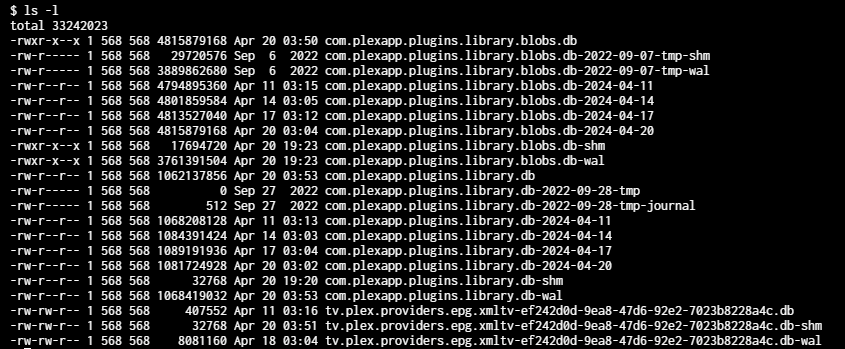
Also please show me a ls -lah of the ‘Databases’ directory ?
There are some folks who’ve had upgrades take hours (for small-medium libraries).
Back when DSM 6 → DSM 7 occurred, we had one user need 2+ weeks for his migration.
Stopping / killing will only make a mess.
At this point, I see no reason to abandon what’s in process – but I do want to see the logs.
(worst case — If there are database backups, we can rollback / pre-empt the PMS version. I would urge using my DB tool to optimize the DB so the schema upgrades go faster too but let’s get some more info first )
On separate note, I do understand the issue here.
apollo@apollo:/vol/meta$ df -h
Filesystem      Size  Used Avail Use% Mounted on
tmpfs            26G  9.7M   26G   1% /run
/dev/md0p1      464G   50G  414G  11% /
tmpfs           126G  4.0K  126G   1% /dev/shm
tmpfs           5.0M     0  5.0M   0% /run/lock
tmpfs           192G     0  192G   0% /ramdisk
/dev/sda1       1.1G  6.1M  1.1G   1% /boot/efi
/dev/md4        3.7T  1.6T  2.1T  44% /vol/meta
/dev/md3         19T  8.3T   10T  46% /vol/audio
/dev/md2        182T  126T   57T  70% /vol/series
/dev/md1        164T   70T   95T  43% /vol/movies
tmpfs            26G   72K   26G   1% /run/user/127
tmpfs            26G   56K   26G   1% /run/user/1000
apollo@apollo:/vol/meta$ du -hs plex/
793G	plex/
apollo@apollo:/vol/meta$
(/vol/meta = the plex metadata on nvme ssd)
Thanks for the help so far!
Here is the Databases directory.
Plex_Logs.zip (1.3 MB)
Let me know if any more action or info is needed on my part.
I don’t have it on an NVME but I do have it on an enterprise SSD at least.
Thanks
@mattdeezly1996
Does ps -ef | grep -i plex show “Plex Media Server” ??
According to the log you posted, PMS was ordered to shutdown (sig 15)
Apr 20, 2024 17:29:34.800 [140507938597688] DEBUG - Shutting down with signal 15 (Terminated)
Apr 20, 2024 17:29:34.800 [140507938597688] DEBUG - Ordered to stop server.
Apr 20, 2024 17:29:34.801 [140507938597688] DEBUG - [JobRunner] Job running: /usr/lib/plexmediaserver/CrashUploader --sessionStatus=exited --sessionStart=1713648285 --sessionDuration=289 --version=1.40.2.8395-c67dce28e --userId=MatthewRDiFrancesco@gmail.com --sentryUrl=https://o17675.ingest.sentry.io/api/1233455/ --sentryKey=xxxxxxxxxxxxxxxxxxxxxxxxxxxxxxxx
Apr 20, 2024 17:29:34.801 [140507938597688] DEBUG - [JobRunner] Jobs: Starting child process with pid 41
Apr 20, 2024 17:29:34.881 [140507938597688] DEBUG - Jobs: '/usr/lib/plexmediaserver/CrashUploader' exit code for process 41 is 0 (success)
(( These are nvme “pro” SSDs … about 2.7 GB/sec perf and 1.2 PB endurance))
interesting.
Top (not ‘htop’) is showing CPU flicking up for that pid ?
Q: Which version of PMS were you using before 1.40.2 ?
This is what TOP is showing. Staying consistent around 99-101%

I was using PMS Version 1.40.1.8227 before 1.40.2
Your CPU is being floored doing database migrations. Just let it run. If you keep interrupting it, it will just take longer because it’ll try to recover from the last time you interrupted it.
Overall on my whole server it says its only using 3-5% max for my entire CPU though
It’s single-thread (one core) at 100% … This is correct behavior.
The xeon E5-26xx cpus , while they can do a lot, no one thread is very fast.
(I know.  )
)
[chuck@lizum Downloads.2013]$ cat /proc/cpuinfo | grep 'model name' | uniq
model name	: Intel(R) Xeon(R) CPU E5-2690 v4 @ 2.60GHz
[chuck@lizum Downloads.2014]$
Weight it out and tell the beggars to be patient 
So you think waiting it out is the best course of action? Also were we able to confirm it is at least working on the DB at least? If so I’d feel more at ease
The lsof command will confirm the DB files are open.
Seeing the journal file in the Databases directory was all I needed to see to confirm it’s mid-transaction.
Wait it out.
grrrrrr
When done, I’ll introduce you do my DBRepair tool.
It’ll make things like this faster (fewer links in the DB)
The normal “Optimize Databases” is really only a Vacuum.
That’s right, you have this in a container.
Do you see file sizes or dates/time stamps changing ?
whose container are you using ? (it is likely one of my supported ones)
I noticed something weird - I ran top again and it’s saying Plex Media Server only been running for a minute (I never stopped or restarted this server) - is the server crashing and that’s why its stuck?

As for checking on the files dates/time stamps, “com.plexapp.plugins.library.blobs.dl-shm and -wal” are updating