Plex works fine on local network but unusable for remote clients

Server Version#: 1.29.2.6364
Player Version#: various

I am running Plex server on the latest version of Windows 10 (Intel(R) Core i7-6770HQ, 2.60GHz; 16 GB RAM; 256 GB SSD, 1 Gbps Ethernet). My home connection speed is 200 Mbps download and 10 Mbps upload (Xfiniti). Media is on the older Netgear ReadyNAS drive. It was working fine for years (even with lower 100 Mbps/5 Mbps network speed, and even as low as 50 Mbps/5 Mbps), but lately my family members started complaining that they cannot watch pretty much anything because the playback keeps buffering every few minutes (and sometimes seconds). Plex clients also display errors which differ from client to client but generally state that either the server is not powerful enough or something similar. And the problem occurs with a single or at most two concurrent clients.

I first thought is was an issue with the client app (one was a really old Apple TV), so I took my Fire TV 4K stick and while it was somewhat better, it eventually ran into the same issue. The home download speed there was 100 Mbps. In another home (with, I think, 1 Gbps download speed) I tried the latest Plex app on the latest Sony PlayStation and it also showed the same issue.

How do I figure out what causes the issue? I thought maybe I needed to upgrade my NAS, but if NAS were the problem, it would’ve been a problem for local playback, right? And local playback works fine.

My server has been working fine for years, and I have not made any changes. I disabled the “Large Send Offload” setting (as recommended), but it did not make any difference (yes, I rebooted multiple times). So don’t think it’s server hardware.

I do not see how network speed would be an issue since it worked fine with half the speeds at the time.

The content is mostly 720p (H264, 1.5 Mbps), AAC (160 Kbps), or something similar. Some have subtitles, some don’t.

Could it be some setting? My transcoding directory is on the local SSD. Transcoding settings favor speed over quality. Hardware acceleration is turned off. I enabled verbose logging, but not sure what to look for. There are many errors in the log, but I have no idea what they mean or if they are related to the issue.

Any ideas? Thanks.

Have you disabled the xFi Advanced Security?

Isn’t it just blocking dangerous sites? How does it affect speed? Are there any recommendations from Plex to block it?

You are assuming it’s that smart. It most likely isn’t.

I presume the filter is simply based on the assumption that no typical “home” user will ever operate a kind of “server”. Now, Plex Server is exactly that – particularly when catering to remote users.

It sounds like Advanced Security applies to xFi gateways and I’m using my own modem/router. Couldn’t find this option in the Xfinity app.

Do you have a static ip on the machine running the server with port forwarding configured on the router or you’re using UPnP? Do you use a VPN?

Look in your dashboard while a remote stream is playing or turn the Wi-Fi off on your phone to test
What does it say here? (take a screen shot)

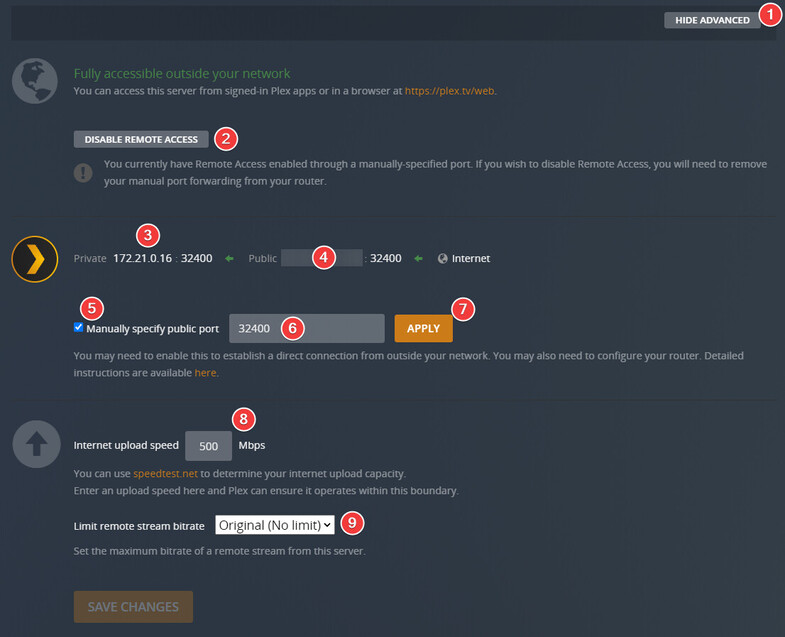
Take a screen shot here on the remote access page (cover/edit/remove #4)

On every client (player) there is some form of quality settings like this (the device you’re remote streamers are using)

Your remote streamers may have to change this setting until they get a smooth playback but you should confirm everything is configured properly on your end first

1 Like

Oh, thank you so much. That’s troubleshooting tips I desperately needed (have been a Plex user for years, but never realized I could monitor stats in real time). I noticed that my Internet Speed Upload setting was set to 5 Mbps and it was pegging, so I bumped it to 10 Mbps. On my cell phone (without WiFi) it made the playback smoother, but I will check with my folks to see if it made a difference for them. I hope this will give me enough tools for troubleshooting, but I will post if I get stuck. Will also post the results. Thanks again.

1 Like

you can also set up tautulli so you can see history of what is happening. why things are transcoding. how many direct streams are causing it etc.

1 Like

Bumping the Internet Speed Upload setting to 10 Mbps did not help. Will need to do more troubleshooting.

there are too many factors for what could be causing this but its is likely just remote streams causing you to peg the bandwidth limit. just because you have 10 upload doesn’t mean its consistent. so if you are close to 10 with how many people are streaming you will always have hiccups. you can limit your remote stream bandwidth to 3 or 4. but with 4 only two people can stream at once and it may not be reliable. also, you will be transcoding likely many of those streams unless your content is already in 720p range. i’m surprised you managed with 5mbps with anyone streaming other than one person in the past. main reason i switched to att. comcast upload limitations are brutal. hopefully should be changing in the next year or so.

1 Like

I’m just talking about a single remote client streaming. I wish I could switch to AT&T, but they only offer 50 Mbps speed max in my location, so Comcast is the only option. I will continue testing but from what I saw so far, it may be an issue with both bandwidth and CPU power. Although, my PC’s CPU should be adequate, it seems to spike when it needs to perform heavy transcoding, and it differs from one media to another. And direct play may be hitting bandwidth limits. Surprisingly, I do not see any issues when I stream to my cell phone (when not on WiFi). I just bought a new Roku 4K Player, so I will try it from my folks’ house when I go there. It’s nice to be able to use Tautulli to see what is going on on the server side. That was the part I needed most. Thanks for the tip.

not familiar with windows server but if you can get plex pass and get HW accelerated transcoding working it could help assuming it works on windows.

I do have the pass but I don’t think my serveр supports hardware acceleration.

well this link should tell you if you do or not. and i have seen some threads with work arounds for people getting other hardware to support it even if it is not officially supported.

https://support.plex.tv/articles/115002178853-using-hardware-accelerated-streaming/

1 Like

Your CPU Intel Core i7-6770HQ is of the “Skylake” generation.
As such it has support for H.264 hardware acceleration. It is supposed to have support for decoding HEVC as well, but only with 8 bit color. But you will usually find HEVC with 10 bit color, so that in particular is not very useful.

If your mainboard has an embedded monitor port and you can enable support for the embedded GPU in the BIOS, chances are good that you can use hardware acceleration at least in some cases. (don’t forget to install device drivers for the embedded GPU)

Thanks for the tips. I will check it out.

Couldn’t find an option to turn on embedded GPU in the BIOS, but I re-enabled the hardware acceleration. Didn’t seem to help.

So I got my folks a new Roku Premiere 4K Stick (model 3920RW), and tried it with verbose and debug logging enabled on the server while watching the stats on the dashboard and Tautulli. It played marginally better, but it still stuttered. Finally got the “connection to the server was not fast enough” error. The weird part is that the dashboard and Tautulli stats did not show anything wrong. The CPU generally stayed below 20%. Throughput had occasional spikes but generally did not look suspicious. The transcoded bar was about 5-10% ahead of the streamed bar. I saved the logs just in case, but after taking a brief look, could not see anything weird, although I noticed message: “Failed to stream media, client probably disconnected after 491520 bytes: 10054 - An existing connection was forcibly closed by the remote host.”

At this point, I’m lost. Not sure if this is some setting that I need to tweak or need to upgrade upload speed or my server.

This topic was automatically closed 90 days after the last reply. New replies are no longer allowed.