Plexamp - Pause from Mobile remote dodgy / sometimes doesn't work

I have a simple setup where:

  • server runs on a jetson in my living room
  • I’m listening to music via Plexamp on my Windows PC
  • I’d like to pause the music from my phone (android pixel 7 pro) if I go to do something and the music is distracting

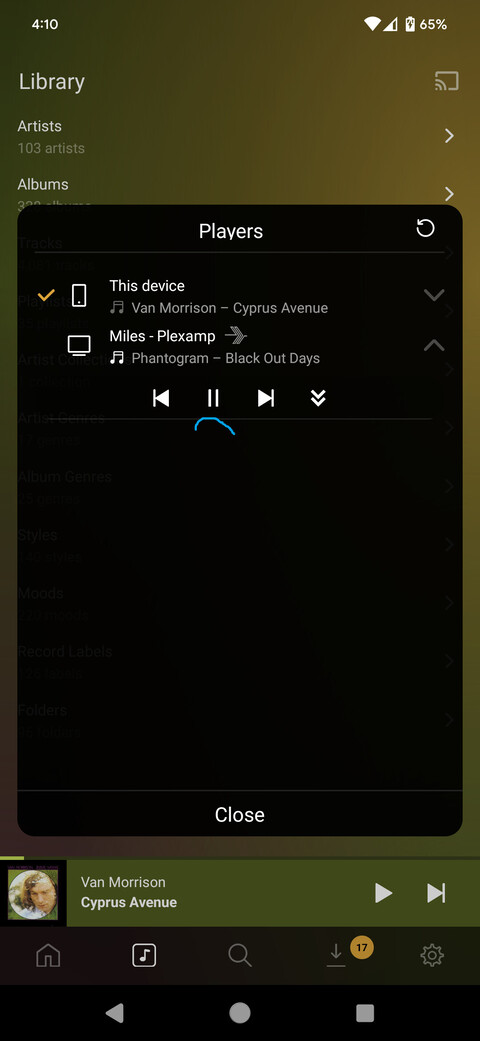
I have used the pause button below in the past with success so I know it can be made to work, but I’m currently trying to get it to work any way possible and the button (underscored in blue below) won’t do anything. Did a lot of restarting and making sure no VPNs or firewalls are on. The server is directly connected to my router via ethernet.

Apologies if this is more of a bug report on a feature I really like and (try to) use all the time.

Best,
Rich

If everything is on the same network/should be accessible, please send over Plexamp logs after mashing on the pause button a few times.

Well that was certainly the case one time for me (my phone switched to the ‘Friends’ subnetwork in my house). Thanks for reminding me to check that. Now that they are on the same network, I was able to pause and also ‘steal’ from PC → Android phone.

However, now I’m having trouble with the opposite - Plexamp is running on my Android, I’m back from lunch, and I would like to transfer sound to my PC. I’m trying to hit the double-downwards pointing arrow from my Windows Plexamp, this one:
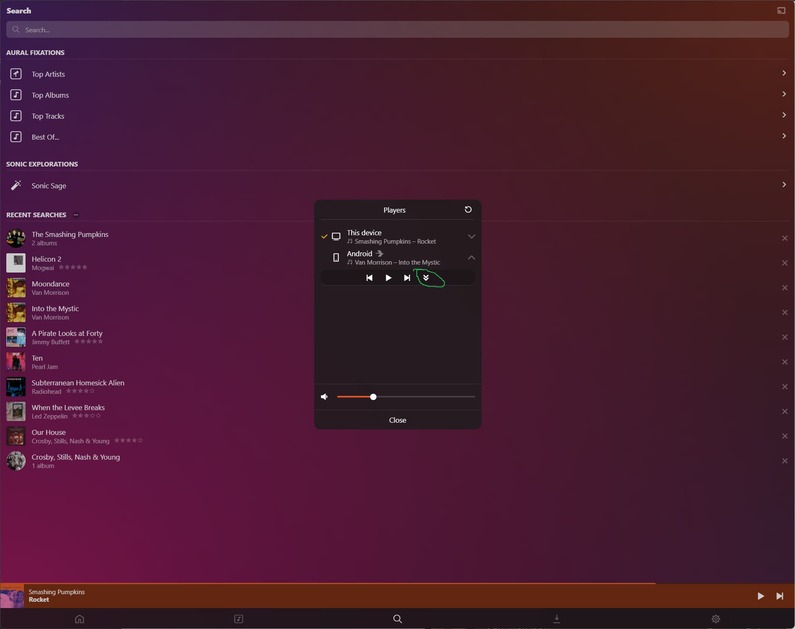
I’ve also attached a fresh log with me ‘mashing’ on that button and nothing happening, and also the Play/Pause button which interestingly works.

Plexamp.log (434.8 KB)

Thanks for your help,
Rich

Hmm, I see a lot of these:

Aug 11, 2023 12:18:44.503 [Javascript] WARNING - DEVICE: Player connection http://192.168.12.132:33795 didn't work for Android: HTTP status -28

28 is a timeout, like a network issue connecting.

Do you see anything there showing that I was able to pause the music running on my Android from the desktop PC’s Plexamp? Because that worked.

I see a few of these:

Aug 11, 2023 12:13:20.855 [0x0000be5c] DEBUG - Networking: Completed request 89: (GET https://plex.tv/player/playback/pause) with code 200 (have 0 bytes) in 179 ms.

which implies it had to use a very indirect route to make it work (up to the cloud, down to the player).

You probably have double NAT or some such thing.

This topic was automatically closed 90 days after the last reply. New replies are no longer allowed.
