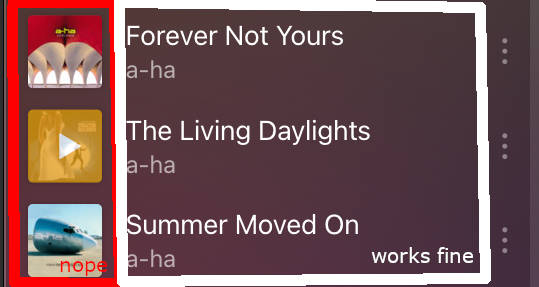
I have noticed this behavior only on PlexAmp for macOS for a while now. Since this problem has not been fixed in the last few months, I am reporting it now. Both versions (Plex Server and PlexAmp are on the latest beta versions as of Dec. 22nd, 2024).
Steps to reproduce:
Open PlexAmp
Select a playlist of your choice and open its detail view so you can see the list of tracks
Click on any track in the list
Now it gets complicated with a (sometimes) random behavior. One of the following scenarios will occur:
Playback starts as expected with the album overlay and controls appearing.
Playback starts as expected but the album overlay and controls will NOT appear and you still see the track list with an error overlay.
Playback does not start as expected and the first track in the list will be played. The album overlay and controls will NOT appear and you still see the track list with an error overlay.
I would guess that 8 out of 10 times I will receive an error. Starting the playlist with the big play button on top or using the shuffle button works just fine without any errors. The behavior can’t be reproduced on my iOS device either.
However, I can see errors in the server error logs. Maybe they can help you narrow it down.
No, I have uploaded the log after I have completed the steps described above.
I have screen recorded the whole process for you (the MP4 video file is in a ZIP file attached) and what you see in the video is what you will also get with this new log file. As you can see, it always fails in some way. Only at the end when I click the huge play button it does what’s expected.
I think I have found what’s causing this problem. After enabling the debug log and reproducing the error I noticed that it worked just fine this one time and then it hit me. I always clicked the album cover in the track list which then results in an error. I did this because it has a hover effect and I thought that’s the way to do it. I do this all the time to start something from the the PlexAmp start page for “Recently played” or “Recently added”. But by mistakenly clicking on the song title/artist name in the track list of a playlist worked as expected.
So I guess you must change the behavior of the click event on an album cover in the track list for playlists. However, I’ve also attached the debug log for you.