I followed the Example Home Setup guide here: https://support.plex.tv/articles/204234313-example-plex-home-setup/
I’ll use the same analogy. Homer = admin user who owns the server, Marge = home user (who has their own plex account login) and has no content restrictions.
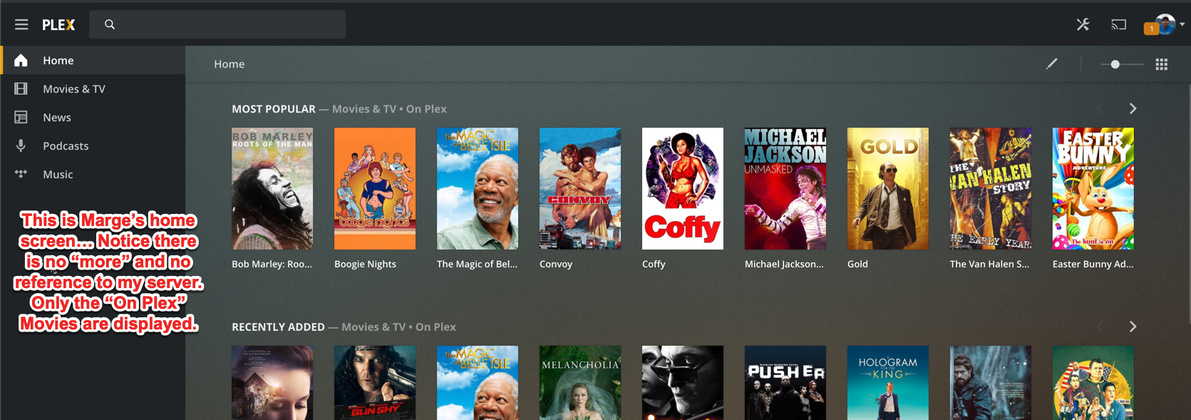
As Marge, I’ve accepted the invite… I can see in Users and Sharing that the content is shared with me. But, I do not have any options to play the content.
Additional Notes:
Remote Access is enabled
Server is setup on a Synology DS218+.
I migrated the installation from Mac to Synology DS218. I then upgraded to plex pass and added other users.
Do you have other browser tabs open to other Plex related pages? This can confuse the browser. Close out any of these other tabs then refresh the one left.
No luck there… i’ve tried it on completely different computers, my sister is in a different household.
I tried it also on a few smart TV Apps…
Samsung App: After I select either a managed user or a home user… it goes to a spinner that never stops (i have to unplug my tv). It works fine if i select the “Admin” (Homer)
Roku App: does a bit better… with both a Manged User (Bart Simpson) and Home User (Marge Simpson) I can now see a “More” in the left sidebar. Upon clicking it I can then see my server name on left side but right side says “Sign in to access ”. Same situation when i do it with the managed user I created which obviously doesn’t make sense since they can’t even log in.
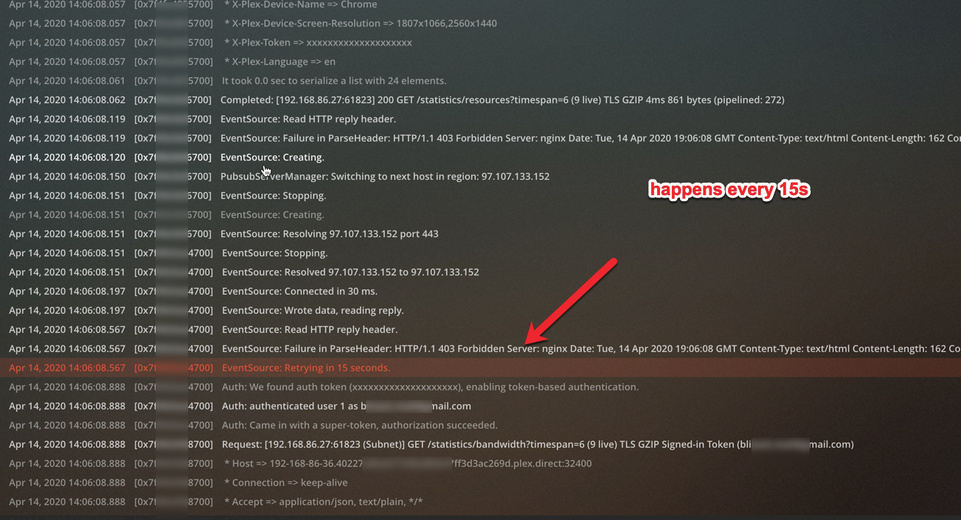
I looked at the server logs… only errors seems to be like getting a forbidden from what appears to be a pub/sub…
I am unsure why this fixed it… but what i did was.
mv /volume1/Plex/Library/Application Support/Plex Media Server/Preferences.xml Preferences-backup.xml
Restarted the server
Went to the web interface it asked me to name this new server. But, all other configs were there basically…
Oddly… my home users which previously couldn’t see any servers could suddenly see the old servername (the one in the original Preferences)… but with an alert indicating it was offline. I say it’s odd because they never saw that server when it was online…
I then re-shared the libraries on the new server with the users and my issues were resolved.