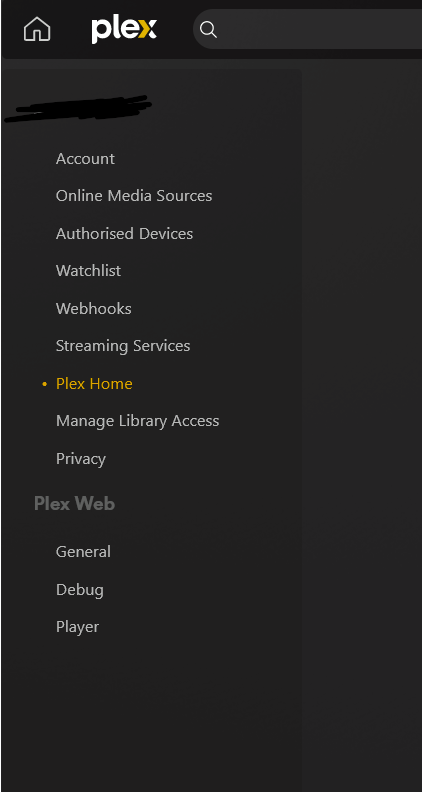
Server Version#: TOS app centre says 1.31.2.6783 (I thought I had updated to 1.40 – maybe as per https://forum.terra-master.com/en/viewtopic.php?t=2340, it’s not updating the app screen with the new version?)
Player Version#: Settings > Plex Web > General says “Version 4.125.1”
<If providing server logs please do NOT turn on verbose logging, only debug logging should be enabled>
Context: I had Plex set up and working fine, on a Terramaster F2-221 (TOS v5.1.29). However, since updating to a new internet provider and migrating the Plex over to the new internet set-up, the managed user I have set up for my partner to use can see the Plex media server files, but the home admin account sees no files.
What the home admin sees under Settings (i.e. nothing about the server in the left-hand nav)
In the main navigation, if the Home Admin clicks “Your media” there’s a prompt to “Get Plex Media Server” (??)
The question: what can I do to get my Home Admin to regain access to the media server? It means I’ve lost all ability to configure things, I think!
(can provide logs on request, but I have no idea what thing to even provide)
Hey @swann866 I read your question and I’m not sure I can help, but here is goes. It seems like my struggle was the opposite of yours. My admin account was fine, my user accounts were going out my firewall and back in as if they were remote users outside the house. This was even though both admin and user accounts were accessing the home server at home. Because I’m a networking guy, I was able to put a rule in my firewall that caught the outgoing plex traffic and redirected to the internal IP of the server. I only realized it was an issue when 4k media was playing at a low bit rate - the Plex was dumbing the bitrate down because it was determining that it was a remote user. I have a little experience with NAS devices, and I don’t want to frustrate further with stupid questions, but from the screenshot it looks like you are not logged into Plex. Anyway, hope that helps.
Hey, thanks for the reply. Could you give any specific guidance for next steps? How could I tell if there was a routing issue – is that something you could help diagnose if I shared the logs, and if so, what would you need logs of?
Sure, I can try to help. Let me verify some facts. The problem is your partner can see content and the admin account does not see content, instead the admin is prompted with “Get Plex Media Server”?
Do you have Plex Pass? Is the partner account accessing plex from the same network as the admin account? What player are you both using, just the web or is it an app on a player?
Amazing, thanks! To answer the Qs:
- You’re correct about the description of the problem.
- I don’t have Plex Pass (I didn’t before either, when both accounts could access the NAS fine)
- Yes, both the managed account for my partner, and the admin account, will get different results on the same device on the same network (we live together)
- I see the same issue with both the web player, and also the Samsung smart TV Plex app
are you accessing it from the local IP or app.plex.tv ?
Does anyone else have any guidance? It’s pretty frustrating!
I’ve got the same issue as you, by the sounds of things. I just posted here Can't view my plex server or content libraries via primary account but I can via a managed account - #4 by geraldgg
An interesting thing I’ve noticed is that I had a plex client still open on one of my devices from before the issue started occuring, and on that device I can still use my admin account to interact with the library and watch content. But on any other device I have, my admin account cannot see the libraries and I have to use a managed account instead.
It’s frustrating that you’ve had no help for nearly 2 months. I’m not hopeful I’ll get a quick resolution either.
Hi,
If you look at my thread, I solved my issue. With new internet provider (Free), my box had a different gateway and my server was using the old one, so no access to plex server.
You might look into that.
Oh that’s super helpful, thanks! I can imagine it could be a gateway issue, as I did recently switch internet provider. That said, I don’t know how to fix that issue either  is there any guidance you can give me about how you fixed this, or give any guidance you followed? I’m not really a knowledgable network person! Thanks
You can see your gateway by typing route
Then you delete the current gateway:
sudo route delete default gw 192.168.22.1
and add the new one
sudo route add default gw 192.168.22.254
I did the route command, and did see that it was looking up the old router. I used the commands you suggested, and that seemed to switch it over to the new one – thanks for that!
However, the main Plex account still doesn’t have the device in the left-hand nav etc., as before. Is there any kinda caching problem I need to resolve, do you think? Or could there be some other related problem somewhere in the config? I tried restarting the NAS, but that didn’t help…
Try to look at this thread Plex Server doesn't show my libraries and I can't add others
Also check the logs if you see something.
Thanks for this – I didn’t see anything specific about gateways in that thread, guidance-wise. I also tried looking at the logs, but there are 10s of logs, each with 10,000s of rows. I tried checking the Plex Media Server log (felt the most relevant) for “error” or “gateway” or the gateway IPs I updated based on your last advice, and nothing obvious sprung out to me – but conscious that I don’t really know what I’m looking for.
Any advice you can give on keywords to look for in the logs, that could help pinpoint a problem? Things I should expect to see / not see?
More than the what, it is the “when” to look at.
You can stop plex, clean the logs, and start plex, and look again, amount of logs will be reduced. There should be connection to plex.tv, check the errors if there are any.