I have my logs extracted, is there any data that needs to be removed from the logs before they are sent?
i have no issue posting logs here, the important things like the token are already redacted in the logs
1 Like
The crashes are the same as ones seen before - always logging a line like this before crashing
ERROR - [FFMPEG] - Error setting child device handle: -xxx where xxx is a number that varies
What we know is that these crashes did not occur on 1.18.0.1944-f2cae8d6b and first reports seen on 1.18.1.1966-10fc2f8d3 and 1.18.1.1973
We have not been able to replicate this crash to find the cause
Would like to see more logs - logs from other users to see if all the crashes are just one issue
and lets collate details of what the hardware is and drivers/versions to see if there is any commonality
The crash is somehow tied to intel graphics; if I disable the intel graphics drivers either in bios or in device manager and let plex use my nvidia card it no longer crashes – now I’m back to using 1.18.2.2029
(logs confirm it’s using the hw transcode with nvdec+nvenc)
1 Like
Revert from the DCH drivers.
2 posts were split to a new topic: Transcoder issues when seeking - gets to 100% CPU
Playing around more, it seems to have problems only when the intel graphics is headless.
(no DCH drivers available – Intel HD Graphics 4000)
More log (183.2 KB) and more (660.2 KB), as asked.
I’ve been having the same issue for a couple of days. It’s much more likely to be replicated on EAC3 codec. Seems to happen mostly on streaming to a particular device (Nexus Player).
Crashing with hardware acceleration when headless or running Plex Media Server as a Service is an old issue - goes back to 2018
The system isn’t entirely headless, it has both nvidia and intel graphics with only the intel side being headless. Exact same setup and drivers worked in 1.18.0.1944.
1 Like
I have this on the newest 2029 update as well. This program has become an absolute unstable POS over the last updates. I can play locally just fine but remote play requiring transcoding = instant crash. I may have to look at another software for my media server. Mine is also related to hardware acceleration. If I turn this off it works. I have Nvidia P2000. Newest version of Windows 10 as well.
First noticed on 1.18.1.1973
Current version: Version 1.18.2.2029 (Still happening only w/ HWA turned on, been working seemingly fine with it turned off. Have remote streams running even now)
Intel(R) Core™ i7-3770 CPU @ 3.40GHz
8GB RAM
Integrated: Intel HD Graphics 4000
Driver Version: 10.18.10.4358
Discrete: Nvidia GeForce 660
Driver Version: 26.21.14.4112
Fresh Logs: Plex Media Server Logs_2019-11-16_21-48-43.zip (5.9 MB)
I have come to love HW transcode feature, but also remember that it wasn’t that long ago it didn’t exist. So while it may take time to sort this out, I want to preemptively thank y’all for y’all’s time and efforts. It means a lot that you’ve reached out here so we don’t feel we are shouting in the dark, to many of us PLEX means a lot triggering great stress when things like this happen. I hope you understand that any frustrations expressed in the forums aren’t truly a reflection on you or your product and I acknowledge patience on our part is necessary.
So, thank you… And God Speed!
*Also notice my logs are really large file size compared to the first ones.
Logs from
11/06/19 w/ Verbose ON - 2,426kb
11/08/19 W/ Verbose OFF - 1,388kb
11/12/19 W/ Verbose OFF - 4,490kb
11/16/19 W/ Verbose OFF - 6,024kb
Not sure what it could indicate but such change caught my eye. 
1 Like
We currently have two distinct crashes relating to hardware acceleration on windows. Your server crashes are the ones that appears to have come in between versions 1.18.0.1944-f2cae8d6b and 1.18.1.1966-10fc2f8d3
We have not been able to reproduce these crashes and I will be discussing with the development to see if we can get some diagnostic builds to help isolate the bug
PS: The logs were taken a couple of days after the launch of Plex Media Server - so not relevant to any crashes that you may have had as they do not cover the time of a crash
Hi All,
First post on these forums. I too had the same issue with the latest build of PMS. Server would crash whenever i was watching from a remote client.
Rolled back to version 1.18.0.1913 which was the first version I installed in October 2019 (I am a new plex user). Since the rollback, no problems with either crashing or hw transcodes.
I am posting this in the threads relating to the crashes when hardware acceleration is enabled
There may be several causes for the crashes
I would like any one getting the crashes and running Plex Media Server as a service or scheduled task or via RDP / Headless to stop doing that so we can concentrate on any new crashes. The issue with crashes in the intel driver when running headless / as service goes back over a year
With regards to recent crashes - we have one crash that appears to have come in between version 1.18.0.1944-f2cae8d6b and version 1.18.1.1966-10fc2f8d3. These are the crashes that manifest themselves in the server logs with this logged error before crashing
ERROR - [FFMPEG] - Error setting child device handle: -xxx where xxx is a number that varies
We have another crash that I am trying to establish when it started or see if it is an intel driver issue
I have feedback from the development team that there is a suspected intel driver bug on Apollo Lake systems
And we have the RDP/Service/headless issue - which we should eliminate by not running in this mode whilst trying to find the cause of the recent crashes
** potential fix for those using dedicated gpu **
I didn’t run any exhaustive tests but HW transcoding seems to be working for me after disabling the Intel graphics from bios. Here is the procedure for MSI Z87 boards:
Settings> Advanced> Integrated Graphics Configuration:
Virtu Technology : DISABLED
Initiate Graphic Adapter: PEG
IGD Multi-Monitor: DISABLED
I’m running Win10 pro, latest Intel drivers, AMD rx570 and Plex is configured to run at startup.
Like many others here plex was crashing immediately when trying to use HW transcoding. I had rolled back to 1.8.0 for a time, but after the change above I can manage at least a single 4K HW transcode. I will know how stable this is in the coming days but I am back to using the latest public release, 1.8.2
I would like to collate platform / hardware / firmware for all cases where the server crashed after logging the above error text in the plex media server.log
So cpu / Gpu / windows version / firmware
Plex Media Server Logs_2019-11-18_11-29-11.zip (6.6 MB)
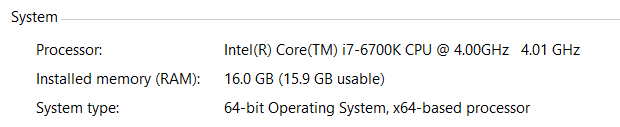
Running Windows 10 Pro, Nvidia GTX 1060, Crashed while running 1903 as well as 1909 ( windows version ). Not sure if you need any additional info @sa2000. I can also confirm that after disabling the Intel GPU in the device manager, without restarting the System the server doesn’t crash anymore. Let me know if you need any additional info and I’m home today so I can assist with any additional troubleshooting if needed.
Hi, just found this thread. I’m having the same issue after the last server update.
I just unchecked “Use hardware acceleration when available” under transcoder and it seems to work. Video is playing now without crashing. This of course is still too early to tell. will update if anything else comes up

