Server Version#:4.30.2
Player Version#:latest android
The initial problem that sent me on this chase was that movies I tried to play, which had always worked fine before, just stopped about 1 minute into the video. These are all local videos stored on my network. Not all movies but some of them, which play just fine if I use a PC media player.
The server is CentOS 7. I ran yum update and this successfully updated CentOS and got the latest version of PMS.
The problem remained and I noticed the processor spiking.
This instance of Linux is a virtual machine (and has been since inception) and had been running on a VMware ESXi 5.5 (paid version) host (Supermicro). I moved it to my new Intel box running ESXi 6.7 (2 “silver” xeons, 256G and all Intel NVMe SSDs). please advise where to look for the problem.
- Verify DEBUG logging ON, VERBOSE off
- Recreate playback issue, stop when seen.
- Wait 30 seconds for logs to quiesce
- Settings - Server - Troubleshooting - Download Logs
- Attach the ZIP file
This is theq quickest way to see what’s happening at playback time.
Quick checks:
- Is skip-intro analysis running in the background? It will use all it can get
- Is this HEVC source without HW transcoding enabled (Settings - Server - Transcoder - Show Advanced) … It may need to be toggled.
Here are the logsPlex Media Server Logs_2020-05-29_16-38-35.zip (1.2 MB)
May I see the XML for that film please (or the “Get Info”)?
I see subtitles being burned. I need to calculate bitrate vs thread-speed.
Subtitle burning is single threaded. (12% of an 8 core composite load)
Audio conversion to aac will use partial of 2 threads (10-15% max)
There is other analysis happing concurrently.
Anything else happening on the host?
Confirm: This is the CPU? https://www.cpubenchmark.net/cpu.php?cpu=Intel+Xeon+Silver+4208+%40+2.10GHz&id=3507
Are you seeing 100% of all cores (meaning top shows utilization 1600%)?
Not sure how/where to get xml.
This was the only movie streaming. Have been no changes to the library of any nature and this old movie used to play just fine, I also noticed a very similar problem with another movie.
CPU is a little strange to analyze in this case because my PMS instances have always been virtual machines. The box running ESXi 6.7 is an Intel server with 2 of the xeons you listed, 256G RAM and 4 2T Intel NVMe SSD datastores. The virtual machine(which is CentOS 7 is assigned 16G RAM and 8 virtual CPUs, whereas the host has 32 vCPUs. The CPU utilization I presented was from ESXi monitoring data where each is a separate trace on the graph and all were hugging the 100% mark at the time.
The video library store always has been an nfs-mounted share on other hardware. Originally this was a Synology NAS. For the past year this has been another CentOS 7 box (bare metal) on a Supermicro single socket MB (some flavor of xeon - do not remember which) and a number of SATA drives of large capacity.
I turned off subtitles and tried again and this time it seemed to play fine, I let it play much longer before closing out. Seems to work.
I had not attempted playing this movie with subtitles previously… Not sure how they got turned on. But we play a lot of other videos with subtitles and have never had this issue, only that the subtitles might either be out of sync or not fully match the actual dialog.
Since this is ESXi, how many vcpu do you have allocated?
You might not have enough -or- other VMs are using up the base CPUs in combination.
You have 8 cores with a little under 2000 Passmarks per core.
That’s not a speed demon. It’s heck of a slugging workhorse due to 8 cores but the per-core speed is slower than a 2012 Core-i7.
I just tried to play 2 other movies I played star trek first contact in its entirety with no issues at all. I then tried to play star trek 5 ‘final frontier’ and experienced loads of stalls and choppy video and sound.
Plex Media Server Logs_2020-05-29_21-36-32.zip (1.5 MB)
I attached another set of logs.
Please be aware that I had PMS running for a very long time. My first go was a standaolne bare metal Linux (32 bit) with only 8G and a Pentium. I have never had these issues prior.
I moved the vitrual machine running PMS from an older ESXi 5.5 last night when this problem started. The older box only has 24 vCPUs (2 of E5-2620V1) and half the RAM. On this new box there is NO DIFFERENCE in performance.
Also, the 5.5 box had vCPU allocations which fully subscribed its capability. This new box has (Inel said) more powerful CPUs with more cores. This box has about half of its vCPUs allocated.. Here is a screen shot of host CPU performance

Having said that the media is on a separate device accessed via NFS. This has been in operation for over a year. Is there a quick and easy way to rule out the media storage as the source of the problem, while understanding that all the media is stored there and only 2 movies have had these issues.
Also, so far selinux is disabled. I have not shared Plex outside of my home yet, so I turned this off when I created the Linux virtual machine.
Thanks for helping., Best regards.
I think I may have found the culprit.
As you may know, I run an MSP company. As such, my MSP vendor (Solarwinds) provides monitoring agents to install on devices for remote monitoring and management. At 10:24, I removed this agent from the VM that is running Plex and the CPU utilization immediately dropped to nearly zero. I will continue to monitor, but since this is the only change I have made, this has a high probability of being the problem. I will update this thread tomorrow.
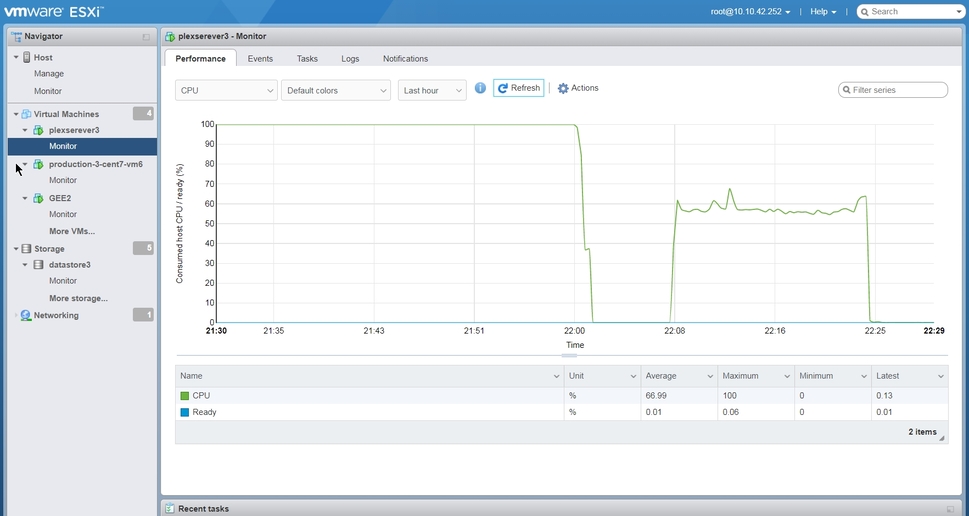
That agennt was the cause. All of the problems with playback have vanished and all of the media I tried to play ran fine with no issues of any kind.
The key was when I installed and ran htop on the Linux instance. This showed that the top 3 processes utilizing CPU resources were all related to the Solarwinds TKC agent. Together they added up to nearly 100% of CPU. Uninstalling that agent reduced CPU load to nearly zero. I have reported this to Solarwinds and await their response. I certainly hope this does not bite someone else.
Thanks again for your help with this.
Best regards.
…Now it’s time to look into the “watch together” possibilities as we shelter without guests in our home. Might be nice to share some videos with the grandkids.
