Hi, I have this problem with quality of streaming. My upload speed is 25Mbps and I’ve setup it on the server. My download speed is currently on my cellular data 20Mbps. The quality limitations for cellular are turned off, I have setup up it to use the maximum quality. Still when I try to play video that has 6.5Mbps bitrate it is automatically downgraded to 2Mbps max and I can’t change it. What am I doing wrong? It looks like Minecraft. I’m trying to play it on iPhone 15. It’s 1080p video in HEVC.
From the sound of it, there might be an issue with your remote access setup causing your remote connection to depend on a Plex Relay server (indirect connection).
Does the connection show as remote or indirect on the „now playing“ section of your server’s dashboard?

https://support.plex.tv/articles/200871837-status-and-dashboard/
If so you might need to troubleshoot that remote access setup.
Did you already have a look at the related troubleshooting support article?
https://support.plex.tv/articles/200931138-troubleshooting-remote-access/
There’s also a guide with some more details on how to troubleshoot remote access issues.
I have port forwarding setup correctly. External port is 47839 and in my Mikrotik router everything comming on this port is forwarded on 32400 on local IP of the windows server. Even if I type to my browser myPublicIP:47839/web/index.html I can connect to my plex account and use it. Still I’m locked only on 2Mbps, it looks like that everything goes through the Plex Relay which is limited to this bandwidth
When I connect it, it even says in the server remote access settings that the Servers is available ouside of my network for a while, after some time it turns red and says that it couldn’t be contacted through the internet
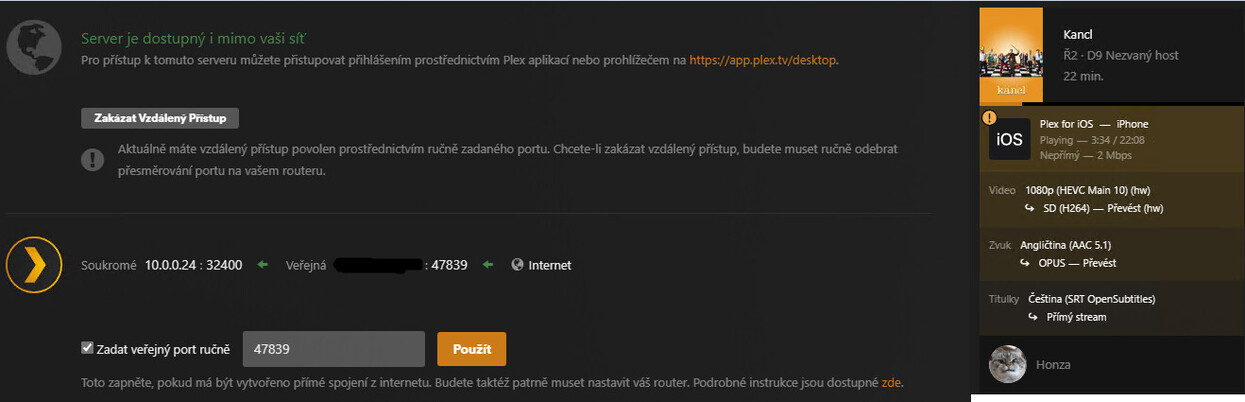
PMS shows your remote access status as „green“ while it’s checking the status. The status changing back to „red“ means your remote access setup isn’t working to start with.
If your own configuration is flawless, there’s still other restrictions that could impact the remote access setup along the communication chain.
How can I troubleshoot more deeply? Could it be some ISP related problem?
See the troubleshooting support article and forum guide posted above…
That article is totally useless
Are you using a mobile / wireless ISP?
The wireless ISPs in the US (T-Mobile, Verizon, Starlink) use CG-NAT addressing, which is incompatible with Plex remote access. It places the server in a double-NAT situation.
The ISPs in your country might be doing the same.
Contact your ISP. If they use CG-NAT addressing, ask if they can provide a public, IPv4 address that supports port forwarding.
