When I go back to watch a series where I left off the episode it tries to start from is often 10 or so episodes back from where I actually left off.
I have no idea what settings to look at or what information would be helpful in diagnosing this issue.
I am streaming from a desktop PC, this issue seems to exist on any device I stream to including a laptop, samsung TV and TCL TV.
Are the episodes Plex is going back to marked as played?
There have been times I’ve shut off an episode too quick, it doesn’t get marked as played, and then Plex will try to play that episode again
I would assume that they are since I watched them, I do generally skip the intro credits and outro credits so possibly it’s not getting marked as played in time? I will double check next time I notice the issue.
Additionally I will look into the settings for anything related to marking them as played, thank you for the input!
So I watched a few more episodes as normal and then today it reverted back through about 10 episodes.
The ones that I have watched are not marked as played.
I am not at home and haven’t looked for settings yet, is there a specific setting I can change that will allow me to mark something watched when say 50% of the episode is watched or something along those lines?
Go to the show level and mark everything as played.
Then mark it all unplayed - then mark each season you’ve watched played (yes, you can do a season at a time), then mark every episode you’ve watched as played. <— basically reboot your watch history for this particular show.
When you’ve got a mish-mash of episodes in a show that are partly played, Plex doesn’t know what to do when it comes to deciding ‘what’s next’.
Watch shows/movies far enough out to have Plex think they’re done - or mark them done - or be prepared for a confused Plex.
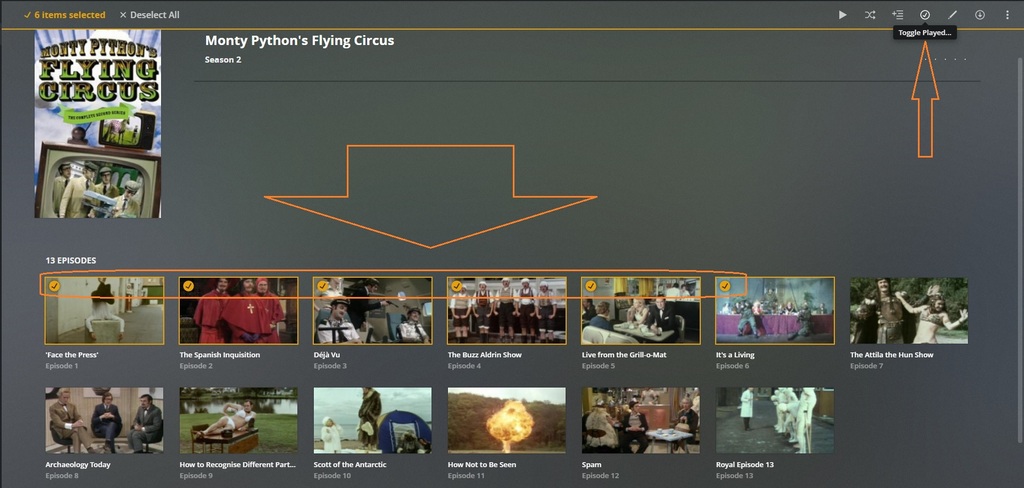
Here’s a little ‘Selection Trick’ - if you want to do a bunch of episodes in a season at the same time:
Tick the little circle in the upper left of each episode - or tick the first one, hold shift and tick the last one in a group - then go up and mark them all played/unplayed.
Might save some time, but is cool none-the-less. You can use this trick for edits, collection building, etc… any time you’ve got a bunch of items on a page you need to do the same thing with.
Note:
On Deck assumes you have watched every preceding episode in a group of played episodes. You can’t leave E4 unplayed while everything around it is played and expect Plex to pick that one up… it won’t. You have to maintain at least some order in your watch history maintenance and that may require a little manual intervention, or slight alteration in your viewing tactics.