Yes! I can confirm after updating things are working normally and I’m no longer getting buffering of my favorite TV shows 
Thanks Plex Team!
Yes! I can confirm after updating things are working normally and I’m no longer getting buffering of my favorite TV shows
Thanks Plex Team!
So I’m wondering if these issues also relate to something similar that I’m seeing. Using Plex app version 5.41.2 on PS5, connecting over internet to my Plex Server back home (cos I’m staying with family). Direct Stream and Direct Play are enabled, upload bandwidth back home is massive, download bandwidth here is massive. Everything is set to play original quality. And yet, my server is transcoding everything. I even optimised a version leading to the ridiculous sight of “1080p h.264” transcoding to “1080P H264” and “AAC 5.1” transcoding to “AAC”.
However, using the app on my iOS device? Perfect - direct play every time.
Is anyone able to confirm this IS another case of the PS5 app not playing ball as opposed to me missing a teeny tiny setting somewhere?
Thanks.
You’ll need to enable logging in the app to the server, and then grab and post the server logs here to see why you’re seeing transcoding.
me too I have exactly the same problem it is not corrected for videos in 1080p acc 5.1 classic blocks direct playback and in my case cuts me the video since my nas is not powerful enough
Moussa
I launch a simple video in direct playback normally since it’s classic 1080p acc3 I just reactivated the video transcoding otherwise I had the error at startup.
before I had no problem with all my videos I paid close attention to the subtitles but since a ps5 update and on my samsung 2020 TV not this problem I also noticed that the parameters only in image format in the subtitles disappeared what was also essential for direct reading.
But currently the biggest worries are on the ps5 you can watch please thank you.
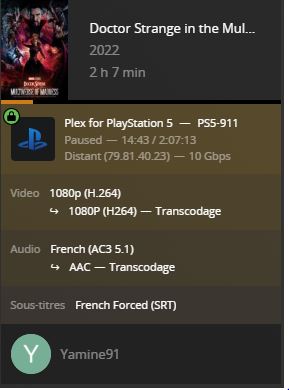
After seeing all the posts on Reddit, seems that everyone is experiencing this issue.
The PS5 is more powerful than the majority of PCs and probably more powerful than the Nvidia Shield yet buffers worse than a $20.00 chromecast.
Which proves to me the PS5 Plex app is not optimized.
Is anyone noticing issues with HEVC x265 encoded files recently on PS5?
Similar to the previous issue, but now doesn’t freeze, “just” jitters constantly.
The only thing U can do to smooth it out is decrease the quality to 720p, but that’s not ideal
I’ve recently faced the same problem with my streaming device (roku). Needed to reinstall it.
I have an issue with UHD movies in HEVC x265. It will be played with direct stream on the PS5 and the picture ist complete colorful and flickering. If I try to use direct play on PS5 it will be tried to transcoding and the movie stucks and lags.
Have you found the solution? I have the same issue. I looked for the info online and even checked these PS reviews in the hope someone shared the solution but didn’t find anything helpful.
Most of my files are either x265/x264, mp4/mkv and 720p/1080p (nothing 4K/UHD). I’ve been noticing that direct play starts fine, but will then “pause” (the little wheel will spin on a black screen) within a couple minutes and from then on the file will play fine but is transcoding.
It’s not a dramatic dip in quality but it is kind of annoying since I’m guessing playing direct is easier on my server.
@Moussa are you aware of any other reports of x265 files jittering?
Again, decreasing the quality helps but far from ideal.
Thanks.
Mine seems to be flakey-er since the last update. 720p/1080p x265 mp4’s start fine as direct play/stream on a network connection, but after a few minutes they start to transcode. If they don’t start to transcode automatically, they will if I skim ahead or backwards.
I haven’t had anything flat out not play, but it isn’t working as well as my PS4 which is over wifi.
I have actually resorted to remuxing any files I have issues with using MKVToolNix.
I’ve been stubbornly avoiding this because I don’t think I should have to (I still think that), but it’s turned out to be incredibly easy and so quick to do that performing that task as I come across problems takes less than a minute.
The other thread was closed, but still occurs. I’ve gone so far as to even take files and make them smaller. The app always stops and buffers. This is even on a wired network. Come on, some of us paid for the service. This has been ongoing for years now.
