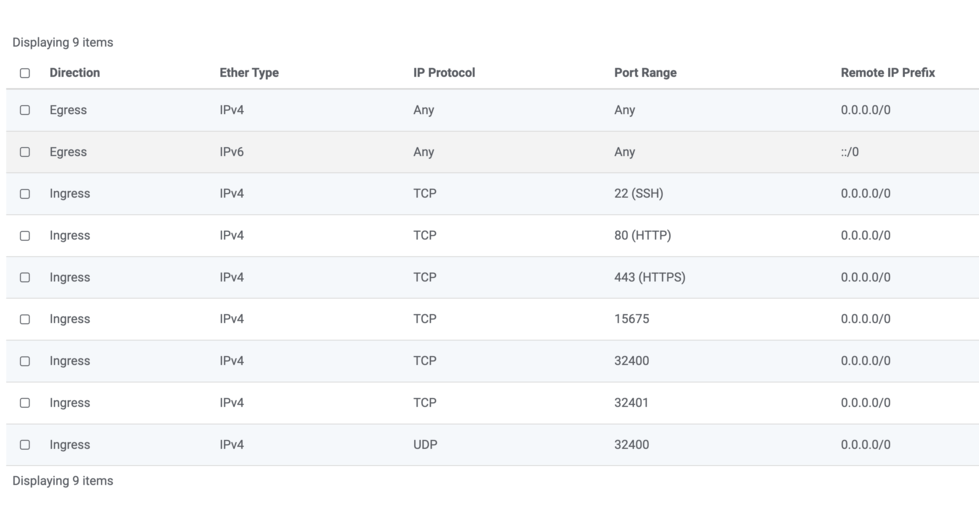
Server Version#: Debian Bullseye
Player Version#: Newest.
Hello community,
I have a new problem with the port forwarding of my Plex server. I have activated the port forwarding on TCP/UDP for port 32400. When I now try to activate the remote acces I get the following error.
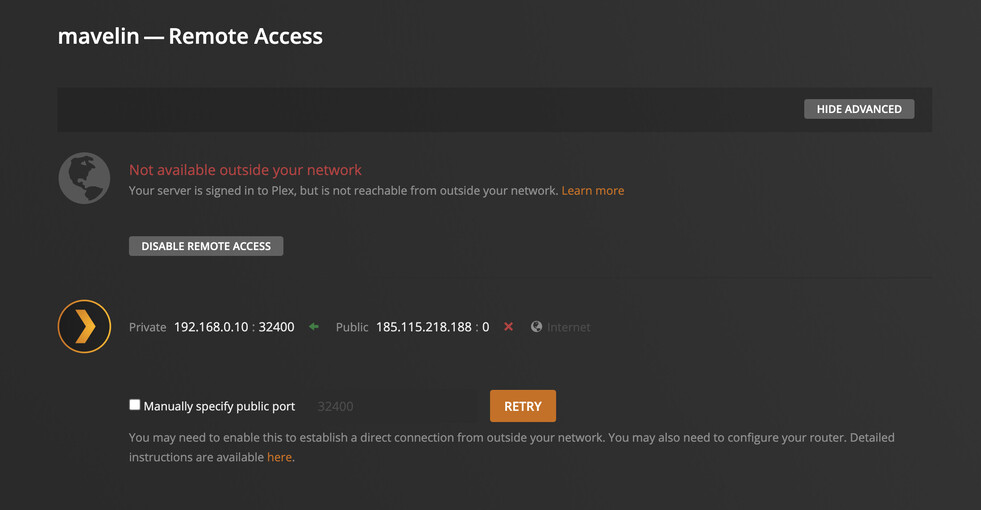
It keeps setting my WAN port on 0. I try to change this to another port, but it still gives problems.
I have also configured NGINX on my server. So below config.
“/etc/nginx/conf.d/plex.conf” [noeol] 54L, 1664B 18,1 All
server {
server_name plex.mavelin.be;
  location / {
      proxy_pass http://127.0.0.1:32400;
      proxy_set_header Host $host;
      proxy_set_header X-Real-IP $remote_addr;
      proxy_set_header X-Forwarded-For $proxy_add_x_forwarded_for;

      #upgrade to WebSocket protocol when requested
      proxy_set_header Upgrade $http_upgrade;
      proxy_set_header Connection "Upgrade";
  }

listen 443 ssl; # managed by Certbot
ssl_certificate /etc/letsencrypt/live/plex.mavelin.be/fullchain.pem; # managed by Certbot
ssl_certificate_key /etc/letsencrypt/live/plex.mavelin.be/privkey.pem; # managed by Certbot
include /etc/letsencrypt/options-ssl-nginx.conf; # managed by Certbot
ssl_dhparam /etc/letsencrypt/ssl-dhparams.pem; # managed by Certbot


add_header Strict-Transport-Security "max-age=31536000" always; # managed by Certbot


ssl_trusted_certificate /etc/letsencrypt/live/plex.mavelin.be/chain.pem; # managed by Certbot
ssl_stapling on; # managed by Certbot
ssl_stapling_verify on; # managed by Certbot
}
server {
if ($host = plex.mavelin.be) {
return 301 https://$host$request_uri;
} # managed by Certbot
  listen 80;
  server_name plex.mavelin.be;

  location / {
      proxy_pass http://127.0.0.1:32400;
      proxy_set_header Host $host;
      proxy_set_header X-Real-IP $remote_addr;
      proxy_set_header X-Forwarded-For $proxy_add_x_forwarded_for;

      #upgrade to WebSocket protocol when requested
      proxy_set_header Upgrade $http_upgrade;
      proxy_set_header Connection "Upgrade";
  }
Any help? Thanks!