Server Version#: Version 1.18.7.2457 [Plex inc Docker]
Player Version#: Anyone: Shield/iPhone/Android TV
The same file causing errors plays fine later?
All movies play without any problems!
I recently moved to my tmp folder to tmp on RAM (Unraid) could this be the problem?
(I have 64G RAM so space is not the issue and its ECC check its all fine)
[Transcoder] [eac3_eae @ 0x15422c0] EAE timeout! EAE not running, or wrong folder? Could not read '/tmp/pms-018fb146-d1c7-4f41-84cb-cae419d0ca06/EasyAudioEncoder/Convert to WAV (to 8ch or less)/e12d43b76d37f1d2-com-plexapp-android_7893-0-0.wav'
Hope someone can help me?
Trying to build a stable and fast Plex server but currently it’s never been so bad as it is now!
I need to see the log files, collected 2 minutes after PMS startup to see definitively .
The key item to look for is the Notify table overflowing.
If it overflows then increasing the table size is the solution.
In any regard, counting the number of diretories in use for media is wise.
Doing so will guarantee that all locally-stored media will be properly detected automatically.
As you can see after our talk about Synology and the BTRFS file system some time ago I have moved to Unraid (Synology still runs some other things)
But I think my library is getting to a size where I might need to do some custom settings?
Please let me know if you have other recommendations?
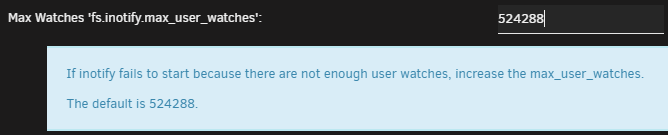
I have now doubled the Unraid value of the inotify table (Its a shared value so I think it needs to be bigger, and I have plenty of RAM so this shouldnt be a problem)
New value: 1.048.576 (32768 * 32)
I also stopped Plex and deleted the codec folder and started Plex up again
After that I could play the TV show folder again! and the eac3 error disappeared
I will post my logs after and before the change when I get home
Transcoding activity started before server startup was complete
The current logs were downloaded before Notify setup was complete.
ar 10, 2020 16:57:11.937 [0x14cdfd4c8700] DEBUG - Completed: [192.168.0.32:57167] 200 GET /video/:/transcode/universal/session/E19208DC-EB27-45F9-A45D-7D63EAFFF0BF/vtt-base/00154.vtt (26 live) TLS GZIP 0ms 239 bytes (pipelined: 19)
Mar 10, 2020 16:57:11.937 [0x14cdfd4c8700] DEBUG - Removed transcode data consumer, active count 1 => 0
Mar 10, 2020 16:57:11.939 [0x14cdfcec5700] DEBUG - [Notify] Now watching "/tv shows/TV Shows/Pine Gap"
Mar 10, 2020 16:57:11.939 [0x14cdfcec5700] DEBUG - [Notify] Now watching "/tv shows/TV Shows/Pine Gap/Season 01"
Mar 10, 2020 16:57:11.955 [0x14cdfcec5700] DEBUG - [Notify] Now watching "/tv shows/TV Shows/Planet Earth"
Mar 10, 2020 16:57:11.966 [0x14cdfcec5700] DEBUG - [Notify] Now watching "/tv shows/TV Shows/Planet Earth/Season 01"
Mar 10, 2020 16:57:11.984 [0x14cdfcec5700] DEBUG - [Notify] Now watching "/tv shows/TV Shows/Planet Earth II"
Mar 10, 2020 16:57:12.006 [0x14cdfcec5700] DEBUG - [Notify] Now watching "/tv shows/TV Shows/Planet Earth II/Season 01"
Mar 10, 2020 16:57:12.025 [0x14cdfcec5700] DEBUG - [Notify] Now watching "/tv shows/TV Shows/Powers (2015)"
Mar 10, 2020 16:57:12.026 [0x14cdfcec5700] DEBUG - [Notify] Now watching "/tv shows/TV Shows/Powers (2015)/Season 01"
Mar 10, 2020 16:57:12.030 [0x14cdfd2c7700] DEBUG - Auth: authenticated user 1 as Masterstorage
Mar 10, 2020 16:57:12.030 [0x14cde61f0700] DEBUG - Request: [192.168.0.34:55038 (Subnet)] GET /diagnostics/logs (28 live) TLS GZIP Signed-in Token (Masterstorage)
Mar 10, 2020 16:57:12.030 [0x14cde61f0700] DEBUG - Diagnostics: Building logfile zip
Mar 10, 2020 16:57:12.034 [0x14cde55ea700] DEBUG - Request: [127.0.0.1:58016 (Loopback)] GET /:/metadata/updateProgressMessage?message=Scanning%20Violetta%2FSeason%2003 (30 live) GZIP Signed-in Token (Masterstorage)
Mar 10, 2020 16:57:12.034 [0x14cde67f3700] DEBUG - Request: [127.0.0.1:58014 (Loopback)] PUT /activities/ef53fea8-052a-42e7-a391-b423c6081ed5?percentComplete=%2B0%2E458333343&subtitle=Season%2003 (30 live) GZIP Signed-in Token (Masterstorage)
Mar 10, 2020 16:57:12.034 [0x14cde67f3700] DEBUG - Activity: updated activity ef53fea8-052a-42e7-a391-b423c6081ed5 - completed 17.0% - Scanning Kids TV Shows
Mar 10, 2020 16:57:12.034 [0x14cdfd4c8700] DEBUG - Completed: [127.0.0.1:58016] 200 GET /:/metadata/updateProgressMessage?message=Scanning%20Violetta%2FSeason%2003 (30 live) GZIP 0ms 166 bytes
Mar 10, 2020 16:57:12.034 [0x14cdfd2c7700] DEBUG - Completed: [127.0.0.1:58014] 200 PUT /activities/ef53fea8-052a-42e7-a391-b423c6081ed5?percentComplete=%2B0%2E458333343&subtitle=Season%2003 (30 live) GZIP 0ms 166 bytes
The old logs do not contain any Notify events.
I recommend obtaining the actual count of how many directories are in use.
Synology and QNAP will provide this info in the GUI. Linux can count them at the command line.
I don’t think you can do it in your docker command line but it’s worth seeing if find is included in the image.
you can put multiple directories on the command line.
Obviously more than 8192 so there is the problem.
Let’s set the fs.inotify.max_user_watches=65536 /etc/sysctl.conf
Be careful on Unraid. Don’t put it inside the container.
This must be the system’s /etc/sysctl.conf. The container draws on the host services and if the host is limited to 8192 (default) then that’s all it will get.
After deleting the content of the codec folder all playback have worked and still does for now…
I did see this in the console:
Held transaction for too long (…/Library/MetadataCollection.cpp:250): 0.180000 seconds
But I think I read that this might be related to the EPG import,
There was no playback and no users while I restarted the server.
Stop Plex
Start Plex
Do nothing for 3 minutes while it starts up and gets all of inotify established.
Now play something.
When it fails, stop playback <— (It doesn’t fail after I deleted the codec folder, but I still think the eac3 error was caused by the scanning of files and playback not having a value high enough)
I asked because the log jumped right into scanning activity and a streaming request
Mar 10, 2020 20:22:47.771 [0x148c09f1f700] INFO - Plex Media Server v1.18.8.2468-5d395aa9d - Docker Docker Container x86_64 - build: linux-x86_64 debian - GMT 01:00
Mar 10, 2020 20:22:47.772 [0x148c09f1f700] INFO - Linux version: 4.19.98-Unraid, language: C
Mar 10, 2020 20:22:47.772 [0x148c09f1f700] INFO - Processor Intel(R) Xeon(R) E-2176G CPU @ 3.70GHz
Mar 10, 2020 20:22:47.772 [0x148c09f1f700] INFO - /usr/lib/plexmediaserver/Plex Media Server
Mar 10, 2020 20:22:47.772 [0x148c02dc5700] DEBUG - Streaming Resource: Usage: 0kbps of WAN bandwidth, 0 streaming transcode slots, and 0 static transcode slots across 0 sessions
Mar 10, 2020 20:22:47.800 [0x148b931f8700] DEBUG - Request: [127.0.0.1:51576 (Loopback)] GET /:/metadata/updateProgressMessage?message=Scanning%20You%20%26%20Me%20Forever%20%282012%29 (13 live) GZIP Signed-in Token (Masterstorage)
Mar 10, 2020 20:22:47.800 [0x148c011b7700] DEBUG - Request: [127.0.0.1:51578 (Loopback)] PUT /activities/08394597-5ab0-44a9-a770-8074b5157c4c?percentComplete=%2B0%2E0115681235&subtitle=You%20%26%20Me%20Forever%20%282012%29 (13 live) GZIP Signed-in Token (Masterstorage)
Mar 10, 2020 20:22:47.801 [0x148c011b7700] DEBUG - Activity: updated activity 08394597-5ab0-44a9-a770-8074b5157c4c - completed 50.9% - Scanning Movies
Mar 10, 2020 20:22:47.801 [0x148c03dfe700] DEBUG - Completed: [127.0.0.1:51576] 200 GET /:/metadata/updateProgressMessage?message=Scanning%20You%20%26%20Me%20Forever%20%282012%29 (13 live) GZIP 0ms 166 bytes
Mar 10, 2020 20:22:47.801 [0x148c03fff700] DEBUG - Completed: [127.0.0.1:51578] 200 PUT /activities/08394597-5ab0-44a9-a770-8074b5157c4c?percentComplete=%2B0%2E0115681235&subtitle=You%20%26%20Me%20Forever%20%282012%29 (13 live) GZIP 0ms 166 bytes
Mar 10, 2020 20:22:47.837 [0x148b937fb700] DEBUG - Request: [127.0.0.1:51584 (Loopback)] GET /:/metadata/updateProgressMessage?message=Scanning%20Year%20of%20the%20Gun%20%281991%29 (13 live) GZIP Signed-in Token (Masterstorage)
Mar 10, 2020 20:26:36.293 [0x148c003b0700] DEBUG - Auth: authenticated user 1 as Masterstorage
Mar 10, 2020 20:26:36.297 [0x148c003b0700] DEBUG - We're going to try to auto-select an audio stream for account 1.
Mar 10, 2020 20:26:36.297 [0x148c003b0700] DEBUG - Selecting best audio stream for part ID 402907 (autoselect: 1 language: da)
Mar 10, 2020 20:26:36.297 [0x148c003b0700] DEBUG - We're going to try to auto-select a subtitle.
Mar 10, 2020 20:26:36.297 [0x148c003b0700] DEBUG - Selected a foreign audio track: eng
Mar 10, 2020 20:26:36.297 [0x148c003b0700] DEBUG - Subtitles: Found a candidate subtitle language [dan] for a foreign film
Mar 10, 2020 20:26:36.297 [0x148c003b0700] DEBUG - Subtitles: Found a candidate subtitle that matches our forced / language preference. [dan] [0]. Reason [Prefer sidecar]
Mar 10, 2020 20:26:36.297 [0x148c003b0700] DEBUG - Audio Stream: 1370027, Subtitle Stream: 1370033
Mar 10, 2020 20:26:36.303 [0x148c003b0700] DEBUG - MDE: Selected protocol dash; container: mp4
Mar 10, 2020 20:26:36.303 [0x148c003b0700] DEBUG - MDE: analyzing media item 329327
Mar 10, 2020 20:26:36.303 [0x148c003b0700] DEBUG - MDE: E5 - Høje forventninger: Direct Play is disabled
Mar 10, 2020 20:26:36.303 [0x148c003b0700] DEBUG - MDE: E5 - Høje forventninger: media must be transcoded in order to use the dash protocol
Mar 10, 2020 20:26:36.303 [0x148c003b0700] DEBUG - MDE: E5 - Høje forventninger: no direct play video profile exists for http/mkv/h264
Mar 10, 2020 20:26:36.303 [0x148c003b0700] DEBUG - MDE: E5 - Høje forventninger: no direct play video profile exists for http/mkv/h264/eac3
Mar 10, 2020 20:26:36.304 [0x148c003b0700] DEBUG - MDE: Cannot direct stream audio stream due to codec eac3 when profile only allows aac
Mar 10, 2020 20:26:36.304 [0x148c003b0700] DEBUG - MDE: Formula 1: Drive to Survive - S2 E5 - Høje forventninger: selected media 0 / 329327
Mar 10, 2020 20:26:36.304 [0x148c003b0700] DEBUG - Streaming Resource: Added session 0x148b8433dff0:mpzlkxsk2lvtatolckplnw9c
In logs from 20:13:00 , I see the Notify start but never see the list declare itself complete before playback requests begin
When I restart Plex it often start with scanning folders (I waited 4-5 min before playback)
And scanning takes a very very long time.
It’s a very old DB from my Synology maybee I need to “clean” it up?
I have had “Scan my library automatically” disabled before because I read that this would case error on playback if there was problems with fs.inotify.max_user_watches?
But I enabled it again to see if it still was causing problems
I think its +3-4 years moved from Synology upgrades and now to Unraid…
But so many titles are fixed and corrected so I don’t want to do a new scan.
The Appdata with Meta data and artwork has also grown but I think that is as expected
Would the repair instructions here be what I need to follow?
I also have the DB Browser for SQLite installed that might be easier
com.plexapp.plugins.library.db
My DB is 354 MB (371.723.264 bytes)