Server Version#:Server-1.24.3.5033-757abe6b4-x86.exe…
Player Version#:SONY A90J
GOT A LIMITED INTERFACE AND CAN’T ADD MY CONTENT.
WHEN I TRY TO ADD IT SAY THATI NEED TO DOWNLOADE THE SERVER AND DIRECT ME TO THE SAME LINK , AND AGAIN SAME ISUUE
Server Version#:Server-1.24.3.5033-757abe6b4-x86.exe…
Player Version#:SONY A90J
GOT A LIMITED INTERFACE AND CAN’T ADD MY CONTENT.
WHEN I TRY TO ADD IT SAY THATI NEED TO DOWNLOADE THE SERVER AND DIRECT ME TO THE SAME LINK , AND AGAIN SAME ISUUE
Make sure to open Plex through your server’s local IP address in order to complete the setup. Only after you completed the setup and claimed the server will you be able to access it through other apps (incl. the regular hosted web app).
Use http://127.0.0.1:32400/web from a browser on the same machine or http://[PMS IP address]:32400/web if the server is hosted on a different machine inside your home network.
https://support.plex.tv/articles/200288586-installation/
PS: looks like your caps lock is broken.
sorry but i tried some of those and didn’t succeed.
he link you gave me leads to the same missing interface plex.
i tried also according to the link of “installation”
when i choose “lunch” it bring me bake to the same missing interface.
uninstalled, cleaned everything, installed again by the instructions.
again same issue.
You’re on the same network and using the server’s local IP address?
Did you at any point use a different account with this server (even on a previous installation)?
Edit:
in Case it’s the latter you might have locked yourself out. There’s a procedure to fix this:
thanks,
by trying to fix something i erased yesterday my account but then i recovered it again according to plex instructions ang got this massage: “Success! You’ve recovered the Plex account”
and yes i am on the same ip address all the time
make sure you download the server and not plex PLAYER.
they are 2 different installers/apps.
if you already have plex server installed, look in your system tray by the clock, you should see the plex icon, you can right click it to launch the server interface Plex Web (or you can click the link).

if you do not see an icon in the tray, then you should look on the start menu for “plex media server” and click it, which should then load the icon to the tray and start the server in the background.
Either way, to add media and setup the server, you should use Plex Web.
i installed the server not the player.
i have the plex icon on the bottom.
my user name and account info appears when i open the server.
all the links you gave me direct to the same place, the basic plex missing the whole settings and the option to add files
That only means that you’re signed in as „you“… it says nothing about who owns the server.
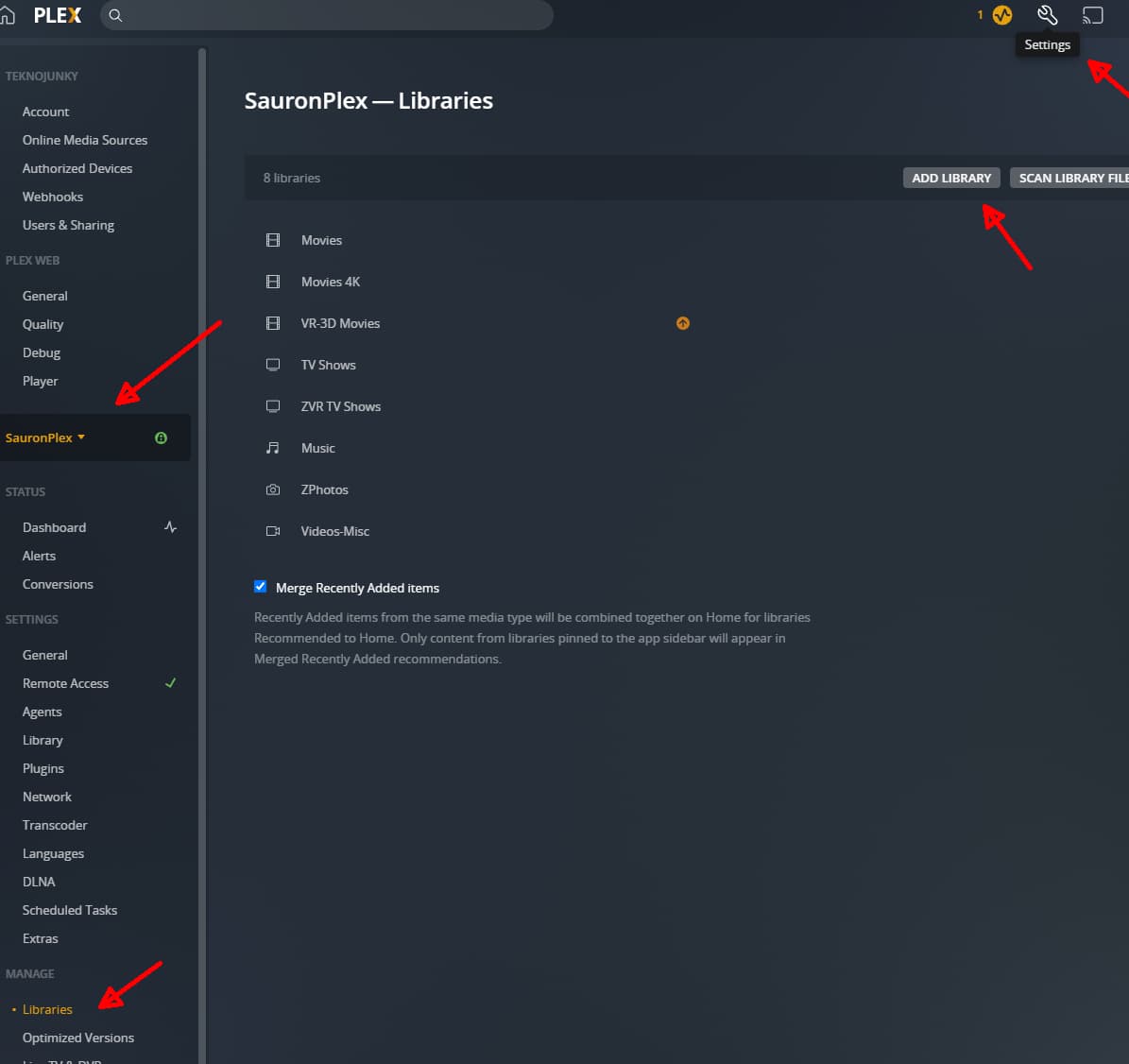
within the plex web, click the settings (top right), then make sure your server is selected on the middle left (if it is not showing, then your server is not logged in to your account, or not logged into the same account).
once you have the server selected, you can click the manage libraries section, then add a new library or edit any existing library, then you add/remove any paths to your media and set the library options to your preferences.
i understand all this, but how do i log in to my account?
cant find where and how to do it.
when i go to https://www.plex.tv/ and choose launch, it leads me to the same place i described above.
when i go to “my account” i got only the option of sign out .
when i sigh out and then sigh in again , it still leads me to the same place.
used some account recovery got massage that i successfully sighed in , but again leads to the same place
You cannot use the hosted version of Plex Web to access your server until you linked it to your account (see my 1st post). Instead… use http://127.0.0.1:32400/web if you’re on the same machine or http://[PMS IP address]:32400/web if it’s on a different device inside your home network.
If you’re doing that and Plex is still only offering you an option to download the server but not giving you the server settings… the most likely explanation is that the Plex account you’re signed in with in your browser is different from the one that’s known to the server.
Hence the link in my 2nd post on how to overcome this – technically this will keep all server information (in case you already had any libraries / configs) but make Plex forget it was already linked to another account and therefore giving you the option to subsequently claim the server with your current Plex account.
If you’re actually seeing the server settings you can immediately verify if your server is already linked to your account via Settings > [Server Name] > General (the server settings are not under My Account!!)
again, when i use the link you gave me it leads to the same place.
i didn’t changed any ip, all the time same one.
when i try to resign in is says that my account connected to the same email , the only one i have.
trying to get support leads me to this forum.
i think that only administrator of plex can solve it, but cant find a way to contact.
unfortunately dont have the setting you offer to check
I had only reiterated that point because you mentioned https://www.plex.tv/ and launching the server from there – the interface will look similar but it’s not accessing the version of Plex’ web interface bundled on the server.
As for “the admin” – that’s you and you alone.
If you had been using a different account at some point in the past, Plex will have stored that information somewhere in the Registry of your Windows installation. Hence the guide/procedure of how to make Plex forget that it had already been linked – giving you the opportunity to get into full possession of your server.
the thing is that just yesterday i had the full interface, so if the reason was an older account, it would not give me that.
updated successfully my pin, does not help.
i am close to give up.
there is no way to contact some plex support?
the only thing i can think of is that when i removed my account i got
that massage :
Just so you know, this email address, as well as the username associated with it, cannot be used to create a new account for the next 30 days.
What to do if your account was accidentally deleted
If this request was made in error, you can follow this link to attempt to restore the account within the next 28 days. Or visit Recover your account and input the following code:
but then i recovered it successfully.
its a bit shame that there is no any technical support for this subjects
All I can is suggesting you take a look at the “Why am I locked out of Server Settings and how do I get in?” support article linked above. You’re clearly locked out from your server… this is the procedure to get back in control.
this is probably the reason.
i’ll read and try to follow the article instructions.
think it worked.
got back all my settings etc.
now it’s uploading from the pc to the server automatically all my movies, photo etc. without i asked it
Not sure what you mean.
Plex should only display the media from folders you have linked to a library ( Add Folder tab in the library options).
i am also not sure but the operation sign is rolling and every action takes a lot.
edit:
forgot to link to client, now it works fine, ill se how is the streaming