Im glad im not the only one. I thought I was losing my mind. why would I have an IP address of microsoft for my local PC. is there any way to install an older build? @dane22 - would it be the PMS server build causing this anomaly as it is a new install and I have no way of configuring the server IP like that?
Plex Media Server has nothing to do with the IP address of the server.
The IP address is either configured manually or assigned by your router via DHCP.
Who is your ISP and what kind of router are you using?
Check the router configuration, including the DHCP settings.
EDIT: Also check the IP address settings on the Plex server.
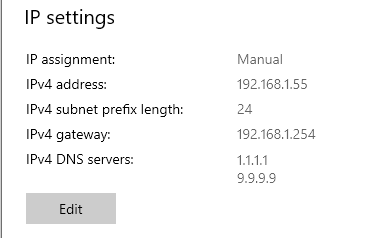
In Windows 10, go to Settings → Network & Internet → Status → Properties and scroll down to IP Settings.
What is displayed? Can you attach a screenshot?
Example:
ISP is ATT and I am using the same everything I was using with a working PMS setup 3 days ago. everything was working and I could access my PMS on the same network and computer I am currently on. the only thing that has changed is I reinstalled the OS and installed a new version of the PMS. There is nothing to claim as a new PMS has not been configured. I get the software is on my workstation but nothing about it has been configured.
Is an older build available for me to download and try to install and configure? you have two people saying now that this build is not working on a fresh install even though everything was working on a previous installation.
Please answer @FordGuy61 question
It will not matter what version of Plex you installed if the IP address of your system is incorrect.
Please verify the IP address of your server.
Are you running Plex in a virtual machine, using Docker, etc? It is odd that an AT&T router would supply 20.x.x.x addresses unless it has been manually reconfigured to do so.
I am not running a virtual machine, I am hosting locally on my desktop. I reconfigured the IP configs manually of my network to the 20.XX scheme when I got the network so that it was not the standard IP range, it has been running like that for well over a year, it was not until I reinstalled everything that it began giving me this error. why would it matter what my LAN IP scheme is?
Shouldnt I be able to route to the PMS using localhost:32400 as well? in a browser on the same workstation as PMS?
This is the problem. You are using public IP addresses assigned to Microsoft.
Plex is designed to work with RFC-1918 private networks.
You can try to claim the server using 127.0.0.1 or localhost (instead of the IP address), but TBH, I do not know if that will work.
You can also try using a SSH tunnel from another PC. See the Installation document I referenced in my first reply.
The real fix is to use correct IP addressing on your network, following the RFC-1918 standard.
I can reconfigure my entire LAN IP setup, not sure why it didnt give this error before, I was always able to just click “OPEN PLEX” on the PMS menu bar and it would open right up to the server configs. For my education, shouldnt I be able to disconnect the router so my LAN is a stand alone network with no access to the WAN, and still be able to access my PMS that is being hosted locally on my PC from the desktop? I mean for that matter shouldnt I be able to disconnect my PC from the LAN and still be able to access the PMS from the same workstation?
Plex requires an Internet connection to claim the server. The claiming process requires communication with hosts at plex.tv.
You might be able to run the server unclaimed, but anything that requires a Plex Pass will not work (the server is not registered at plex.tv, so Plex cannot verify the Plex Pass). Remote access won’t work either. Plex changed the claiming process several months ago. See New Claiming Requirement for Windows .
You can also run Plex without an Internet connection, but not without limitations. See [HowTo] Use Plex with No Internet.
Your best course of action is to re-address your network to use private addresses.
Ok, so I will start with changing the IP address of my network. the standards doc says
"Private Address Space
The Internet Assigned Numbers Authority (IANA) has reserved the
following three blocks of the IP address space for private internets:
 10.0.0.0        -   10.255.255.255  (10/8 prefix)
 172.16.0.0      -   172.31.255.255  (172.16/12 prefix)
 192.168.0.0     -   192.168.255.255 (192.168/16 prefix)
"
so if I take my address set from 20.45..* to 10.45..* you are saying that would work? or does it have to be the 192.168.0.0?
Network 10 addresses are OK.
now i remember why i made it 20. instead of 10., my att router wouldnt let me. warning from the router “address must not be a supernet nor a subnet of 10.x.x.x/8 or 100.64.x.x/10”
Well, I have to come back hat in hand and apologize for my stubbornness. reset router to factory default and reconfigured IP scheme to 192.168 and the setup wizard started right away. I want to thank @FordGuy61 very much for your help and direction, and once again say sorry for the implied tone over text and in some regard my naivete of the situation and issue. All seems to be running as expected now.
1 Like
Glad to hear things are working. Didn’t know about AT&T routers & net 10. Will have to remember that.
No worries about tone. Nobody questioned anybody’s parentage, etc. It’s all good.
1 Like
This topic was automatically closed 90 days after the last reply. New replies are no longer allowed.
