Remote Access connects for about 15 seconds then disconnects

Having the same issue beginning last night. Upgraded to 1.19.4, waited for it to say no outside access and downloaded and attached logs. Any help would be appreciated. I am on spectrum not xfinity. I did not have port forwarding set up prior. I went in to set that up, but it says the port is already in use. There are no other port forwarding rules and any other place a port might be used there is no 32400 so my assumption is that Plex is using/reserving that port.

Plex Media Server Logs_2020-05-30_10-32-59.zip (1.1 MB)

Edited to add: I changed it to use a manual port that I had forwarded. Same issue there.

The log shows server is not reachable through public port 32400

May 30, 2020 10:32:54.085 [26564] DEBUG - EventSource: Got event [data] '<Message address="65.191.xxx.xxx" port="32400" asyncIdentifier="17832e1f-e9ba-442c-805c-488d8609afed" connectivity="0" command="notifyConnectivity"/>'

May 30, 2020 10:32:54.085 [26564] DEBUG - MyPlex: mapping state set to 'Mapped - Not Published (Not Reachable)'.

I would like see the router port forward settings - at the time of getting this

So would like to see that you have a port forward in the router for wan / public tcp port 32400 forwarded to local tcp port 32400 to 192.168.1.4

Also details of what firewall is active - there may be a need for an inboud firewall port rule

Inbound Port Rule
Remote IP: Any
Remote Port: Any
Local Port: 32400
Programs: Any
Action: Allow

Also check that the network interface in windows is set to “Private Network” and not “Undefined Network” or “Public Network”

You updated your post with this

Edited to add: I changed it to use a manual port that I had forwarded. Same issue there.

I presume that was done before posting the logs ? The logs do show a manual port 32400 being used.

Actually I did that after posting the logs. However I had the port forwarding rule set for 32420 forwarded to 32420 but i guess it has to be 32400? even if I am using a manual port in plex settings? Still whenever I try to use port 32400 in port forwarding settings on my router it says “The specified port(s) are being used by other configurations. Please check your configurations of Remote Management, Port forwarding, Port Triggering, UPnP Port Mapping table, RIP, and Internet connection type”
However, I’ve looked through all those settings and can’t see anything using that port. Is there a way to forward my ports without using 32400 at all?

Here are the logs from when I have the port manually set to 32420 with a port forwarding rule using that as the internal and external ports.Plex Media Server Logs_2020-06-02_09-59-33.zip (2.8 MB)

That would not work. Whatever port you choose to forward (eg 32420) it has to be forwarded to 32400 and in the manually specify port box in Plex Media Server settings - you enter the port you forwarded (eg 32420)

Get screenshots of all these router settings pages

As I mentioned I can’t use port 32400 in any configuration. There are now no port forwarding or port triggering rules. Remote Management is turned off and using 8443. RIP and Internet connection type do not exist as configs in my router setup. upnp mapping is attached, but no 32400. Doesn’t Plex do some type of magic to reserve the port? I am thinking that is what is preventing me from adding it to the router.

Running a netstat command in the terminal i do see that there is a process listening on the port. The process ID matches that of Plex Media Server

seems to be working now. i disabled upnp, which then allowed me to add a port forwarding rule.

That is about local ports in the machine.

If you have “Manually Specify port” unticked then we use a dynamic uPnP port and we have it forwarded to 32400. This needs uPnP enabled.

If you have “Manually Specify Port” and a port number entered in the box, we expect you to have NAT enabled in the router and a port forward setup by you for that public port number you entered in the box and to have it forwarded to 32400 to the local IP of the server. It should be possible to have uPnP enabled when using NAT port forward.

you have to be able to forward to 32400 to use Plex Media Server remotely

There should be a separate port forward screen from the one you pasted - sometimes it is under security / firewall in router setting

Thanks for sending me screenshot and the earlier logs.

As there is nothing sensitive in the information you provided, I will respond here

Sorry I took so long to respond, here’s the screenshot you requested. I changed the windows setting from public to private, but there was no change (didn’t realize it was set for public).

The network being public would have stopped remote access working - but that is not all that needed fixing

Your port forward will not work.

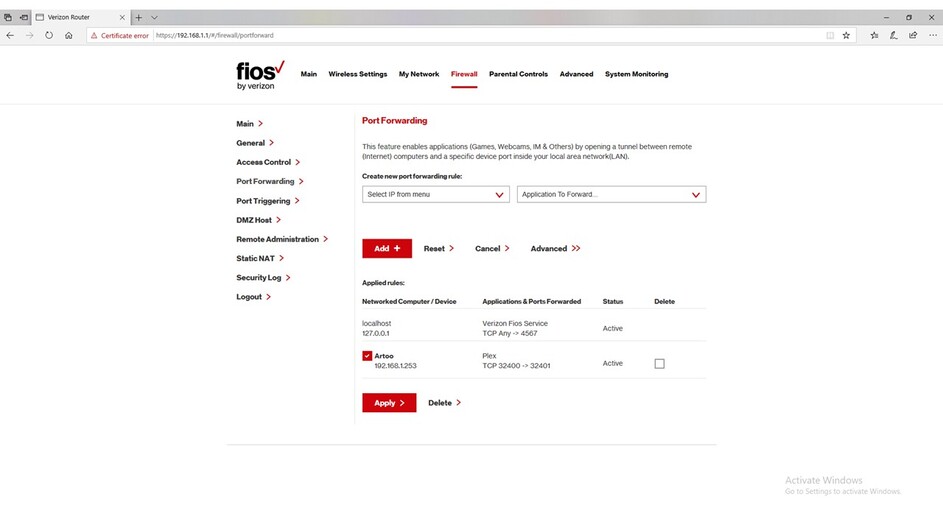
Your screenshot shows you have 2 ports forwarded

32400 and 32401 and what you actually have is

32401 forwarded to 32401
32400 forwarded to 32400

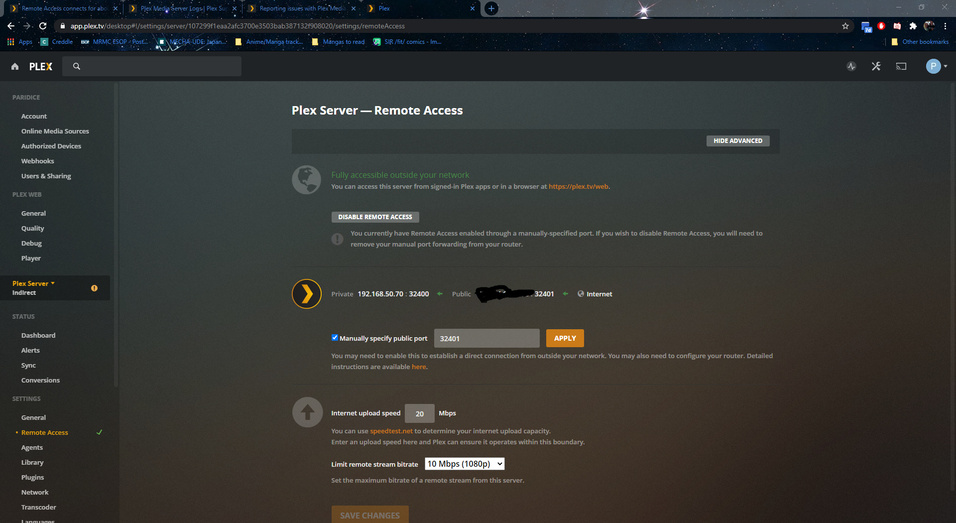
You have manually specify port set and wan public port 32401 specified

So for this to work I need to see in the router:
wan/public port 32401 forwarded to lan/private port 32400 to 192.168.1.253

and we do not have that - instead it is forwarded to 32401 which does not help as locally it has to be 32400

Some routers have that restriction on port forwards - not allowing you to specify a different wan/public port from the one to forward to locally. Your router appears to fall in that category as your screenshot does not show different port for wan/public from lan/private

For such routers, you just have to use wan/public port 32400

So change your port forward to be just 32400 and not a range of 32400-32401

Then in server settings change the manually specify port to 32400 and retry

You may need to disable / re-enable remote access

if problems persist, fresh logs and screenshots please

Has the issue affecting servers in servers in Australia, New Zealand and Singapore / Malaysia been resolved?

Remote access indicator is a lot more stable but still drops out.

I have not heard but we have asked Tautulli developers to stop doing connectivity testing the way it was being done - at every minute get servers to do a reachability test through the servers in Ireland.

There is a high load that was never intended to be there as the interfaces that Tautulli is using were meant for Plex Web use in conjunction with server settings and enabling / disabling remote access

Had my entire system break on direct and remote connection with this new update. No settings changed and only accessible in relay. This includes on my local network.

I have ports forwarded, manual connections configured and checked my firewall rules on the last update.

What info is needed to help fix this?

  • router screenshots showing the port forward and the dhcp reservation for the local IP
  • server logs whilst the server settings for remote access are displayed in Plex Web and to be done after a restart of the server (10 minutes after)

https://support.plex.tv/articles/201643703-reporting-issues-with-plex-media-server/

https://support.plex.tv/articles/200250417-plex-media-server-log-files/

Also checking out the troubleshooting guide in case there is double nat or using Xfinity Port Forward
https://support.plex.tv/articles/200931138-troubleshooting-remote-access/

1 Like

Attaching logs and screenshots here (want to note I have attached a screenshot of a new screen I have never seen during login)

Plex Media Server Logs_2020-06-16_21-50-02.zip (2.2 MB)

Thanks - all look good with a port forward for public port 32401 to forward to 32400 to local DHCP reserved IP 192.168.50.70

I cannot see any errors since you selected 32401 as the manually specified port. I cannot say anything about failures before that as i do not know if you had any port forward in the router and if it was correctly setup

This is what the logs show

June 15

Plex was trying to connect through public port 32400 without success - i do not know what was in the router at the time - in terms of port forward
(You obviously had manually specify port set then with 32400 in the box - i do not know if the router any port forward)

Jun 15, 2020 19:40:53 Enabled

Jun 15, 2020 19:42:58 Disabled
Jun 15, 2020 19:43:16 Enabled

Jun 15, 2020 19:44:54 Disabled
Jun 15, 2020 19:44:56 Enabled

Jun 15, 2020 19:45:08 Disabled
Jun 15, 2020 19:45:09 Enabled

(retry on remote access settings screen also simulates disabling / enabling remote access)

June 16th

Plex was initially trying to connect through public port 32400 without success - i do not know what was in the router at the time - in terms of port forward

Jun 16, 2020 19:00:12 Disabled
Jun 16, 2020 19:00:51 Enabled

Jun 16, 2020 19:01:36 Disabled
Jun 16, 2020 19:01:37 Enabled

Jun 16, 2020 19:01:53 Disabled
Jun 16, 2020 19:01:54 Enabled

Jun 16, 2020 19:02:10 Disabled
Jun 16, 2020 19:03:07 Enabled

Jun 16, 2020 19:03:23 Manually Select Port unticked
Jun 16, 2020 19:03:23 Disabled
Jun 16, 2020 19:03:27 Enabled

Jun 16, 2020 19:04:00 Disabled
Jun 16, 2020 19:04:17 Enabled

Jun 16, 2020 19:12:50 Manually Select Port ticked
Jun 16, 2020 19:12:50 Disabled
Jun 16, 2020 19:12:51 Enabled

So this with 32400 as public port - and there were failures to get through on this port up to 19:13 - i do not know what port forward was in the router at this time

But from 19:13 all was ok - what did you do ? Did you add a port forward ?

Was there a change in the router to make this work at 19:13?

Connections worked every time it was tested between 19:13 and 20:07:59 on public port 32400

At 20:09:28 the selected public port was changed to 32401

Jun 16, 2020 20:09:28 Manually Selected Port = 32401
Jun 16, 2020 20:09:31 Disabled
Jun 16, 2020 20:10:00 Enabled

Then you switched back to 32400

Jun 16, 2020 20:23:08 Manually Selected Port = 32400
Jun 16, 2020 20:23:08 Disabled
Jun 16, 2020 20:23:09 Enabled

and back to 32401 !

Jun 16, 2020 20:27:45 Manually Selected Port = 32401
Jun 16, 2020 20:27:45 Disabled
Jun 16, 2020 20:27:47 Enabled

Were you changing the port forward in the router each time you switched ports ?

After this last change - all was ok from 20:31

All connectivity tests to 32401 were successful as from 20:31:50

I do not see any failures after that - all tests show connectivity="1" in the log which indicates success

Jun 16, 2020 20:52:34.946 [8784] DEBUG - EventSource: Got event [data] '<Message address="173.174.xxx.xxx" port="32401" asyncIdentifier="f788a94b-ac4d-4af7-b87c-883b016e644f" connectivity="1" command="notifyConnectivity"/>'
Jun 16, 2020 20:54:33.102 [8784] DEBUG - EventSource: Got event [data] '<Message address="173.174.xxx.xxx" port="32401" asyncIdentifier="302383f4-1b2b-4a68-b7c4-d5fb00f2aacc" connectivity="1" command="notifyConnectivity"/>'
Jun 16, 2020 20:54:50.808 [8784] DEBUG - EventSource: Got event [data] '<Message address="173.174.xxx.xxx" port="32401" asyncIdentifier="70c57912-86e2-4f65-bf13-796778f7db1f" connectivity="1" command="notifyConnectivity"/>'
Jun 16, 2020 20:55:10.114 [8784] DEBUG - EventSource: Got event [data] '<Message address="173.174.xxx.xxx" port="32401" asyncIdentifier="5173c0e0-efa5-4162-a4f8-088052831efd" connectivity="1" command="notifyConnectivity"/>'
Jun 16, 2020 21:00:30.694 [8872] DEBUG - EventSource: Got event [data] '<Message address="173.174.xxx.xxx" port="32401" asyncIdentifier="1a75a611-08ad-432f-8156-9e76794b5c9d" connectivity="1" command="notifyConnectivity"/>'
Jun 16, 2020 21:03:05.000 [8784] DEBUG - EventSource: Got event [data] '<Message address="173.174.xxx.xxx" port="32401" asyncIdentifier="35f7db49-9da9-498b-b53c-455805bb276a" connectivity="1" command="notifyConnectivity"/>'
Jun 16, 2020 21:17:48.537 [8872] DEBUG - EventSource: Got event [data] '<Message address="173.174.xxx.xxx" port="32401" asyncIdentifier="4b5dbc5f-a4f1-4987-93fc-256f85ea67d1" connectivity="1" command="notifyConnectivity"/>'
Jun 16, 2020 21:23:15.583 [8056] DEBUG - EventSource: Got event [data] '<Message address="173.174.xxx.xxx" port="32401" asyncIdentifier="606bf6d5-549a-45bf-8bdd-d78af9aa24ab" connectivity="1" command="notifyConnectivity"/>'
Jun 16, 2020 21:33:52.427 [9012] DEBUG - EventSource: Got event [data] '<Message address="173.174.xxx.xxx" port="32401" asyncIdentifier="f39527ab-e7c1-4f61-8fda-e5d6096c8f6c" connectivity="1" command="notifyConnectivity"/>'
Jun 16, 2020 21:44:21.675 [9036] DEBUG - EventSource: Got event [data] '<Message address="173.174.xxx.xxx" port="32401" asyncIdentifier="c5c7823d-0116-4d62-b030-08e9bff4671e" connectivity="1" command="notifyConnectivity"/>'

I do not see an issue - the only possibility is that you did not have the right port forward at the time you were having issues and flip-flopping may need router reboots - anyway try and leave some time between trying different setup as there are timing delays after any change

1 Like

Thank you for looking at my logs and thank you for the break down. This helped me better understand what is happening.

The port was toggled on/off due to the GUI showing that the server was not accessible after about 10-15 seconds after logging into the server via the web and the Windows app on the server PC. I confirmed this with my main PC that would lose connection with the server (the server and PC are wired on the same network, same switch). After toggling the connection would stay at times but not be consistant. Router was port forwarded in the screenshot posted earlier.

After changing the public port to 32401 and changing the port forward settings in the router to match the remote access did not drop after 15 seconds. I went back to public port 32400 for troubleshooting and testing purposes (properly changing the router port forward when doing so) and noted that the connection dropped again after 15 seconds. I am not sure what is causing public port 32400 to drop/close/etc, but I have reconfigured the server to use public port 32401, port forwarded the router for 32401.

I will shut down the server, power down the entire network and then power up the network. Once the network is stable, I will boot up the server PC, wait 10 minutes and see if the connections are back online.

UPDATE

The connections still show as indirect within any service on the network, including Plex web on the server PC itself. I have attached new screenshots of the router port forwarding and Static IP config with timestamps. The Plex logs were pulled after the screenshots were taken (before the 10 minute time limit) Central Time Zone

23:04 UTC as of time of posting.

Plex Media Server Logs_2020-06-16_21-50-02 sitting on remote access screen for 12 minutes on Plex PC with Plex web.zip (3.9 MB)

Thanks for the logs and screenshots. So the screenshot is of Plex Web launched on the server PC.

I can see a gap of 10 seconds in the server log just before relay (indirect connection) was requested at 17:08:52 - it could have because of a hang on the server for 10 seconds.

Does the same issue arise when using the bundled plex web app as opposed to hosted - meaning one that is launched on the server PC through http://127.0.0.1:32400/web

may need to get plex web log as well to see why it is starting an indirect connection. Are you launching the browser afresh after the restart of the server - or left open from previous launch of Plex Media Server?

Would like you to try with the bundled Plex Web app through http://127.0.0.1:32400/web repeating similar sequence to the test above and capture logs as well - but this time lets add Plex Web logging as well

So click on Show Advanced if not already selected on the settings and then in the sidebar on the left, click “Debug” within the Plex Web settings. Set the logging level for plex web to verbose and save changes,

You may need to do this beforehand as we need to have the logging enabled already when the indirect connection is established. The setting should get remembered for that url (http://127.0.0.1:32400/web) - after setting it, if you close the browser and relaunch it and go to the debug page (having used same url as before) you should find it is already enabled and set to the level you set earlier - for this it would be “verbose”)

So go through the sequence now of relaunching Plex Media Server and launching Plex Web through 127.0.0.1 after that. When you see indirect connection established take a screenshot and then save the plex web log quickly before it gets overwritten - settings / debug / view log / select all / copy to text file)
and then collect the server log

If the issue does not arise with the bundled plex web app through 127.0.0.1 - repeat the test you did earlier but with plex web verbose logging enabled - same steps as for the 127.0.0.1 and it will be remembered for that url https://app.plex.tv/desktop once you set it - it is separate setting from the one for 127.0.0.1
and repeat the tests and collect both plex web and server logs and screenshot

Thanks