Remote Access connects for about 15 seconds then disconnects

Tried this just now, it connects and shows the server as “Nearby” with the green lock pad. Attempted to login via “https://app.plex.tv/desktop” and it shows “indirect” on same server PC.

Side by side screenshot attached

Restarted the server and logged in via “https://app.plex.tv/desktop”, captured verbose debug when an “indirect” connection was established. Selected all and pasted to the text file attached.

Verbose debug app.plex.tv.txt (551.8 KB)

That was useful and the issue is not really remote access issue but caused by “DNS Rebinding Protection” and the use of secure connections.

This can be verified by doing an nslookup in command line for this

nslookup 192-168-50-70.909d342cea4e4b899b1665912f2d130d.plex.direct

I expect it will give you an error rather than returning 192.168.50.70

When there is DNS Rebinding Protection and Secure connections set to preferred or required, then the plex client apps will try other https routes to the server and the next one to try would be the remote access route and if that is successful, the connection would show as remote. However, in the past year or so i have come across routers that stopped allowing the public IP to be used within the local network to reach local devices/systems - and this appears to be the case here as well and so the only left option for https is relay connection which ends up showing as “Indirect” going through the Plex Relay service

You can read about DNS Rebinding protection and secure connections here

https://support.plex.tv/articles/206225077-how-to-use-secure-server-connections/

On some routers you can add plex.direct to a whitelist for DNS Rebinding protection

You can see if you have such options.

For plex web use within the local network, you can switch to using
http://127.0.0.1:32400/web on the server itself and http://192.168.50.70:32400/web on other systems.

Also you can try disabling secure connections on the server and see if http://app.plex.tv works ok rather than https://app.plex.tv

Log extracts

"message": "[Connections] Plex Server is unavailable at https://192-168-50-70.909d342cea4e4b899b1665912f2d130d.plex.direct:32400/media/providers (Status 0)",
"message": "[Connections] Plex Server is unavailable at https://173-174-xxx-xxx.909d342cea4e4b899b1665912f2d130d.plex.direct:32401/media/providers (Status 0)",
1 Like

@Paridice further to my earlier reply, you could use the hosted web app to access the local servers through 127.0.0.1 or local IP by using this url
http://app.plex.tv/desktop?secure=0

That should work where secure connections on the server is set to “Preferred” as opposed to “Required”

1 Like

Thank you for the reply and the help. I am attempting to connect via “http://192.168.50.70:32400/web” now and I am getting a timeout.

Tried [http://app.plex.tv] as well and I am not able to connect to the server with secure connection disabled.

I have an ASUS RT-AC86U and will be looking into whitelisting “plex.direct” within the settings.

I will update this post with my findings.

Thank you, I attempted this one as well but was unable to connect to the server. I believe the router is severly regulating plex to the point of being unusable. I am looking into whitelist settings at the moment and will update this post with my findings.

Within the same local network? It should not timeout within same network if the server is running. Care get me some logs - from web (verbose) and server (debug) when this happens from a PC on same network subnet - what firewall software do you run on the PC running Plex Media Server?

Within the same network.

Attempted to whitelist plex.direct but did not have any luck, router crashed and I had to rebuild it from a clean reset. (Reconfigured to same setup as before attempting whitelist)

I did find a setting to turn off DNS rebinding protection and have turned it off.

Unable to connect to Plex even through indirect connection now. Remote access will show green connection for about 10 seconds then drop. Sometimes it is instant on the GUI.

Standard Windows firewall with Malwarebytes (Free) and SpyBot Search and Destroy (Free) running in the background.

Attaching logs of the remote PC attempting to connect on same network and subnet mask and screenshots of router configuration.

Verbose logs web access on remote PC (same network and submask) Unable to connect.txt (11.4 KB)

Attaching Plex Server debug logs pulled after getting the verbose logs on the remote PC and a screenshot of plex web via http://127.0.0.1:32400/web and via plex.tv.

Server debug.txt (9.9 KB)

At this point in time you have secure connections disabled and you have issues still. Basic http connection that should be working is not - so you need to park any whitelisting of plex.direct aside until we understand and resolve your current issues - if http://127.0.0.1:32400/web or http://192.168.50.70:32400/web is not working on the server and within the local network then things are not right

This does not make sense to me - what does it mean? it is a remote machine but on same network ?? which network ? and what is the relevance of the subnet mask? Have you been adding any non standard subnet masks ?

You have provided verbose Plex Web logs for the remote machine and it is failing immediately on the requests - not even a timeout like you would expect - so could be setup issue on the remote PC network

Just 2 seconds between sending request and logging the error

"message": "[Connections] Testing connection for Plex Server at http://173.174.xxx.xxx:32401/media/providers",
    "time": "2020-06-19T01:42:58.798Z"
  },
  
"message": "[Connections] Plex Server is unavailable at http://173.174.xxx.xxx:32401/media/providers (Status 0)",
    "time": "2020-06-19T01:43:00.810Z"

I do not have server logs to match this

This may be the problem area now.

I do not have server logs nor verbose Plex Web logs for any attempt to connect to the server within the local network through http://127.0.0.1:32400/web on the server itself and other PC on the network to http://192.168.50.70:32400/web

The log i have is not server debug but client app and it is debug when i was expecting verbose of plex web and not Plex for Windows app version 1.13.0. - ie similar verbose log to what you provided for the remote machine and of course for both tests needed the server debug logs

1 Like

Thank you for catching that, I have corrected the settings to “preferred”.

I have this working now on the server PC, turning DNS rebind protection off in the router settings fixed this issue.

Remote PC=Main PC
My apologies, when mentioning the remote PC it is my main PC that I have been using for testing. I will call it my Main PC from here on out.

No new subnet masks, saw this was a common question in troubleshooting so I listed it.

After changing the Server PC secure connection settings to “preferred” the Main PC connects via indirect.

Attaching Verbose logs of the Server PC and the main PC via web and debug

Server debug.txt (343.1 KB)

Logs were taken when an “indirect” connnection was established.

My apologies on this one. I got my windows mixed up. I have attached the logs above from the server PC and the main PC. If you need any other logs I can get them ASAP.

Edit: Plex Web verbose logs downloaded and removed by @sa2000

Thank you

Only loopback connections through 127.0.0.1:32400 on the server appears to be working. All others failing - http and https

I just tried your public IP directly with public port 32401 and could not get through on either http http://173.174.xxx.xxx:32401/media/provider or https plex.direct url https://173-174-xxx-xxx.909d342cea4e4b899b1665912f2d130d.plex.direct:32401/media/providers

These should reach the server and then challenge for a username/password - but server is not being reached.

Assuming the server is actually running and responding on the server itself to http://127.0.0.1:32400/web browser request then it can only be config issue or windows firewall

Sometimes - the network connection on the windows PC gets flipped to be classed as “Public Network” or “Unknown Network”

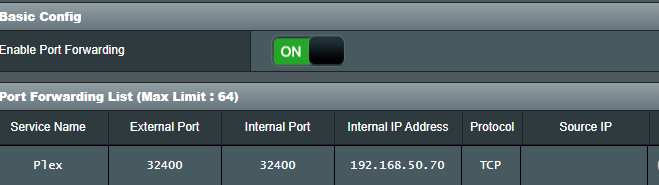
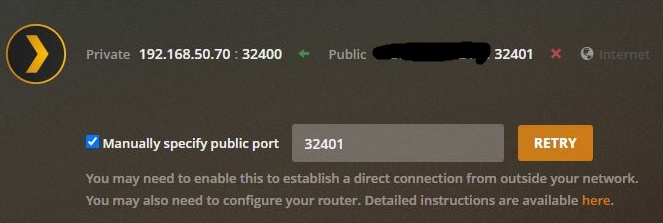
But - i have just established why this does not work. It is because you changed the port forward in the router to use 32400 public port but remote access settings for the server are still set as 32401. Changing the above 2 requests to 32400 got through and got a 401 authentication error as expected.

See your screenshots from the 19th - 32400 in router, 32401 in Plex Media Server settings

This would explain the remote access issue

But does not explain what i saw in the main PC and server PC plex web verbose logs

The logs show these failing

Main PC

https://192-168-50-70.909d342cea4e4b899b1665912f2d130d.plex.direct:32400/media/providers

Don;t know why

https://173-174-xxx-xxx.909d342cea4e4b899b1665912f2d130d.plex.direct:32401/media/providers

This would not have worked anyway because of the port forward mismatch with the settings as explained above

Server PC

Connected ok through http://127.0.0.1:32400/media/providers

Server not available through
https://192-168-50-70.909d342cea4e4b899b1665912f2d130d.plex.direct:32400/media/providers

Server not available through
http://192.168.50.70:32400/media/providers

I cannot explain this. Check windows network connection to see that it is “Private Network” and not “Unidentified Network” or “Public Network”

You could also a port rule to the firewall in windows as follows

Inbound Port Rule
Protocol: TCP
Remote IP: Any
Remote Port: Any
Local Port: 32400
Program: Any
Action: Allow
Scope: All profiles

By the way - in last 2 sets of diagnostics, you have been only providing Plex Web app logs. Server debug logs are available through https://support.plex.tv/articles/200250417-plex-media-server-log-files/

Same issue here. I rebuilt my plex server this last weekend to run on my new proxmox server. Running the latest build of plex on ubuntu server 18.04 with the exact same router config that I have used for the last year. I hit “Retry”, it says “fully accessible” for about 1 minute, then says disconnected. I have tried multiple external ports remapping to 32400 on the plex machine and still no luck. UFW is disabled on the host.

My Remote Access disconnects after a few seconds

Was this ever fixed or was a workaround ever developed? I have this exact issue - Remote Access was working but no longer works. I did see there were some timeout issues identified, but I didn’t see either an announcement of an update that fixes the issue or any configuration adjustments to make it work.

I also enabled “relay” to see if I could use that temporarily, but that doesn’t appear to work for me either

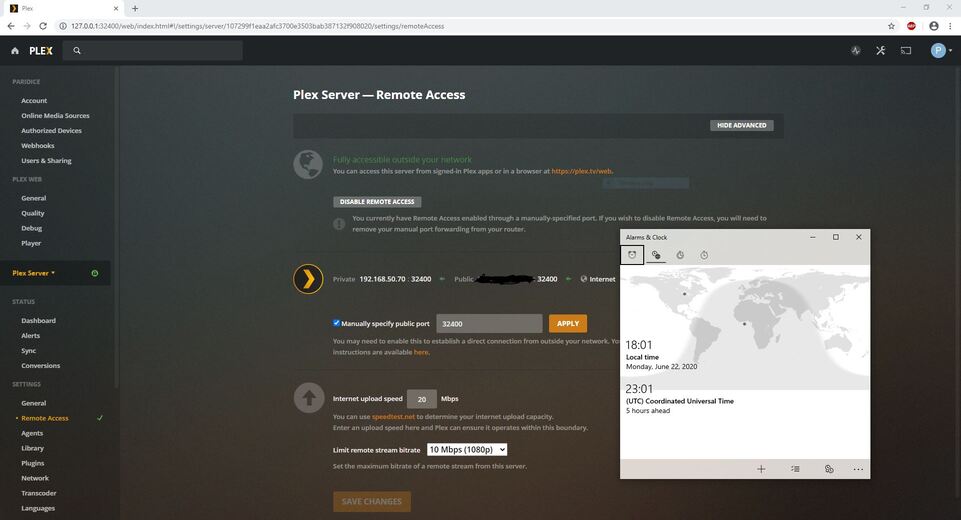
Thank you for catching this. I have made the proper corrections and have remote access working properly now. If you need to attempt to access the server it will be on.

(attaching screenshots with timestamp for records)

As of writing this post remote access appears to be staying stable.

Thank you for the link. I have attached the log for the Server PC debug logs below when an “indirect” connection was established on the Main PC via web.
Plex Media Server Logs_2020-06-22_18-14-11.zip (3.1 MB)

Checked and confirmed Server PC firewall is set to Privite.

I will do this and update with the results.

UPDATE: after creating the windows inbound rule and restarting the Server PC, I am still unable to make a “secure” connection. I still have “indirect” connections and have remote access outside my network.

I can see relay being started (resulting in indirect connections) and I also see that remote access was working and tested ok

You had an android mobile accessing Plex Media Server from 17:56 on 22 June - name: LG G8 ThinQ? was this on local wifi or remote ?

It started with a relay indirect connection but immediately after that - in same second - it switched to remote access via cellular.

When you get indirect connections on a PC, please try this in a command line window on that PC - eg main PC

nslookup 192-168-50-70.909d342cea4e4b899b1665912f2d130d.plex.direct

it should return 192.168.50.70

You could also try it in browser like this

https://192-168-50-70.909d342cea4e4b899b1665912f2d130d.plex.direct:32400/web

can you also try this in a browser on the Main PC
http://192.168.50.70:32400/web

What is the IP address of the main PC ? It is on the same subnet ? 192.168.50.xxx ?
And is the main PC also connected via ethernet cable to same router as server?

On the main PC could you also try your wan IP address in browser

https://173-174-xxx-xxx.909d342cea4e4b899b1665912f2d130d.plex.direct:32400/identity

and also
http://173.174.xxx.xxx:32400/identity

replace the xxx’s with the actual octets from your public IP address (canyouseeme.org will show you what it is)

1 Like

Cellular, was using it to test remote outside my network.

Ran the command in command prompt and returned “non-authoritative answer:
Name: 192-168-50-70.909d342cea4e4b899b1665912f2d130d.plex.direct:32400/web
Address: 192.168.50.70”

Attempted these in the web browser, both returned with a “time out took too long to respond”

Main PC is on the same subnet, 192.168.50.145 static IP, connected via ethernet cable to the same router as the server.

Attempted to connect via web browser with the IP’s provided, all connections timed out. (Made sure to replace the xxx’s with my actual octets for the public IP before attempting).

May be you have errors in your network setup on the main PC

You mention static IP

One thing people do get wrong with static IP s is that the gateway / network mask gets setup wrong

Could you change this Main PC network windows configuration to be automatic configuration and not manual IP configuration and see if it makes a difference

Before making any change - take screenshots of all the network configuration tabs in windows for the Main PC

Would like to see the full details of how you had setup the static IP address in windows

1 Like

Also on the Main PC - in command line window, try

ping 192.168.50.70

you could also do the same on the server, doing

ping 192.168.50.145

1 Like

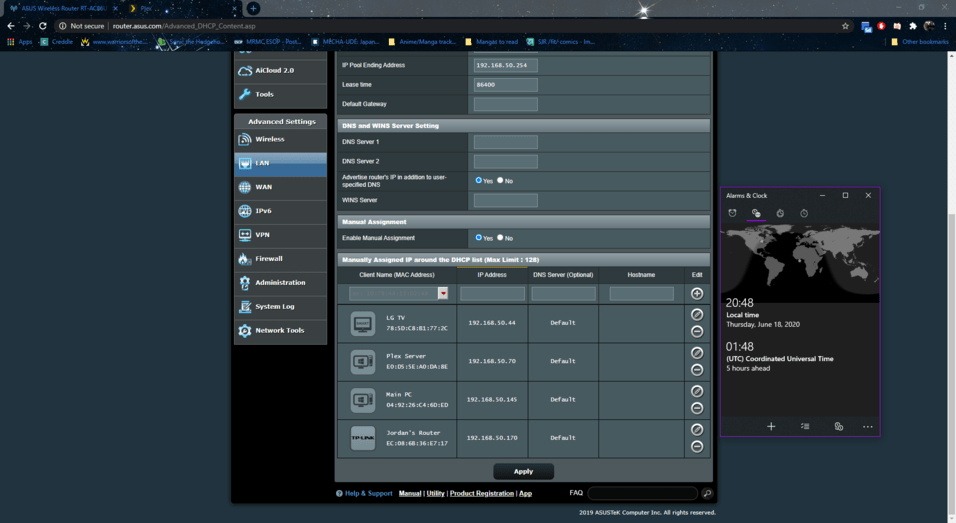
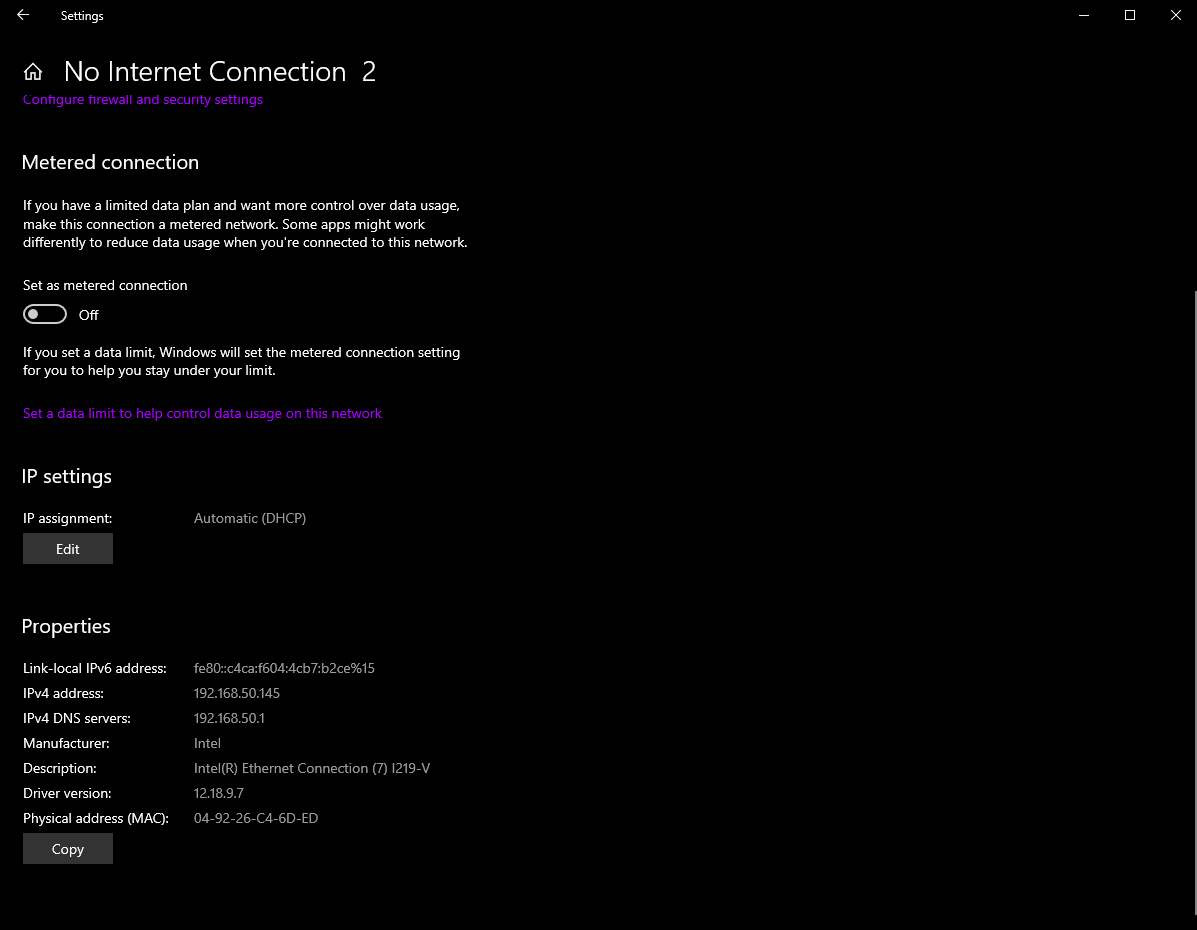
Looking at it now I misquoted, the Main PC and Server PC configered for DHCP. What I was thinking if is the manually assigned IP around the DHCP list within my router.

Attaching screenshot of the properties and the router DHCP workaround list below.

Attempting to ping the Server PC resulted in “request time out” Lost all packets.

Attempting to ping the Main PC resulted in " general failure" Lost all packets.

So you need to fix this networking issue before investigating any plex aspects

1 Like