Huh, well it seems that it may be a modem thing, this article seems to have solved it for my Motorola SBG6580
Set external IP to 0.0.0.0 in the port forward
Huh, well it seems that it may be a modem thing, this article seems to have solved it for my Motorola SBG6580
Set external IP to 0.0.0.0 in the port forward
I have the same problem
I have bought if I have the CGN NAT and I don’t have it
I have checked the router, firewall and ports
All ok
The web canyouseeme.org see my ports
I’ve run out of ideas
I am so frustrated. I love plex but am having the same issues. I can send some one the log file but I can put the plex server in the DMZ and it has the same result. Is it caused by Xfinity?
1st… be cautious what you put in a DMZ. A DMZ is a dangerous place if you don’t exactly know what you’re doing.
As for remote access troubleshooting…
I personally prefer establishing a manual port forward and don’t rely on UPnP where the router allows pretty much any app asking for it an opening 
This will also allow for some extra “security by obscurity” by allowing to pick a custom public port of your choosing.
When you got that… first step of troubleshooting should be if you can access your router’s public IP address and the specified public tcp port from outside your home network (you can e.g. use canyouseeme.org as posted by TheDragonSoul above).
If you can see it and remote access is still not working, it’s likely an issue in the configuration from (including) your router to your Plex Media Server.
If you cannot see it, the issue is likely between “the internet” and (including) your router’s configuration.
As for your specific question:
Yes… Xfinity is filtering your traffic… so they might also block your Plex Media Server’s connection and streaming attempts.
No I would not leave it in the DMZ was just trouble shooting. It has worked in the past and not sure what update it stopped working. What is weird is I can access it from my work with my own account but my sister can not from there home with her account. I have used port forwarding and I have also used different ports 3400, 3401 and 2 all with the same result. I am leaning towards Xfinity but don’t know how to make sure it is them causing the issue.
I am having the same issue on windows 10. I have configured port forwarding on router 32400 UDP and TCP. Disabled FW. Maybe someone can help me with some more tips.
Are you on xfinity also? If so turn off “xfinity advanced security” it’s a Plex killer.
You only need TCP.
Have you already double-checked the remote access troubleshooting?
My router is a DLink DIR-860L… I have checked the troubleshooting.
I have enable also port forwarding for UDP after didn’t work only with TCP; obviously not usefully since i am posting here .
Can you verify if your router gets a public IP address from your ISP?
If the router got an IP address from a private network address space, your server might not be addressable from the outside world (except within your ISP’s network).
If the router has a public IP address… can you see it while being outside your home network (e.g. using a service like canyouseeme.org)?
I also have the same issue, all router configs correct. It seems to happen recently with an update. I have had this running for years just fine and then bang, the problem occured.
Well… can you still access your router through the defined public port from outside your home network? Still getting an addressable IP from your ISP?
Strange thing, it still seems to work from outside the network. If I access that page it shows green for a few seconds and then flips to disabled even if I don’t touch a setting. It seems just accessing the setup page for the remote access causes it to flip red. Very odd!
Is it a plex remote forwarding problem on their end? Never had an issue and now my remote clients want to connect indirectly. As a matter of fact, I have never seen this before. All of my clients were working without issue yesterday. And they seem to disconnect frequently as well.
How did you downgrade plex OS?
Came to post this here too. My Plex instance cannot be used by anyone outside of my network without using a relay.
Been working fine for years and then this happened. Seems like there’s a big problem for a lot of people with the latest version of Plex.
I’m running Docker Version 1.22.3.4392.
Could do with this being fixed ASAP.
Not so sure about that. Most of the issues recently raised in this thread seem to have been false alarms or worked themselves out.
Have you verified your own setup is still working / valid? There’s more to remote access than just the PMS version you have installed.
Most common troubleshooting scenarios include:
Sadly… just because something used to work doesn’t mean there isn’t all kind of factors that can changed (under and beyond your control).
Side note… you might want to restart your docker container to get the latest public release and see if any of the recent changes might indeed have some positive impact (not ruling out there might actually have been some issue that I might not be aware of)
Literally the only thing that’s changed is the version of Plex.
My apologies for being skeptical… that’s pretty much the 1st thing we read in every post (next to “my files are named according to the official schema”) – in many cases the next post exposes that there’s been some provider change, a new router or some changes applied by the ISP themselves.
Edit: especially but not exclusively with users running their server in a container.
Again… not saying you’re wrong. From experience it can be helpful to rule those things out.
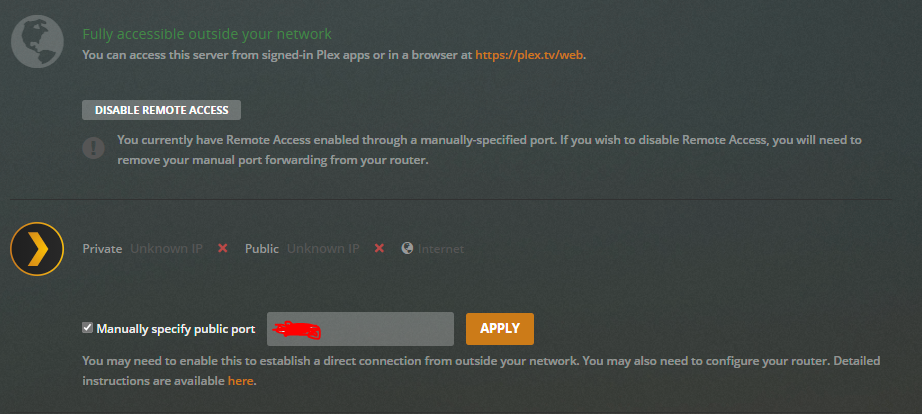
These are two screenshots. I’ve never seen anything like this before. Says it’s “Fully accessible”, but then says it doesn’t have an IP and has no connection to the Internet.
When I click “Apply”, the screen turns to the second photo with the “Connecting server…” swirly progress thing continuing ad infinitum.