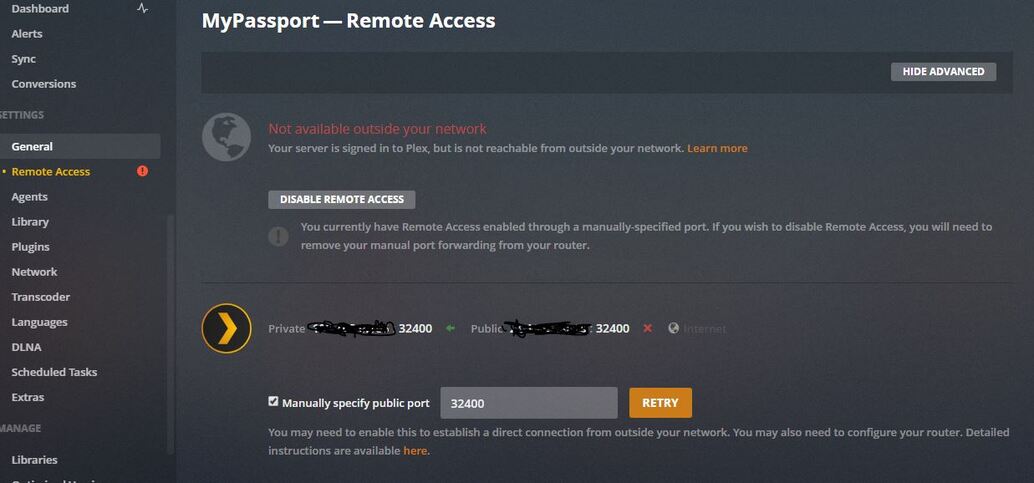
Remote Access is kaput

That part about a static IP address is something that your internet provider needs to provide as far as I know. I used to have a static ip address for stability at an extra cost each month. When Spectrum took over BrightHouse they took away the static IP, and do not offer it, so I don’t know about that static part.

If you have a separate modem and router, re-boot the modem without the router being attached, then after the modem is up and running connect the router, and see if that doesn’t fix the problem.

That’s all I’ve got.Plex used to have their employees looking after the forum, but I guess they don’t anymore. Maybe getting too big with offering all of the added cost stuff.

I can see that your local IP communicated to plex.tv is 192.168.88.251
Is the subnet for the new router 192.168.88.xxx ?
With a Port Forward, the local IP needs to be a DHCP Reservation or static outside DHCP range but within same subnet

connection info held by plex.tv shows that you ticked manually specify port and entered public port 32400 in the box. So this means the router needs to have a port forward of tcp public port 32400 to forward to private local port 32400 and assign it to 192.168.88.251

As it is windows, check in Network & Internet Settings that the network connection is classed as Private Network. Sometimes windows gets it wrong and shows it as Public Network or unidentified network

For the firewall, the whitelisting of the program files is done automatically for windows firewall. You could also add an inbound port rule (no program specified)

  • Inbound Port Rule
  • TCP
  • Remote IP: Any
  • Remote Port: Any
  • Local Port: 32400
  • Action: Allow

Just found this web page - looks quite complex and advanced
https://www.mikrotik.com.my/port-forwarding/

So I presume the To Addresses and To Ports on the 7th screenshot would be 192.168.88.251 and 32400

On the 5th screenshot, Dst port would be the public port - you chose 32400 and that is what goes there

and src port unset as in their example.

if problems persist get full screenshots of these screens plus dhcp reservation / dhcp range and server debug log after trying to establish remote access

See
https://support.plex.tv/articles/201643703-reporting-issues-with-plex-media-server/

https://support.plex.tv/articles/200250417-plex-media-server-log-files/

Debug logging needs to be enabled beforehand and server restarted to get fresh logs

We have a troubleshooting article here https://support.plex.tv/articles/200931138-troubleshooting-remote-access/

That would only be the case for static public IP. This is not necessary unless you have CGNAT.

But for port forward, the local IP must be DHCP Reservation or static outside dhcp range - or both to be doubly sure

i am the original poster of this thread. I thought I had the problem licked, but with the new Plex updates and Windows updates, the problem recurs. I can get full access, but when I check after a while, it becomes inaccessible outside my network. When i disable and then enable remote access sometimes it re-connect. Other times I have to push re-try several times to get access outside the network. A few times I had to re-boot the server, and the modem and router several times. The public ip address is greyed out during these times, and gets red again when it becomes accessible. This afternoon it said it could connect, but not securely. I fiddles with it, and it became normal. I’m beginning to think that this is a problem at Plex’s end with their servers and switches which they are too busy selling extras to content with. A once stable platform became very unstable, and a once contented supporter has become disenchanted with the system. Has anybody empowered by Plex ever addressed these issues with what I think are problems at their end?

Yes, I agree. When costumers pay Plex for a subscription then at least Plex should provide an app for easy network setup. You can´t pay for a service and then be expected to provide the service yourself. That´s kind of ■■■■■■ behavior Plex…

i have the same

dear Sam, i have same problem…gathering all details and will post new item. hope this will be resolved soon

Has anyone found a fix for this, the plex retro no longer works, the new plex app works as long as you update your server, and once you update your server the remote access no longer works. I was going to purchase a plex pass but if this is not going to be supported, then I probably won’t.

I think that the problem (at least my problem) has been fixed. I don’t know what corrected it, whether it was the voodoo re-booting process or a fix via the Plex updates. I wish that a real Plex tech employee had intervened, nd told us users what the problem was, and the prospect of correcting it. I was in California last week, and my Florida server worked flawlessly. When I got back there was an update which I installed last night, and that iteration works okay also.

I repeat- the Plex tech department need to communicate with the user mo betta.

Hi all, I had exact problem…my PMS was working smoothly over a year and out of sudden last week I could not connect remotely. thus i started to google and search forum for answers. I did not do anything with PMS, neither router and I recall one power outage but no impact on router setting. My problem was that when I clicked activate remove access, it was OK for few seconds and then got errored that I am connected but they cannot reach me.
what I did

  • restart NAS
  • restart plex , updated latest version
  • turned off the PMS on NAS
  • double check port forwarding
  • i deactivated upnp on router & defined again router forwarding as type ‘both’ not UDP nor TCP but both
  • restarted router again and NAS too
  • i also turned off all devices and turned one by one to ensure correct IP address is assigned just in case
  • all was working fine and still not working
  • i activated back the upnp option on router

I was about to open new topic on forum describing the problem, and give it a last check and out of sudden it was green. it turned green again and since then working for like 3 days now.

Not aware of current issues. Each case needs to be investigated through debug logs / screenshots (as outlined in earlier posts)

Where do I send my logs, don’t want to put them out here for all to see as they have info on them. I have the logs and can send them. Screen shots are the same as above, but have attached.

You can send me the zipped logs by private message
Also screenshots from the router showing the port forward rule and dhcp reservation and wan IP address on the wan status page

Have you opened a web browser, and gone to www.canyouseeme.org . Once there, it will automatically enter your service providers IP address, that your service provider had assigned your modem. All you have to do, is enter the port number for your server, (usually port 32400 for Plex Media Servers) and click “Check Port”. If it can see you, then you just ruled out your Modem and router, being the issue. If it can’t see you, then there is a port forwarding issue in one, (or both) your modem or router.

I was having this issue after upgrading to a newer PMS at one time and until I did this check at canyouseeme.org, remote access was always flakey. After fixing my port forwarding issues, (mine was my router not port forwarding correctly) I have never had the issue again.

Thanks for the suggestion, I tried this already and I can see my ports. My plex server is on a WD Passport. When they moved from the retro to the new Roku app it would not work, the Roku app, so I had to upgrade my Plex Sever on my WD Passport. I had used plex remote on our iphones and androids when Retro was running on the old several software and they worked fine. When I upgraded to the new several software they stopped working. It’s an update issue and I doubt they have gotten to fixing it.

How do I send a private message?

I figured it out, sent the logs, let me know if you know how to fix.

Thanks

Got the logs but i also asked for

Also screenshots from the router showing the port forward rule and dhcp reservation and wan IP address on the wan status page

The logs show that you tried different ports
Jun 11, 2019 20:07 to 20:20 - public port 32400
Jun 11, 2019 20:21 to 20:25 - public port 9091
Jun 11, 2019 20:26 - public port 80
Jun 11, 2019 20:27 to Jun 12, 2019 16:04 - public port 32400

Did you at these times have port forwards in the router of
Public/WAN Port 32400 to Private/LAN Port 32400
Public/WAN Port 9091 to Private/LAN Port 32400
Public/WAN Port 80 to Private/LAN Port 32400

Would need the screenshots from the router to go with these

So for the last period above i would like to see
remote access setting page with show advanced (no fields masked)
and from the router
The port forward rule in the router
The DHCP Reservation Table entry for the server
The WAN Status page showing the internet / WAN IP Address

Is there any IP Address filtering / blocks in the router?

Did the local IP address of the server change making the port forward ineffective?

The logs show failure to get to the server from outside

What happened to the rest of the Plex Media Server.x.log files ? I see only 3 server log files
Plex Media Server.log
Plex Media Server.1.log
Plex Media Server.2.log
There should be more - up to Plex Media Server.5.log
I would like to see the start up sequence of the server.
So restart the server and get the screen shots and logs

Thanks for the screenshots

what is the router make / model?

I needed to see the port forward rules - not the uPnP port mappings

I also want to see if you have a DHCP Reservation in the router for your server device so that the port forward that you setup goes to that device

Thanks for the further screenshots and the make / model of the router

The router is AC1750 Wireless Dual Band Gigabit Router - Model No. Archer C7

You said

When I googled port forward rules for my router is says I would need to create one in the virtual servers tab of the forwarding menu. I never had to do this in the past. There are no port forwarding rules set up in this section. Is this something that is new

This is not new. You decided to tick Manually Specify Port within the Server Remote Access Advanced settings page and if that is ticked, you must have a Port Forward setup - it was always like that. See https://support.plex.tv/articles/200289506-remote-access/

So with the external port entered as 32400 in the manually specify port field, you need to setup a port forward with external/wan/public port 32400 forwarded to internal/lan/private port 32400 and assigned to the local IP address of the server

And with a port forward in place, the local IP of the server must never be changed - so coupled with that you need a DHCP Reservation - which I mentioned before. If you had googled that, you can see the info on how to do it here http://screenshots.portforward.com/routers/TP-Link/Archer_C7/Address_Reservation.htm and on the screenshot you sent to me

you see that there is an Address Reservation button on the left sidebar within the DHCP section

The alternative to a port forward is to use dynamic port assignment through uPnP, but to do that you need to ensure Manually Specify Port is not ticked when remote access is enabled.

There are pros and cons for the two approaches. A port forward is more reliable but for users that have ISP supplied routers, ISPs sometimes reset the router without any warning or notification and one may find out that all added settings are gone

uPnP dynamic port mapping gets renewed every hour by plex media Server, and we have seen cases where sometimes routers do not respond correctly or timeout and may end up with failures. With uPnP dynamic port mapping you do not need to have a dhcp reservation, however, if the local IP of the server does change, plex apps running on devices and accessing the server locally, may not discover the change immediately and could lead to hiccups. So always best to have a DHCP Reservation or a fixed IP that is static and outside DHCP Range -