Server Version#: 1.18.3.2156
Player Version#: 4.12.3
Evening,
I’ve been having some remote access issues lately that have been quite annoying. Although I’m not trying to watch my plex media outside my network, only on the TV in the living room. That TV and my Desktop are on the same network. But, I’m getting a “John’s Media Server Not Reachable” error.
I managed to connect to it when I set secure connections to “preferred” but it was always on “disabled” to begin with. Once I set it to “preferred” my media loaded on the TV, but when playing a show, the quality was awful. I went to settings where it was on a setting called “limited quality,” and beneath it had a message stating, “a direct connection to the server is not available”.
I’ve read online on how to fix remote access issues, but I still cannot seem to figure it out, I did try port forwarding, which did work for a couple of weeks, then suddenly stopped yesterday. However, I’m not sure if it stopped working before yesterday, it was only yesterday when I checked settings and saw the remote access error once again.
I want to enjoy my media without all these issues, so if anyone knows how to solve this by explaining it most simplistically, I would be a happy camper. I will post some ss below on how my port forwarding settings look, which Xfinity just updated, which doesn’t help the situation either. I can no longer edit the port forwarding settings on the gateway page, and it now directs me to edit it through the xFi site, which doesn’t show many settings for port forwarding anymore.
Port-forwarding Settings Screenshots:


Plex Remote Access Error Screenshots:
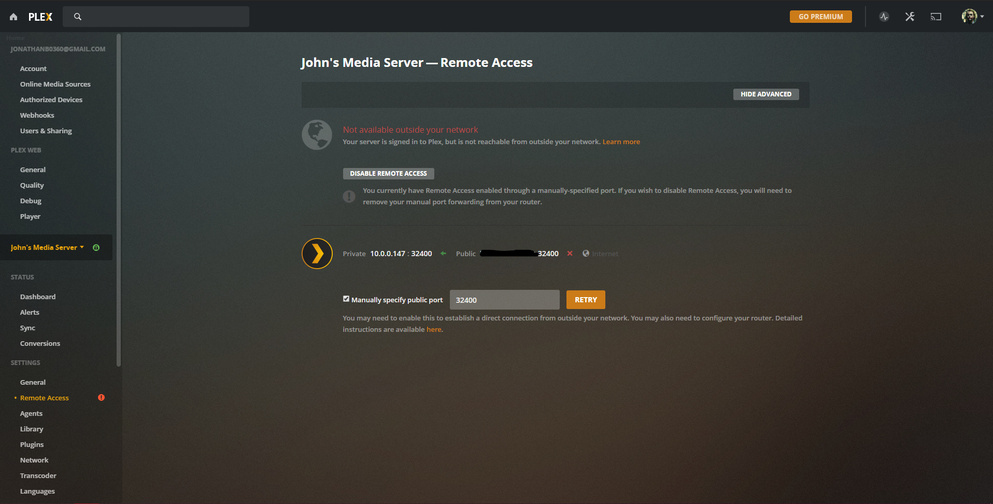
The Plex Media Server IP was 10.0.0.97 earlier, now it’s 10.0..0.147. I have no clue why it changed and if this causes the issues.
