Hi,
I have been going through the forums and the YouTube videos about how to resolve this issue and for the life of me, I can’ get it resolved.
I’m running a Netgear XR500 with updated firmware; UPnP enabled, portforwarded and still nothing.
I’ve turned off UPnP and it’s not working. I’'m not behind a double NAT scenario.
I really don’t know what else I can do. I’ve gone on the http://whatismyip.host/ to make sure that IP’s are the same and still nothing.
I’ve removed all VPN / external VPN applications from my Mac. I’ve also restarted my router and uninstalled PLEX and re-installed.
What else do I need to do to get it working.
Player Version#: 1.16.1.1291
I have the same issue.
Plex isn’t able to access my server and I have no idea why. I think like I’ve tried everything.
What’s your Plex server running on and what’s the details of your setup? Has it ever worked before? Have static ip and port forwarding on for the machine the server is running on?
My Plex server is running on a Macbook Air. It has worked all the the time. This is the first time that it isn’t working this long for a few years.
I have portforwarded on my router. Static IP on my MacBook Air, I don’t believe I have done that. Do I need to have static IP on my Macbook Air and set up port forwarding on my Macbook Air as well as my router?
For me, I run a Plex server on a Windows 10 laptop and Nvidia Shield. Both of them access media on a WD MyCloud NAS. So I have my laptop, Nvidia Shield and NAS all setup with a static ip and port forwarding set in the router. Reason is so anytime you reboot or loose power, the same IP address will be used for everything and prevents issues.
So, Ive tried setting up my MacBook Air to be be Static IP. Still nothing happening. When I hit the retry button, still nothing is happening.
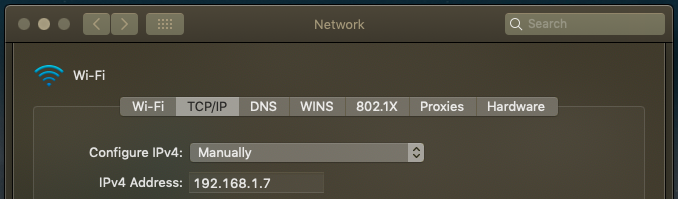
See the below screenshot of my network preferences of the MacBook having Static IP
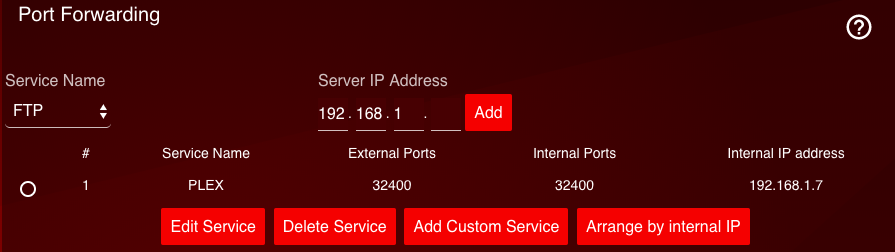
Here is the screenshot of my router:
I’m not too sure what else there is to do?
Suggestions?
What do you have set for your PMS Remote Access settings? Once everything is set correctly, I would reboot the modem, router and PMS.
Yeha, it’s still not working. Here is the PMS remote access settings:
That is the web-address
and this is the PMS remote access settings:
I think Ive broken my Plex. This is the first time anything like this has happened.
Sorry if I missed it, where’s your media stored? What protocol is selected for port forwarding? Also try https://app.plex.tv/desktop#. Also may have to disable remote access and enable back for it to work.
At the moment, Im’m jus using my MacBook Air that contains all my videos. So my Macbook is where my media is stored.
The protocol that Im using is TCP/UDP. I’ve enabled and disabled it a few times and still not working.
I tried that link that you sent me and still not working.
Try just TCP on the port forwarding. Can check www.canyouseeme.org to very if the port forwarding works. If not read this.
https://support.plex.tv/articles/200931138-troubleshooting-remote-access/
I’ve just noticed something quite odd. Every time I shut down my Plex and repoen it, it defaults to http://127.0.0.1:32400 and not my 192.168.1.7. Why is that and how to I change it?
Thanks Busaman_VA for all your help. I figured out the issue. The issue was with my local ISP. I was behind a CGNAT, thus, that’s why PMS was having the doubleNAT scenario. Within 1hr, I reset my modem and it’s all working. This issue is now solved.
Glad to hear you got your issue resolved @jpzappia!