ok… its Christmas and im going to dedicate time to fix this!
The overview: Ive had plex for 3 years. Mac/ IOS user. Works great in the house on my network. I can watch shows on my iPad, phone, TV . All good.
The issue: when i am away from home, i cant access my Plex shows remotely.
The hardware: my movies are all on my MAC. Its on 24/7.
I’ve tried: reinstall, updates. Ive read the instructions, boards, but no luck
The ask: Could someone point me in the direction for help? Ive found while the Plex board helpful, I wanted to see if its just some common thing Im not doing. Cant understand why its not working.
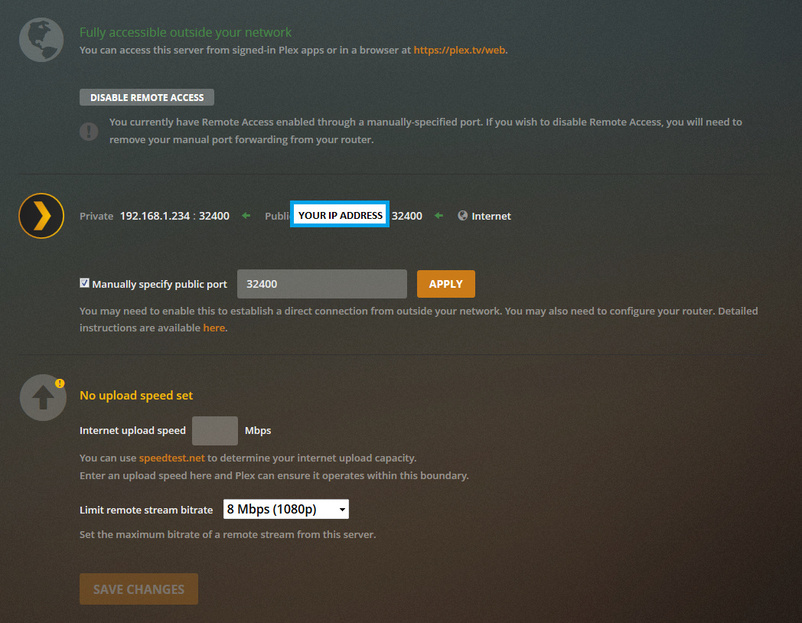
Hi @NewtCat, we are going to make it work today! When you go to Settings > Remote Access , does it show the message Fully accessible outside your network ?
If it doesn’t and when you try to enable it you get an error, it’s fine. Just log in your internet router and look for UPNP and enable it. Once it’s done, try to enable your remote access again.
Tell us what happens and the model of your router. It should be on a sticker under the router.
He needs to enable remote access to his Plex. He can do or port forwarding manually or let UPNP do the exactly same thing automatically for him. The risk in
both cases are the same, but UPNP is way more convenient, specially if he uses dynamic IP on his server (most of users do).
Ok, if you want the router to automatically open ports from instruction from a computer. It’s like leaving a gate open, manually is like having a lock on the ports not used.
Don’t be dramatic. His router will only accept instructions from his local network, not from the the internet and Plex will choose a random port to face the internet, so his external por will change sometimes, which will not happen in static NAT.
That said, what do you think is gonna be safer for an end user?
If you wish to illusion yourself that’s fine, at worst I would suggest at least using NAT-PMP.
For myself I protect myself with an extra router to all my IOT’s and manual port forwarding with the public port something else than using the well known 32400 port
Cross your fingers there is never any Malware or Adware to pickle your setup.
thanks for your help.
when i click on the button to activate it, it will activate for a few seconds, then come up with this error > "Not available outside your network Your server is signed in to Plex, but is not reachable from outside your network.
So will try and log in on router. question… uh… how do i do that? i went to Network>advanced> and see wifi,TCIP,DNS, WINS, 8-2.1x , proxies, and hardware.
You will need the IP address of your router, and the admin username and login (of the router, not Windows). The IP address is often something like 192.168.1.1
Once you have that information (you may have to get it from your ISP), try these instructions:
thanks! im in the router
when i go to Port forwarding it lists
Plex media Server ( at least 26 separate entries so i deleted 25 of them
each entry says Status "ON: protocol TCP and has local IP address .
asks “Add a rule for port forwarding services by user…”
Protolcol says either TCP, EDP, USP etc etc…
i deleted all of the entries, and kept just one for Plex .
Then i refreshed… it now says “fully accessible outside your network” and appears to be holding…
i will check it and see.
thank you everyone for your help… i think … this… may …work…
I’ve found that people who see a problem with UPnP from the LAN side don’t fully understand how networking works. No malware already living inside your LAN is ever going to bother with opening incoming ports through UPnP, when it can just open an outgoing connection to anywhere (much harder to detect!), and/or act as a relay and attack other local devices from within the LAN.
The actual risk with UPnP (and that’s where those warnings from the early days of UPnP come from) is for old buggy implementations of UPnP on the router, where someone is somehow able to issue the command to open a port from the outside. But the risk of buggy old routers vulnerable from the outside is also there without UPnP - if an attacker uses an exploit to log on to your router webinterface from the outside it can open ports there too (actually, it can do much worse, like DNS hijacking etc).
Both using UPnP and not using UPnP are risks, and both scenarios have been exploited, but we’re twenty years onwards from those first routers, those bugs are very rare now.