Seems like most people are having issues with the server not being claimed but that’s not happening with me. Changing the password somehow just broke remote access. Some devices work locally, some don’t.
I am currently running plex on a windows 10 machine. Everything has been working fine for years before this password issue.
So just to confirm, i’ve done all of the things that people have been repeating in the many other threads. After changing passwords i went to each device including my server and logged back in. I never had an issue where it said the server was unclaimed. It says it is claimed by me under the settings. But just to be sure i removed the claim and reclaimed. I had the port set to 32400 but someone said to try bumping it up one after the change, so i did that with no luck. And yes i updated my firewalls and port forwarding rules to match the new port. Restarted my router and server multiple times. I also tried deleting the preferences.xml file in the server directory.
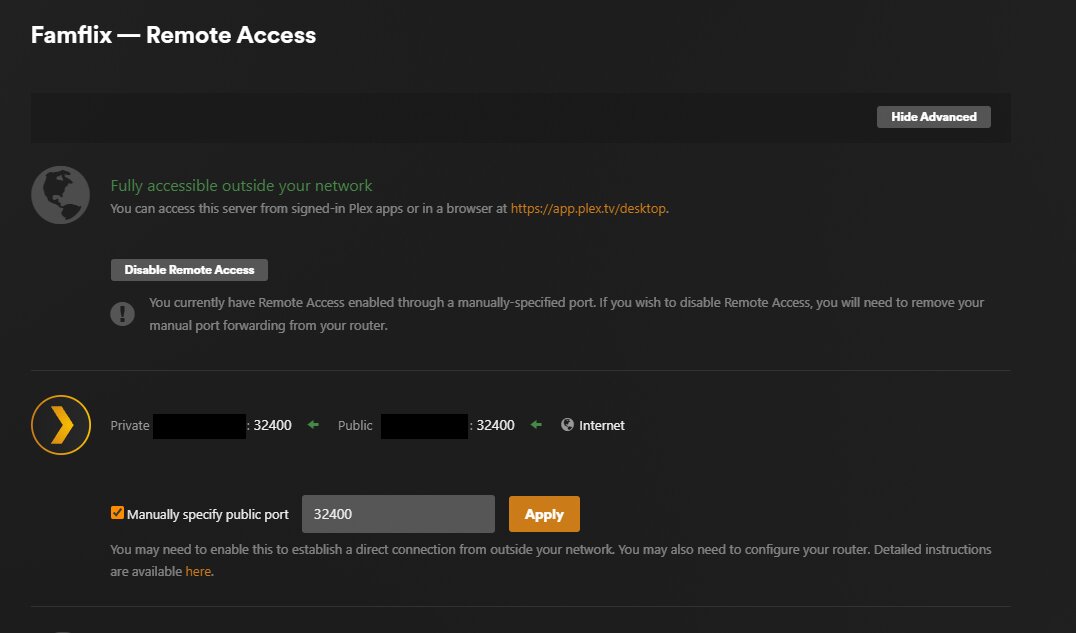
Under the remote access section of the settings, it says that remote access is unavailable. When i click “retry” it switches to green available but then shortly later it flips back to unavailable. Sometimes a few seconds later, sometimes a few minutes later. But no matter what it says, i am not able to connect on my phone when i’m not on the wifi.
Other devices (all on the same network) are also seeing things differently. My windows player on a different pc than the one that runs plex can see and play videos just fine. Same with my ipad. But my phone and my nvidia shield both say the server is offline. I am also able to play anything from the plex.tv/desktop page without issue. So i don’t get how that works remotely but nothing else does…
You seem to have created a wholly new server instance.
Which means a new security certificate has been generated for you.
Which als means you get a new subdomain on the plex.direct domain for your server.
That change has to propagate through the DNS system – including your ISP’s DNS server and the DNS resolver in your router.
This can take a while, depending on the configuration of all involved systems.
Therefore I recommend you to
Just let the server sit running for a few hours.
Then stop it using the task tray icon.
The restart the whole Windows machine.
Then let it sit running Plex server again for a while.
Now force-close the Plex app on your client devices and reboot the client device.
Alternatively, you can log out on your client devices from your account restart the device and log back in.
With a wholly new server instance, you might also visit the left side bar of the big screen clients and unpin all libraries and re-pin them from the new server instance.
If you are using the new experience mobile clients, a similar principle to pinning there is called “favorite libraries”.
How long is a while? it’s been like 36 hours and it’s still not working. Have restarted the server and the computer the server runs on many times.
Are you able to see that I have a new server? how can i verify it’s a new one? I logged in with the same account as I had before. It also has the same name as before and i didnt go through any server set up process. Tautulli also still is pointed at the same server in it’s settings, i just had to get a new auth token for it. I also didn’t have to re-pin any of my libraries on the devices that work locally. Also didn’t lose any watch history and my continue watching is still accurate which would have been lost of this was a new server right? That’s what happened when i had to rebuild from scratch a couple years ago. The remote access section in the settings still won’t stay green. I click retry and it switches to green but then flips back to red.
Yes. It is looking good so far. Successfully claimed and published for remote access.
However, it doesn’t look like it is using your manually set port number. On the Remote Access configuration page, you appear to not have ticked the checkbox before the “Manually specify public port” input field. If you have a proper port forwarding rule set up in your router, you need to tick the checkbox and put the external/WAN port number into the input field.
Yea i just unchecked it a couple minutes ago. just trying to change things in hopes of it working. Looks like that may have done it? gonna check with the people i have shared with to see if it’s working for them now. What’s weird is i don’t have a port forwarding rule in my router for the port that plex chose when i unchecked manual. But i did have the rules for 32400 and 32401 when i was trying those.
It might be working now with an automatically created port forwarding – however many routers will disable such a port forwarding after about 24 hours automatically. Which means you will lose remote access and will have to stop and restart Plex server, so it can create another automatic port forwarding.
Hence it is recommended to use a manual port forwarding.
I assume that something is not right with your manually created port forwarding in your router’s settings..
Did you think of leaving the internal port at exactly 32400?
You can pick almost any number for the external port number, but the internal one must remain at 32400.
That external port number then must be put into the input field on the Remote Access configuration page in Plex.
I had the SAME thing happen to me all of a sudden and NOTHING I did helped!!! I even gave my family my account and it WILL NOT PLAY FOR PROFILES I CREATE ON MY OWN ACCOUNT! First it was just the shared library. MY profile works just fine outside my network.
Whenever I go to Remote Access, it connects for a minute then just disconnects for no reason. I have been using Plex FOR YEARS and nothing has changed about my network or settings!
This is incredibly frustrating. The tech support is non existent. Why am I even paying Plex?
I did exactly this and it’s not working for my friends and family outside my network. If I click up to another settings page then back to Remote Access, it’s disconnected again. It will connect if I click on Retry, then disconnect. I have verified that there are not multiple instances of Plex running.