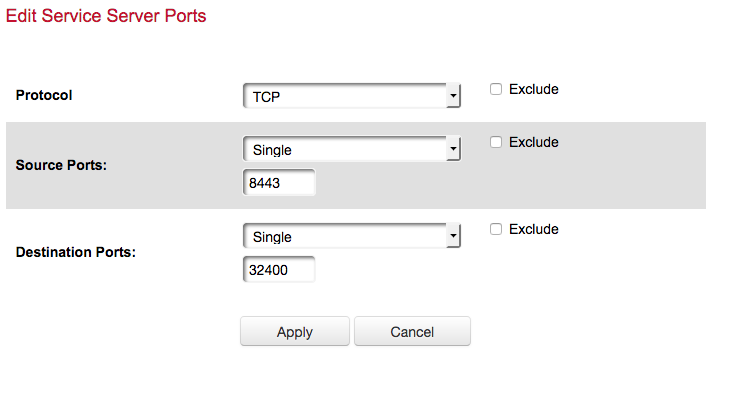
I have on my MacOS X computer, which is the fixed IP ending in .235, I have a firewall exception in it to let through both incomming and outbound traffic for the Plex Software.
On the router side, I have my Linksys Velop set to bridge mode, so it is just an access point. My Fios router, has wifi turned off and set to DHCP. I have the port forwarding set and also the exception in the firewall via the Fios router to allow connections to said port.
I will actually reboot both my routers tonight and try again to see if that works and post additional logs when trying to access via my Phone on cellular.
May be your firewalls are blocking some packets regardless of your exceptions. As I said at those times in the log, 17:45, 18:29 and 18:34 the requests did not reach the server. Is your port forward 8443 to 32400 and is it reaching the router with the port forward as a destination port of 8443 ?
8443 to 32400. I had it backwords in my previous posts, but the last screen shot I posted of my port forwarding configuration, has it corrected. I will again test the canyouseeme.org once I am back home and on the network.
I am concerned that these are referred to as ‘Source’ and ‘Destination’ Ports. In a port forward rule, we deal with wan/public port and lan/private/local port.
In a tcp packet there is a ‘source port’ and a ‘destination port’. We would be wanting to forward packets that have a source port of ‘any’ and a destination port of ‘8443’ and we would want to forward to local port ‘32400’.
Perhaps need to check out the router user manual. Some routers have advanced rules that allow selection of source port as well as the normal rules for wan and lan ports.
The screen shot I linked to is the port forward rule that I setup. I had the ports backwards and was advised they should go this way. Which is how they are setup now.
This is rule in the firewall that allows the access through the firewall of the port forward.
For the original port forwarding rule I setup, it is now setup with the new port number in the above screen shot. I will get an updated screen shot of the firewall exception if you would like. But I have the port forward rule setup and I have that rule enabled in the firewall to allow it through. When I update the ports, the rule is automatically updated on the firewall side to now include the updated ports etc.
Having screenshots without the user manual for the router will not be of any help - obviously this is not like any other router or you are simply on the wrong screens
In the menu shown in the first screenshot change Source Ports to Any (or something similar the dropdown offers) and change Destination Ports to 8443. This should allow any remote port to connect to your port 8443 (which is what you need for remote access).