Hi,
I would like to request help in setting up my PLEX server. I am running by PLEX server an a WD NAS PR2100.
My router is ASUS RT-AC3100.

Any help/comments will be appreciated.
Hi,
I would like to request help in setting up my PLEX server. I am running by PLEX server an a WD NAS PR2100.
My router is ASUS RT-AC3100.
Any help/comments will be appreciated.
A couple of things to check
Your server is on NAS - you have selected a windows server tag. I am editing your tags
For remote access issues we have a Troubleshooting support article here https://support.plex.tv/articles/200931138-troubleshooting-remote-access/
A couple of things to check
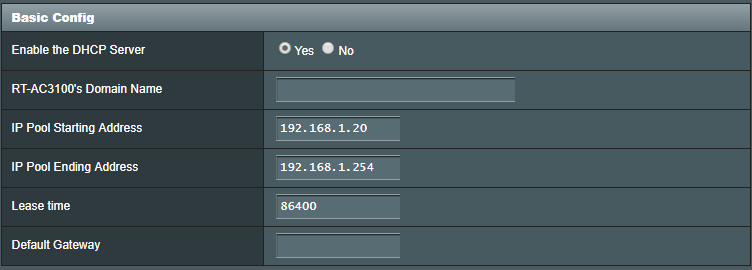
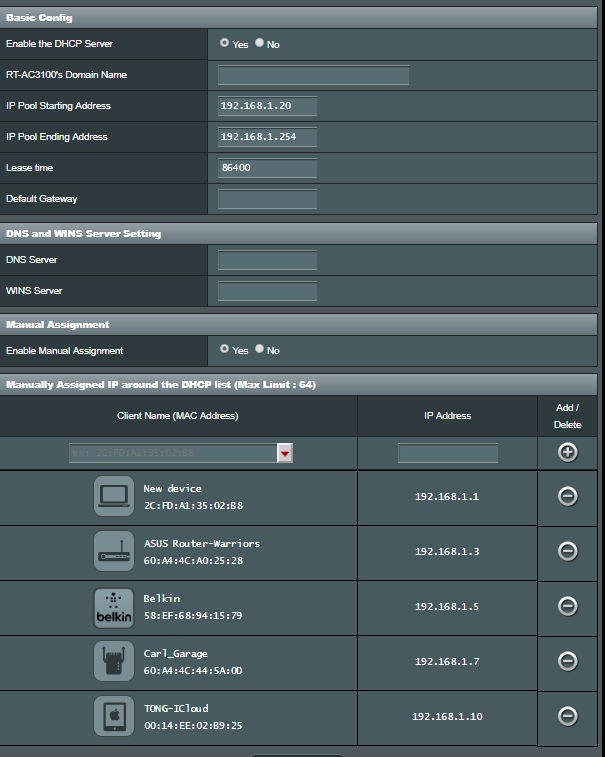
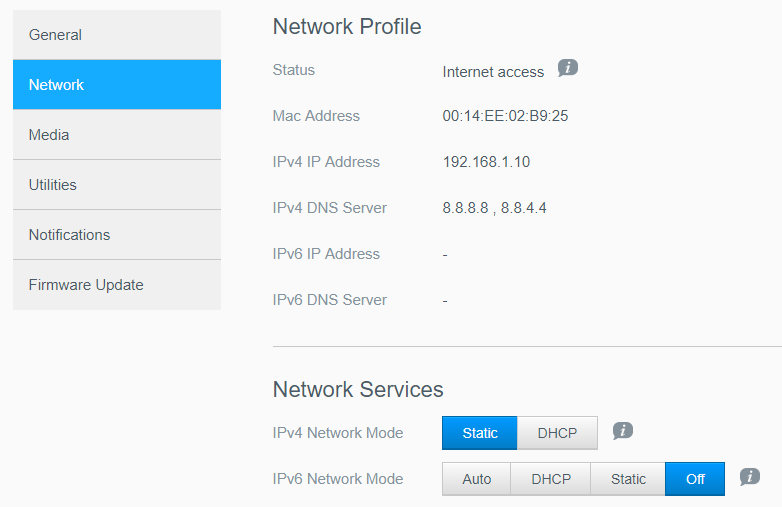
Is the 192.168.1.10 IP Address outside the DHCP Range on the router?
Yes, pls refer to screen shot below
Is the Port Forward in the router for tcp protocol forwarding port 32400 to port 32400 to local IP 192.168.1.10
Yes, but it does not work. I released the manual port to off and I try to match that port on the router. Still does not work.
I cannot see the uploaded dhcp range image
you should not change settings as you have switched to uPnP now and have also setup a port forward to interfere with that.
Please delete whatever you have seyp that shows 21000, 22000
Setup a single port forward - not port triggering but a port forward - to forward 32400 for tcp protocol to 32400 for 192.168.1.10 and restart the router after that and then setup the remote access in server settings with manually specify port ticked and 32400 entered in the box and retry, Do not click retry too many times and wait 1 minute before retries. If still not showing ok, just refresh the browser with F5
You could also try to add a DHCP Reservation in the router for Mac Address 00:14:EE:02:B9:25 to reserve the local IP address - it would then need to be within DHCP Range and switch the Network Configuration for the WD to be DHCP and have the port forward going to this new IP Address
If still does not work, go through the troubleshooting page I linked https://support.plex.tv/articles/200931138-troubleshooting-remote-access/ and check other aspects and you could get server logs - see
https://support.plex.tv/articles/201643703-reporting-issues-with-plex-media-server/
https://support.plex.tv/articles/200250417-plex-media-server-log-files/
edited your post to correct the image upload link. There was an extra linefeed in the link for the uploaded image. Did you edit your post or did it go wrong itself when uploading/attaching
Pls look back, i am not sure what went wrong. but the DHCP settings seems to be have re-appeared on its own. Anyway, I am re-publishing the image below;
For the setup on a single port forward. it is configured as a port forward.
For the DHCP reservation, I had assigned a static and further reserved the IP address accordingly.
.I hope that I am not over exposing myself on the network configurations for my home network.
That looks fine in the router - and coupled with this you would have Manually Specify Port ticked in server settings for remote access and 32400 entered as the public port in the box next to the tick
If this still does not work - ensure debug logging enabled and restart the server to get fresh logs then open server settings and select remote access settings page and show advanced and take a screenshot and then get the logs -
See
https://support.plex.tv/articles/201643703-reporting-issues-with-plex-media-server/
https://support.plex.tv/articles/200250417-plex-media-server-log-files/
I will have a look at them tomorrow. having an early night - 1am here !
This topic was automatically closed 90 days after the last reply. New replies are no longer allowed.