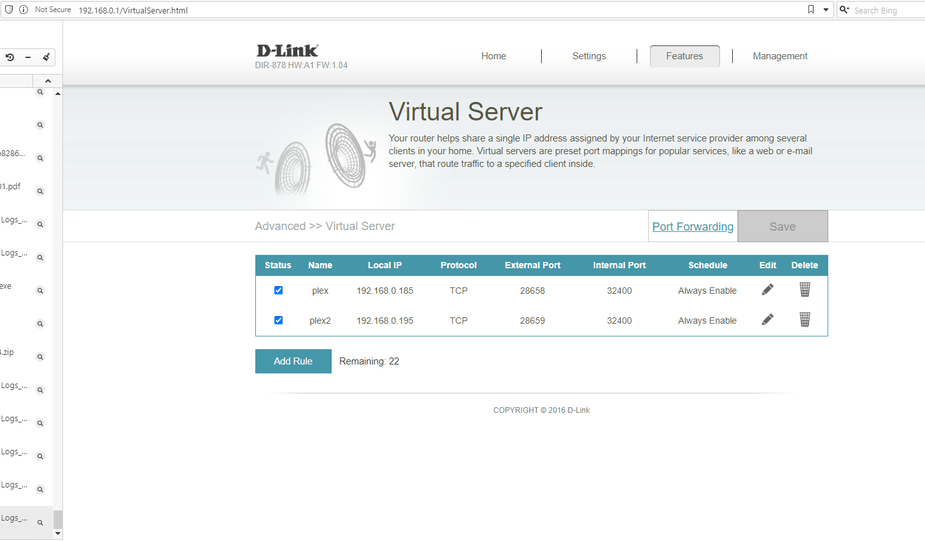
I think I’ve dealt with this as far as I’m able.
I’ve setup port forwarding. I’ve confirmed no double NAT, I think. I’ve consulted the online document on Remote access issues, without success.
See the attached Word doc to see if I’ve made an error in the setup.
(File removed)
(File removed) I’ve also attached the logs.
There is no word document. You can’t attach .doc files. If it’s text, make it a plain text file. If it’s an image, save it as jpg or png.
Made edits. There are several screen shots in the word doc. I can send them separately if preferred. Thank you for your quick respones.
Everything looks fine. Are you on a cellular connection? Your IP traces back to Verizon Wireless. Remote access does not work through cellular connections.
I don’t get that at all.
We have a fiber connection for the windows pc the server runs on.
Here’s a speed test result, our ip address, and provider.
I have a client on my phone that is with verizon.
Does a client have to be running for remote access to show is available?
I’m not an IT industry employee, that I get the impression many users are. Sometimes I follow what’s on the message boards, and sometimes its might as well be in hebrew from my perspective. Sorry.
I’m went to the settings/remote access screen and it briefly said everything OKIDOKI.
Then it went back to ‘remote access not available’.
(File removed)
I attached another log since it shows as not working, if that helps.
I do use the phone app for controlling the server.
I use plex for my own vid and music that I play in my own home.
I don’t share, or play things away from home, at least not until covid is less of a risk.
I like remote access to be able to play music over my echo devices, and that doesn’t seem to work unless remote access is working.
Go to https://www.canyouseeme.org/ and enter your port there and see if it works.
Ok, that sould indicate your port forwarding wasn’t set up properly. Can you screenshot your router’s port forwarding rules?
The IP address for Plex server is set as fixed, not dynamic at …185.
Oh right. That was in your doc from before. So your port forwarding looks fine. PMS looks to be working fine. So something else is blocking. Does your router also have a built-in firewall? Also check your Windows firewall rules.
I’ve tried disabling the firewall for 10 minutes, and still no luck.
This was working until, recently I tried to use alexa to play a TV show, instead of music.
I got the response: ‘Oh Oh, something went wrong…’
Nothring has worked, at least consistently, since with remote access.
Is this with Alexa only? There may be an Alexa outage at Amazon right now. Plex on Echo Flex not working
Well the remote access screen inicates no access, though I think it has come and gone. It has been like that for close to a week. Do the logs tell you anything at all???
The logs are mostly greek to me.
The logs indicate that PMS is seeing the correct public and private IP addresses and that the port is specified properly. The results from the canyouseeme.org test would indicate something on your network or Windows is preventing the connection. If the port forwarding was working, that test should have passed even without PMS running.
I just looked up your ISP, Direct Link. It appears they are a wireless internet provider. Remote access almost never works with wireless internet providers. You’ll need to contact your provider and ask them if they use something called CGNAT. If so, this won’t work. The only fix is to see if they offer a static IP address, which can be expensive.