I just downloaded Plexamp for my iPhone (connected to the internet via cellular) and pressed Play on an album from my PMS, and it worked! What I do not understand is how, when port forwarding has not been set up on my router, and remote access on the server shows as disabled. Any ideas?
perhaps wifi assist is on?
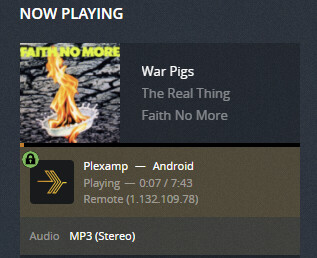
if you look in the dashboard is your iOS device connected? It should also show the IP of the device and if it’s remote or not.
Only other thing I can think of is you synced or downloaded files to the device.
The dashboard just shows the media currently playing on my iPhone XR. I can’t see the IP address anywhere. I have tried playing multiple tracks, none of which are downloaded, and they all play. WiFi assist is not on.
this is what i see for a remote device playing - i wonder if anyone else has any ideas.
Remote access should work automatically, except when explicitly disabled.
The Plex server does create a portforwarding in your router automatically.
(If the router allows it)
In cases when portforwarding is not possible, there is still Accessing a Server through Relay | Plex Support
which is usually enough for music.
There are cases where an automatically created portforwarding doesn’t last long. (The router destroys it due to an inbuilt policy)
This is when you need to create a portforwarding manually Troubleshooting Remote Access | Plex Support
Some ISPs don’t provide you with a publicly accessible IPv4 address by default, which is necessary for remote access to work.
These are the ISPs which either want you to buy a static public IP, or need at least to be contacted by you (ask about “portforwarding”).
This topic was automatically closed 90 days after the last reply. New replies are no longer allowed.
