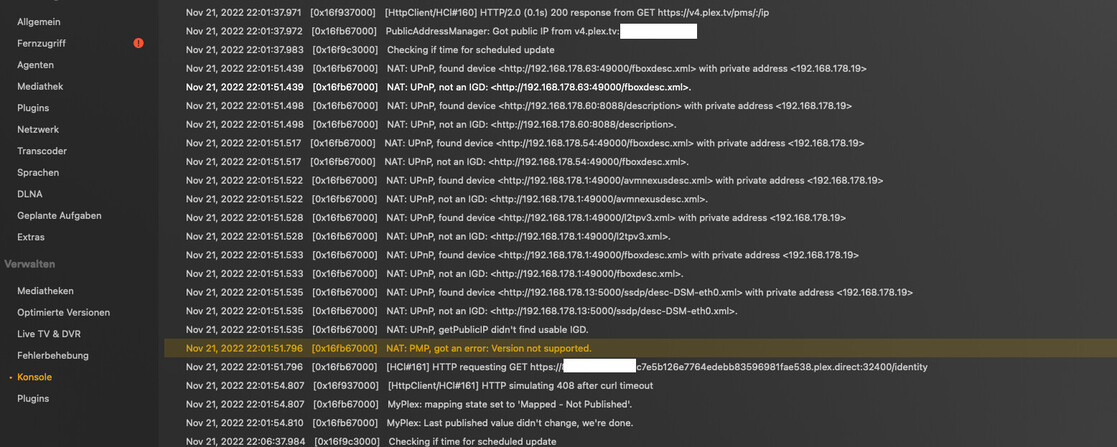
Yes, remote access goes down with the non responsivness, I’ll restart PMS again now, then it should be available again for the next half an hour…
EDIT: Sorry, have to go to bed now, it’s very late here in Switzerland… Will restart PMS one last time today, hope you can look further into this… Thanks you very much for your efforts!
I gathered from the OP that Remote Access is desired and was working well.
I don’t think we’ve made any changes, but there was mention of Open DNS and filters that were removed.
So -
After rereading what was describe there, I must have been incorrect when I pinged you about remote access and lockups.
you don’t spot any log errors
the regularity of the problem occurring after PMS is running a half hour.
both of us seeing a lot of scanning,
one other topic about scanning where a Mac M1 Ultra is locking up.
And I’m wondering
is Plex seeing the crash reports. Do they shed any light?
maybe external media and Spotlight searches? just guessing.
what else might be the issue if the transcoder isn’t, seeing as 1.29.2.6364 still had the same ffmpeg base iirc. I’m happy to keep thinking it’s a bad encode being scanned, but I am really fishing here.
off to work on my media, but because Mac’s just work, how about,
Disable Remote Access in Plex Settings.
Restart the Mac but do not start Plex Media Server.
In my despair I tried another port again, it took 3-4 attempts to get remote access to work at all with new port. But now it gets really odd: Remote Access now lasts up to an hour, before the same issue happens again and if i go back to original port, connection lasts half an hour again. Question also remains why PMS gets unresponsive after it looses remote access and is not even reachable over it’s local 127.0.0.1:32400-IP-Adress.
Also a question for me is if PMS is the issue and can’t establish and hold a stable connection or if it’s my ISP in the end who causes issues all of a sudden. I’d like to mention again that the whole thing was no problem for years with my current ISP and port forwarding worked until last Friday… Also as mentioned earlier in in this thread I’m in parallel assesment with my ISP and still awaiting answers from them regarding CGNAT and Port forwarding…
Thanks!
EDIT: In addition, here are my port forwardings, my router gives me a green “light”, but test with “can you see me” gives me an Error because PMS is unresponsive and offline again. I did not do any changes to this port forwarding in my router, only once just to test the scenario I described above…
EDIT: Do you have any clue yet about the weird port-scenario I wrote about? I’m sorry, I do not want to mix things up, maybe we better handle one problem after another but I’m just curious…
I don’t want to get in the way of your debugging, but we see no corruption or malformed in the logs, and the user found Remote access wasn’t involved.
I am hoping he tries a DB Replace to see if it works, even though it’s not malformed.
He has technically replaced the software which we know tends to work.
Am I off base?
Well it’s harmless to copy in a backup DB. If it works it works.
If not he loses nothing and can put the current one back.
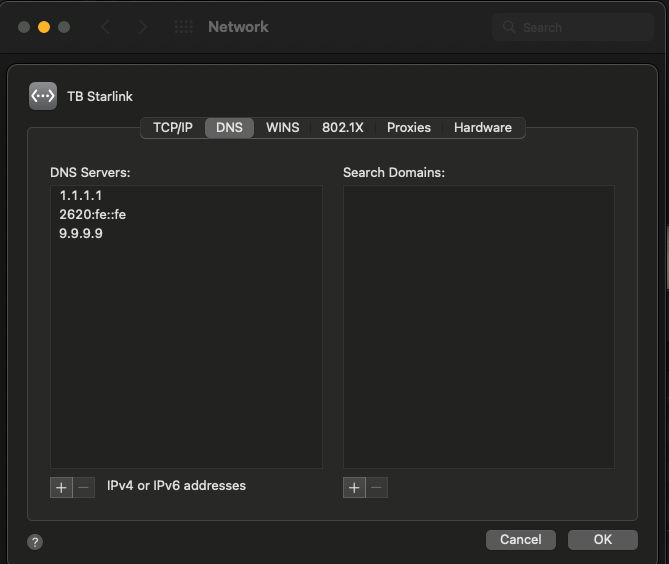
It’s also easy to adjust the DNS. We know Plex Media Server runs well when it has a static IP address and when it uses good public name servers. Can we all agree to do a test of name resolution by changing the Preferences → Network → EtherAdapterName → Advanced → DNS → DNS Servers
to be Cloudflare, Quad9, and Quad9v6
Thank you all, I’m a little confused… I use my ISP’s DNS right now, but willing to change for testing if it helps.
You’ve all seen the screenshot of my port forwarding, i did not change anything nor DNS or any of the networks configuration or any other settings in my router. It all is at it is and stopped working since Friday…