Server Version#: 1.32.8.7639
Player Version#: iOS Plex App 8.28
<If providing server logs please do NOT turn on verbose logging, only debug logging should be enabled>
Hey guys:
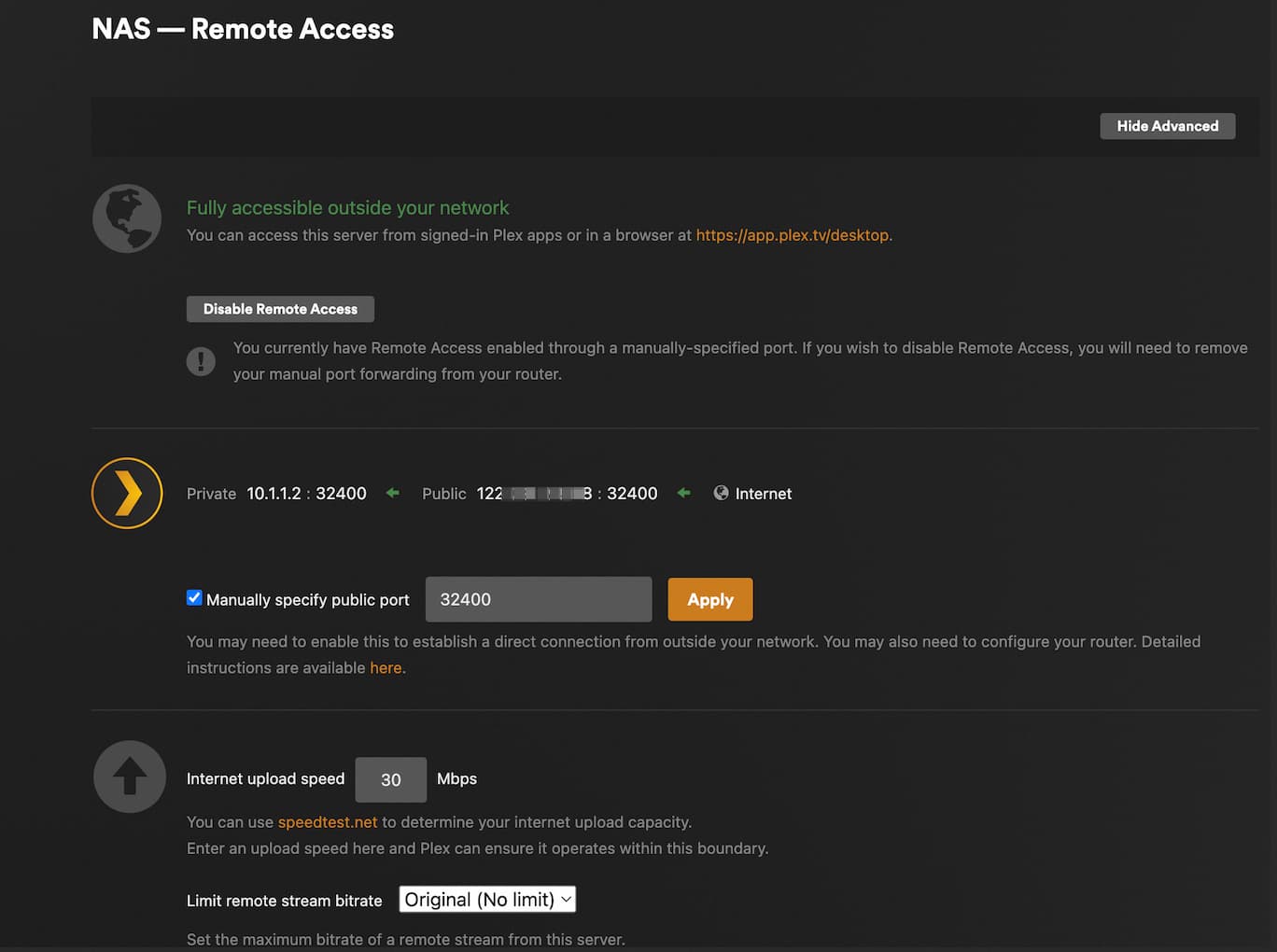
I build a plex media server on synology dms (which is installed in proxmox), I have configured remote access, and it showed me well, i can access my plex media server out of my local network.
in the remote access configure page, i set the upload bandwidth with a enough value (100Mbps), and no limit for single stream user.
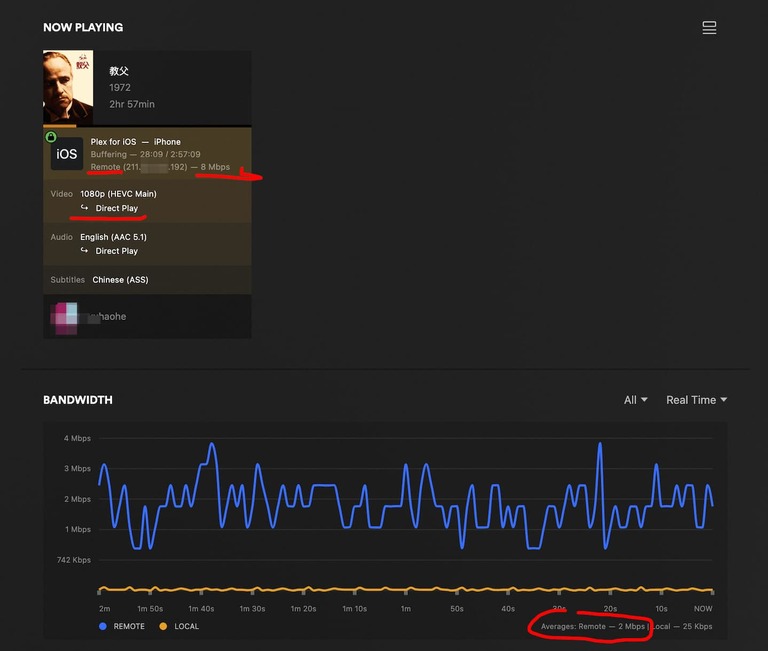
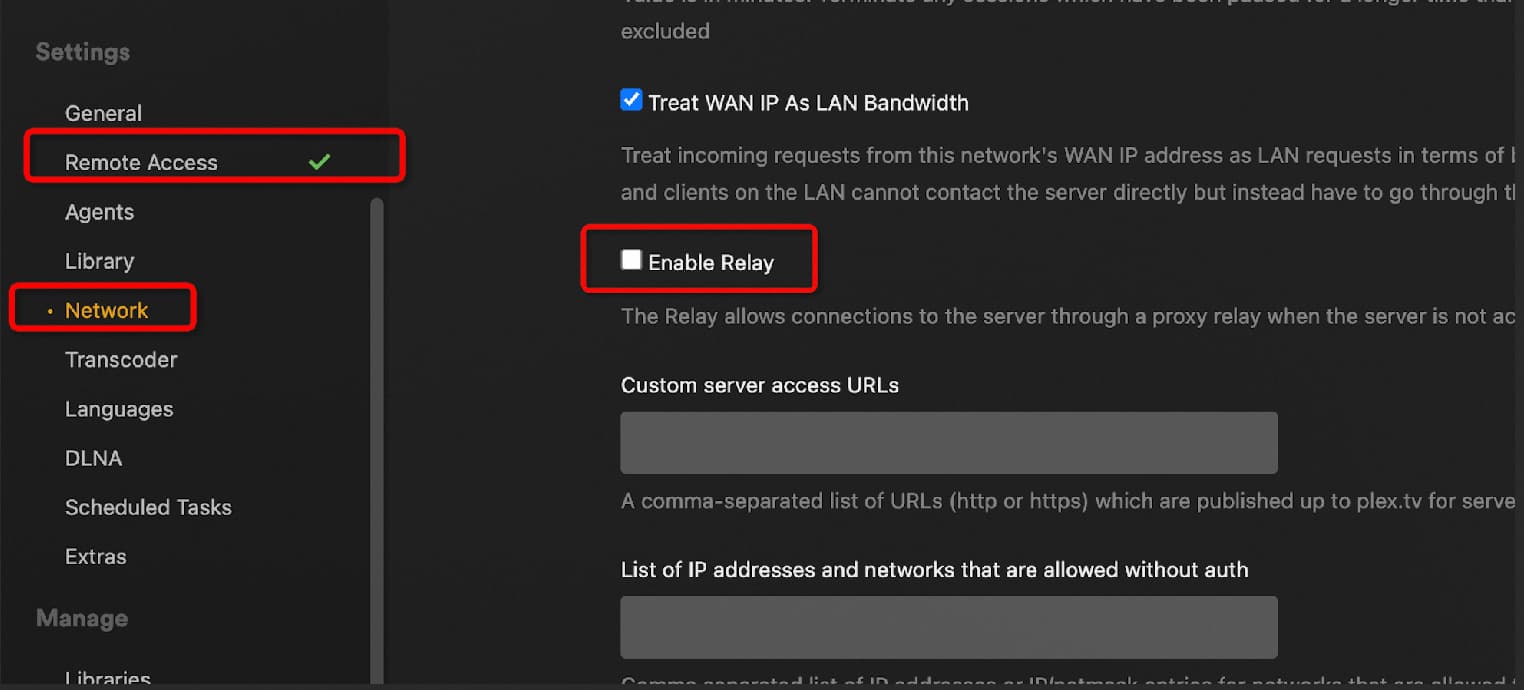
but the problem is when i play movies in remote network, the bandwidth is always below 2Mbps (which is showed in the dashborad), but i didn’t use relay, and it actually showed “direct play” in the dashboard, but the remote bandwidth is still below 2Mbps (I bought plex pass lifetime).
I have searched some infomation, it said that the 2Mbps limit is because of the relay mode, but i already closed relay.
so, is there anyone met this problem? and have some resolutions? thanks.
thanks for you reply. yes, there is a playback problem, it’s very janky, buffering frequently when play some movie which has bitrate above 2Mbps, whatever the direct play or transcode play.
you aren’t alone - i’m not seeing 2Mbps, but playback is AWFUL remotely lately. i’ve got 1 Gbps symmetrical and seeing garbage playback on plex. Emby playing fine. Something not right with PMS at the moment. Nothing will direct play - worked fine 2 weeks ago.
Typically this is due to the PMS not being directly reachable outside your network. In such cases it ends up relying on relay which has a 2Mbps limit for Plex Pass. See the docs for more information on relay.
Check your network setup, router, etc to see if the problem is actually there.
I experience the same Problem since around 2 weeks, i thought it was about peering but i was able to proof that it was not a bandwidth issue. Even stranger: fully transcoded Videos with 70% CPU usage played even better than direct play.
Plex in Google TV said my bandwidth was limited to 2,5Mbit, while i was able to buffer around 90Mbit with the same Server but a different streaming Software. Sometimes like now Playback works fine again.
And it was also no relay issue, the servers traffic showed direct Transmission without any Plex Servers in the middle.
I only have 2 theories: ISP throttling (Deutsche Glasfaser) for Port 32400 or some weird Bug inside PMS. But to me it looks like a PMS bug, because i even was able to stream to multiple devices from the same network, always limited to around 2,5Mbit or less.
Thanks, i checked the media info xml as your mention, and the requiredBandwidths is below my ISP up-bandwidth (also my config value in the remote access page), but it still couldn’t play smoothly.
I have observed the playback records for a week, sometimes the remote bandwidth jump above to 3 or 4mbps,sometimes 5mbps,but the average is near 2、3mbps for the most part, just like the friend Tim836 from upstair.
So, i setup the remote stream quality is ‘720P 4mbps’ to ensure playback is barely smooth.
I’ve continued to battle this, BUT, I have a solution that’s working for me. After lots of testing, I believe the issue is as another user briefly mentioned… it’s a peering issue between residential providers. There simply isn’t enough bandwidth between ISP A and ISP B. I have a solution in place where I’m essentially sending the data out via vpn to a data center with peering points to probably just about everyone on the planet. The server at the data center is effectively acting as a proxy to the Plex server. By routing through a provider with tons of peering bandwidth, I’ve eliminated the constraint between these two specific providers. My sample size is small, but I had not had a successful high bitrate playback in about 2 months. But now, when sending traffic this way, I have had ZERO buffering issues. Perfect playback without a single hiccup.
I suspect for truly reliable playback, transcoding will be necessary, less you want to jump through about 10 hoops and waste the better part of a Saturday setting something like this up.
Thanks for your share, it make sense. Through deeply using in these days, I found that the remote directy playback is unstable, sometimes good, some times bad, it seems that’s difficult to diagnoise. maybe, Plex App can provide a feature that showing the connection status, including streaming bandwidth, and the bandwidth of movie required, etc.