Hello,
I’ve setup a Plex Media Server at home on one of my servers and it works great while on the lan. I can open the plex android app and browse through my media.
However, I now would like to access plex from outside my lan, via a private VPN I have. Both my phone and my plex media server are clients in the said VPN, and they can contact each other fine.
If I browse http://<plex-media-server-vpn-ip>:32400/web/ it works fine and I have access to the PMS from my phone while not on the lan. However, I can’t get the android app to work. It keeps telling me that my PMS is not available at the moment.
How can I get the plex app to look for my server on the vpn ip?
I’ve tried to set in the Network configuration tab the custom url to access the server to “http://<plex-media-server-vpn-ip>:32400/web/” with no luck.
One thing that might explain the issue, is that under the “preferred network interface”, my tunnel interface is not listed. Even though it exists:
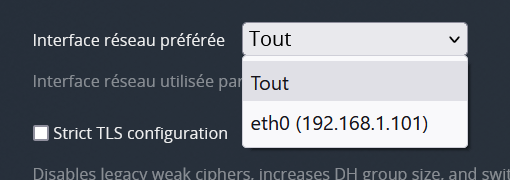
$ sudo -u plex ifconfig
eth0: flags=4163<UP,BROADCAST,RUNNING,MULTICAST>  mtu 1500
        inet 192.168.1.101  netmask 255.255.255.0  broadcast 192.168.1.255
        ether 82:04:90:60:7a:db  txqueuelen 1000  (Ethernet)
        RX packets 449669  bytes 1666731469 (1.5 GiB)
        RX errors 0  dropped 531  overruns 0  frame 0
        TX packets 394659  bytes 651017924 (620.8 MiB)
        TX errors 0  dropped 0 overruns 0  carrier 0  collisions 0

tun0: flags=4305<UP,POINTOPOINT,RUNNING,NOARP,MULTICAST>  mtu 1500
        inet 10.42.0.21  netmask 255.255.255.255  destination 10.42.0.22
        unspec 00-00-00-00-00-00-00-00-00-00-00-00-00-00-00-00  txqueuelen 100  (UNSPEC)
        RX packets 17  bytes 2238 (2.1 KiB)
        RX errors 0  dropped 0  overruns 0  frame 0
        TX packets 41  bytes 10010 (9.7 KiB)
        TX errors 0  dropped 0 overruns 0  carrier 0  collisions 0
Could it be due to the /0 netmask? Anyway to force plex to pickup lo0?
Thanks
Note: no, I don’t want to enable full-on public access to my server via NAT routing

