Server Version#: Version 4.69.1 Nvidia shield
Player Version#: Firestick 8.25.0.28665
A few questions on how bandwidth and quality limits are applied. I am running the Nvidia shield pro latest generation as the server. Most of my movies are MKV h.265. I have a 1Gbps upload and download connection.
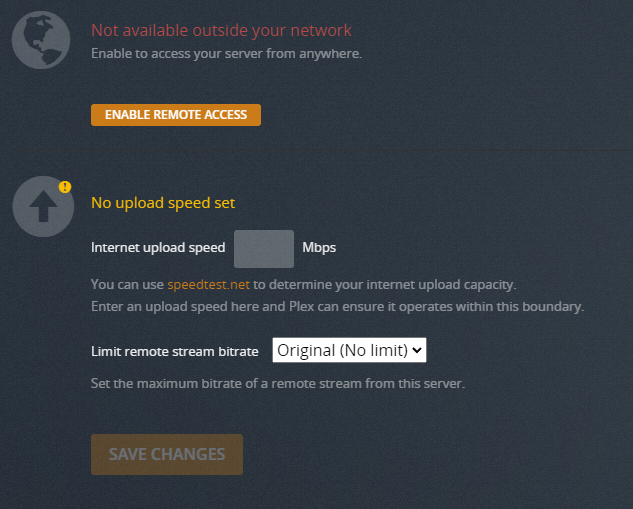
Under remote access I have upload limited to 20Mbps. I have maximum 2 streams selected.
Now under plex web quality internet streaming I have 10Mbps selected.
Now I would expect that to limit single remote streams to 10Mbps 1080. It doesn’t limit anything I have some 4k movies that are encoded around 16-20Mbps it will play these full bandwidth direct play. The only way I can limit the bandwidth and therefore the quality is to reduce the upload limit to 10Mbps. Not really what I wanted I wanted to make sure I have no single hoggers of bandwidth.
Next issue: If I set everything up to maximum upload speed, no limits on quality. Now on the firestick under remote stream quality if I select original it still seems to limit maximum download speeds to about 20Mbps. I have some 4K movies that are encoded at 40Mbps and it tries to transcode to 1080 20Mbps. Direct play of the same movie on the local network is no issue.
This limit applies only to the one instance of Plex web on your own computer. It does not apply to other plex web instances which are installed on other computers.
I guess that doesn’t make sense to me. Plex server is installed on an nvidia shield. So how does the server know which plex web app is used? I think maybe what your trying to say is it’s used for web browser based streams?
This seems counter intuitive. If you are limiting the max bandwidth to say 20Mbps then really you are limiting to a single stream. Since the max bandwidth seems to control the output stream quality.
I think it would be preferable to be able to select what quality you want to stream externally. That feature exists on the client side. You can set the max remote stream quality. But we seem to have no way to enforce that on the server side except for setting the max upload BW.
Please go to Settings → Server_Name → Transcoder.
Do you see an option to Enable HDR tone mapping? See screenshot below.
Please go to Settings → Server_Name → General.
At the top of the page it shows, “Server signed in as e-mail_address.”
Does the e-mail address shown match the e-mail address listed on your Plex xokia account?
Where I’m headed…
Your Plex server may not be picking up your Plex Pass.
The “remote streaming bitrate” and “enable HDR tone mapping” options appear only when a server is claimed by a Plex Pass account. If I claim the Plex server on my Shield with a non-Plex Pass account, neither of those options appear.
Checking the e-mail address verifies you’ve claimed the server with the correct account. Some people have multiple plex.tv accounts and inadvertently claim a server with a non-Plex Pass account. If you’ve claimed the server with the wrong account, you’ll need to unclaim/reclaim it (see below).
If the e-mail address is OK, shutdown and restart the Shield. After the Plex server restarts, see if the “remote stream bitrate” and “HDR tone mapping” options are available.
If that does not work, then try unclaiming / re-claiming your Plex server. This will force the server to re-register with Plex and verify you’ve a Plex Pass.
Point your browser at the Shield’s IP address: http://shield_ip_address:32400/web.
Go to Settings → Server_Name → General
Sign out of the server (click the Sign Out button next to Server signed in as…)
This puts your server in an unclaimed state. You should see “This server is unclaimed and not secure” with a “Claim Server” button.
Claim the server. This will re-register it with Plex. It should now pick up your Plex Pass.
With the Shield, the Plex Media Server and Plex client are both updated via the Google Play Store. They are separate apps and are updated independently of each other.
If the Google Play Store is set to update installed apps automatically, then both should auto-update. If not, you can manually update the apps.
1.23.2.4625 was released in June.
Updating to the current version, 1.24.5.5173, won’t help with remote streaming options. You will pick up some bug fixes. You can see the details in the release notes.