Is there any way to remove/reorder the “Continue Watching” row on the Home screen? My parents are constantly confused by the home screen now with it being automatically managed because Plex decided it’s users shouldn’t have control anymore.
You cannot remove the continue watching hub.
What’s confusing them about it?
They are elderly with bad eyesight, they don’t understand to always scroll down. They were used to a certain order of rows before Plex decided we didn’t need to manually manage them.
You can prevent your server from contributing to the Continue Watching hub, which will have the effect of removing the hub if yours is the only server to which they have access. If you access Settings (Server Name) -> Library and set both of the following settings to zero, that server won’t contribute:
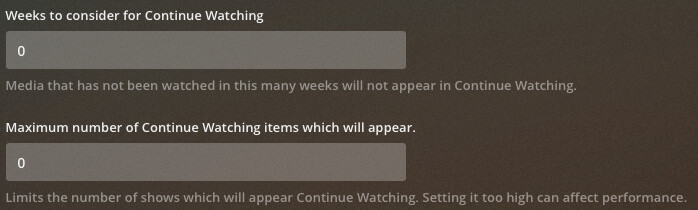
However, keep in mind that this affects all clients which use this server.
Note: You may need to restart the clients and/or server for this change to fully take effect.
This topic was automatically closed 90 days after the last reply. New replies are no longer allowed.
