Serious question: does anyone at Plex understand the difference between a TV that requires a remote control and a device that uses a touch screen, along with the differences in making an interface usable for each one? This new UI isn’t great on Android, but trying to use it on Roku is unfathomably worse. Especially the search and scrolling horizontally through seasons of long running TV shows. Who saw that and honestly thought, “Yea, that’s great. Push it out.”?
I don’t think they do.
On Roku-I noticed that the description of an episode does not show up on the right thumbnail, sometimes it lags behind multiple episodes if you scroll even at a slow pace.
40% off? Really? How about showing your appreciation for your fans by, I don’t know, GIVING THEM WHAT THEY WANT. You know, like left side navigation? Or watch together? Or a complete rollback of the Roku app?
Anything else isn’t appreciation, it is insulting.
You should see the google play store, where to anyone giving a bad review they respond to their review with “come and speak to support on our forums” like they’re actually listening.
The v9 (in beta) fixes most of that issue so that’s at least an improvement on that very annoying bug.
So it has been a while and decided to see what are the answers from Plex to all the complaints… Waste of time. That absolutely unfriendly, annoying and whatever negative superlatives you want to use, top bar will remain there. I decreased my use of Plex a lot as I really hate that UI and now wait for a bit of free time to switch side to another user friendly app. The good thing, in the meantime, is that it got me back to read again.
Has the Roku experience actually been fixed in any meaningful way?
In my case NOTHING WORKS, still.
■■■■ your 40% discount and go fix your royal ■■■■ up.
Thank you Plex for the vertical Library listing. Left side would be nicer, but this beats the hell out of the horizontal scroll.
I agree, this new UI is terrible and virtually unusable. I have been a lifetime Plex user for over a decade and this is by far the worst I’ve seen. Please allow us to revert back.
I agree, this new UI is terrible and virtually unusable. I have been a lifetime Plex user for over a decade and this is by far the worst I’ve seen. Please allow us to revert back. Or make the user experience more similar to the Window Plex UI.
Rollback after three months is no longer an option because the Plex Leadership Team has a major ego trip going on. They know what they want is better that their user base demands. Thus they will forge on making more mistakes and receive more criticism.
Eventually, they will move on to newer leadership positions in another company after citing their success leading the Plex UI team and again will face the same issues because of their unwillingly ability to listen to their users.
Admitting it was a mistake will challenge their ability to lead the team and this is now not an option in their mind. They need to forge forward to extend their careers.
This is EXACTLY my problem as well. I can still access my Plex server on other devices such as my Android TV and laptops, but the ROKU simply won’t see the Plex Server running on my local NAS anymore. It worked for years, now has suddenly stopped. I’ve tried all the usual things (reinstall, rebooting everything, etc etc) but nothing works. I’m no longer to invest any more time in Plex, they’ve simply lost the plot - I’m downloading JellyFin as I write this.
I’ve allowed media deletion in the server setting. Since this update, when I delete a media (episode or full season) from the Roku app on both of my RokuTV, the media thumbnail stay there until I back out and re-enter the show or library to refresh the screen even if the file is deleted immediatly from the server (I’ve tested it). The only time it’s working o.k. is when I delete the last episode from a season or a show, the corresponding thumbnail disapeared at the same time I hit delete. This is only happening on Roku, android and web are working fine. I haven’ t tested my Roku streaming stick.
PLEASE QA before pushing live.
For the updated Libraries Nav. The drop down is not my favorite, but does work better than the previous version.
HOWEVER - use the menu to go to my music library. Initial use is fine, select an album I want to listen to, it all works. Then i go back arrow to add another album to queue or bo to select another album once the first is done and when I get to the music library the dropdown and the extended (browse, collections, etc) is inactive but still there covering a third of the screen.
How can this get past ANY testing?
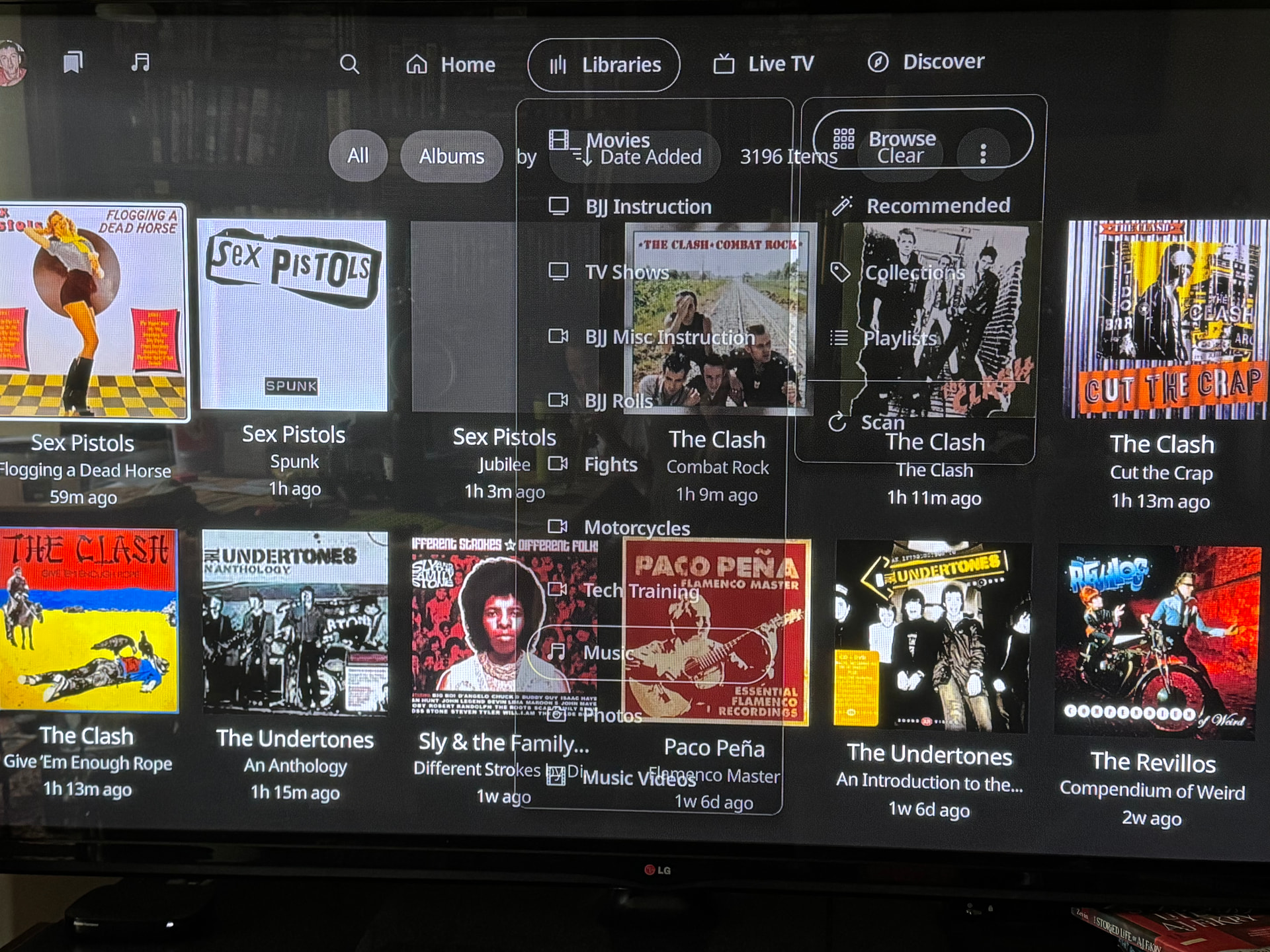
We had already identified internally the issue with the Libraries nav state not resetting after navigating back from playback, which left the dropdown overlay inactive but still present. The fix will be included in the next update.
Thanks for flagging this. We’re currently working on improving the episode screen refresh, which will address the slowness experienced when marking episodes as watched/unwatched or when deleting them. (Sharing this info from the other thread.)
The new app/UI and broken media server are abhorrent.
And now all subtitles show out of sync (tested on movies where they 100% worked perfectly).@ljunkie
Has anyone noticed that your Watchlist can no longer be filtered by Genre?
I have 450+ movies in my Watchlist and used to be able to quickly find something based on what genre I was in the mood for. Now I have to endlessly scroll the entire list and either go brain dead or fall asleep before I can figure out what I want to watch… 
Will this feature be restored? See attached screenshot from Plex in a desktop web browser—those 4 options in the lower half of the menu are no longer available with a Roku streaming device. Please restore!
Thank you.

Did something happen to the ability to reorder libraries on the new Roku player? At some point after the release of this top-menu disaster it was possible to reorder your libraries in a couple of different ways - one was by unfavoriting all your libraries and re-favoriting them in the order you want them to appear in the list, but there was another way to reorder them from some settings menu that was similar to (though not as elegant and simple as it was in) the old left-menu version. Maybe I’ve missed something, but tonight I cannot find any way to specifically reorder the libraries. I haven’t tried the unfavoriting/re-favoriting approach yet, as that’s horrifically stupidly difficult when you have a lot of libraries (I have 22 active/listed libraries, and trying to remember what order you want all 22 libraries in so you can favorite them in the right order is nonsense, especially when you can’t see the whole list of libraries without scrolling up and down).
Is there really not some other way to reorder your libraries at this point?
Just when I get to thinking I might be able to enjoy using Plex again I find something else about this new interface that makes me livid again 
