@kitkat3709 The Platform is the Tizen OS version. Is the app not working for you too? From what I’m seeing, this is happening to TV’s on the 2.4 OS.
I have the same issue as above with a Samsung UE55M5500AK (2016). However my Samsung UE32N5300AK (2018) is working fine (I fresh installed to make sure). When I hit Plex Web on the 2016 I get a certificate error.
Had server showing Offline, reset Plex to get the ‘An Unknown Error Has Occured’.
Checked installed version of Plex and it’s 5.10.0 released on 22/04/2021.
Hope some of that helps!
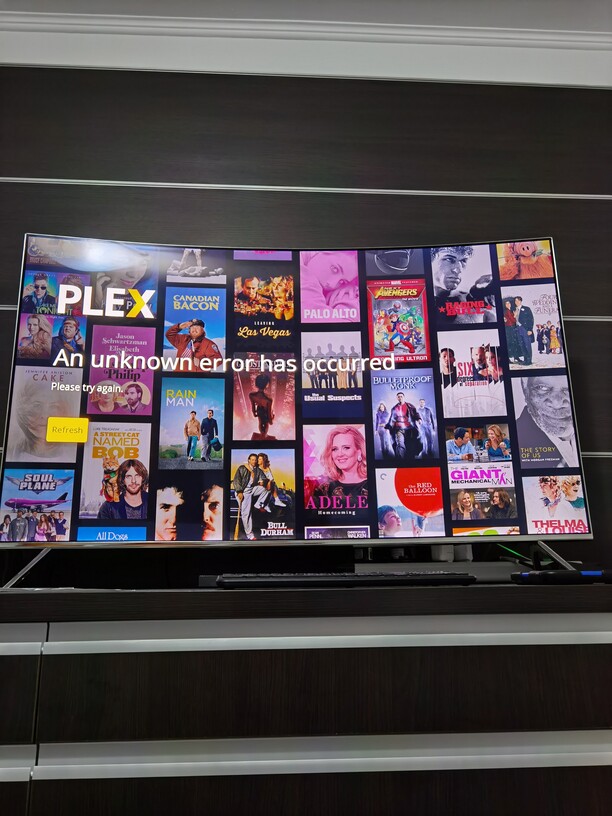
Same problem
Same here. Samsung TV tizen app.
The app is working for me, but for the longest time I had the Beta app, and I couldn’t replace it. I finally was able to figure out how to delete it and put in the current (non-Beta) app.
Thank you for letting me know what the platform is. 
I am having the same issue, remove plex, unplugged the TV, reset samsung smarthub and downloaded again. Still version 5.10 & unknown errror when i should be getting a code for plex.tv/link
It looks the like certificate that caused the issue has been replaced, I am able to Link and Login with Plex again 
New SSL Certificate has resolved my Issue. 
New SSL Certificate has resolved my Issue thank you 
I am also having this issue! I have reinstalled the app and even reset my TV!
My TV was also refusing to install Plex all together, I just set up a Plex server in my home (no real media on it yet but it’s in the works, at least so far) so I went to download the Plex app for the TV and just flat out won’t install “Install” changed to “Cancel” for a couple seconds then back to “Install”. Started trying to install it yesterday (7/25/2021) and tried SEVERAL times to no avail. Tried again today (7/26/2021) and for the first time gave me an error code of 102028 so I looked it up and found this page. I tried it a couple seconds after getting that code and it actually installed finally.
TV:
Samsung UN58TU7000FXZA
I don’t know what version of Tizen it is
App in store claims to be 5.10.0, However, in the About section in Plex (now that it installed) it says Client Version is 5.20.1 and Platform Version is 5.5
Hi I have sort of similar issue but my plex will start ok but also showing different version of app than the version shown in TV menu. I have 5.21 instead of 5.10. Unfortunately I have quite old NAS so I can only run server 1.9.6.
Until today I was able to keep the older app version that worked but somehow a new version of plex got installed and now Im unable to stream from NAS.
I was looking for “leave early access” button but did not found.
What is the way back to older version for my 2018 Samsung TV? Is it possible to install the older app manually?
Thanks!
Kind regards
Miroslav
I’m having the same issue with Samsung TV Tizen (ua65ru7400kxxm). It started yesterday where when I start the app, it shows the loading logo for a while and then black screen (infinitely). After a few force close (press and hold back button), it worked. Today, the same happen again. But now, no matter what I do, it’s black screen. I tried reinstall, remove and install, restart TV (power off/on) but it is still black screen.
Plex version is 5.10.0 as shown in Samsung Smart Hub (installation page). I think I’m seeing newer version for Tizen in the forum? Since the running the app resulting in black screen (no menu), can’t really check what version it is in the app itself.
This topic was automatically closed 90 days after the last reply. New replies are no longer allowed.
